|
This page may contain links that result in small commissions to keep this free site up and running.

Welcome Guest! Registering and/or logging in will remove the anchor (bottom) ads and the security checks. It's Free!
To participate in the forum you must log in or register. | Author |
 Replies: 15 / Views: 16,328 Replies: 15 / Views: 16,328 |
|
|
Pillar of the Community
United States
717 Posts |
My Canon S1 seems to be dying & I probably will need a new digital camera.
I'm sure this has been asked before but since technology is changing constantly, maybe the answers have changed since last asked.
What's the best inexpensive digital camera for coin photography that's available now? Ideally, with macro, easy to focus & easy to use. Suggestions?
|
|
|
|
Rest in Peace
United States
2684 Posts |
Define "inexpensive". My first digicam cost $175 back in 2001 and was worthless for coins although it was great for "scenic" pics. Others have paid $1K and found the camera poor for coins while still others have paid $250 to $400 and obtained excellent results for coin pics. I have heard of coin photographers obtaining good coin pics with a used $30 digicam. Since you're in the Coin Photography Forum, you've presumably already read the thread "Best Digital Camera For The Buck For Coins" topic https://goccf.com/t/4204 . There's plenty of info on digital cameras which provide excellent results with a wide variety of makes, models, and prices. As much as anything, it's the person behind the camera who makes his/her camera "good" or "bad" for coins. I bought a Canon S2IS early last year, the descendant of your S1 for $350 and am completely satisfied albeit I still have some operator bugs to be worked out. There are really not many differences between the S1 and S2 (or the new S3 for that matter) in terms of coin photography. The S2 is still available from Beach Camera for $300. Specifically, what is your S1 not doing that you feel that it is dying? And how much do you want to spend for a new camera? Fred |
|
Pillar of the Community
 United States
717 Posts |
1) Inexpensive = less than $200, maybe less than $150. 2) Just in the last 2 days, the display (& the viewfinder, if I turn off the display) will turn a dark blue/black blur. I put in freshly charged batteries, tried changing all the settings & options, with no effect. I turned it off & on, with no effect. Only when I turned it off for several minutes & then on again, would it spring back to life (sometimes). But then it repeats the "black-out" again after a few minutes. I thought maybe it was just the display, so I took pics. They looked like the display. And, like I said, when I turn off the display, the viewfinder looks the same. 3) Also, I don't feel like I can get a good close-up with any kind of sharp focus, manual or auto, no matter what options adjustments I make or how much light I use. Mind you, I just started to photo coins a couple of days ago, before this camera failure started. But even now when the camera is working, it doesn't look focused on the coin close-ups. That's why I was asking if a macro lens would help, since this camera has no built-in macro setting (that I could find). I tried f/5.6, up to f/8.0 (the highest the camera would go), ISO 200, ISO 400, 1/160 & all different variations & combinations, manual focus, auto focus, etc. All to no avail. Again , this might be symptomatic of the camera dying, rather than the deficiencies of the camera. But I feel like I'm trying to do "macro-photography" without macro. Previous sample pics I made with this camera:       And today, after this problem started (slabbed Proof):  |
|
Rest in Peace
United States
2684 Posts |
Yechi7, your S1 has at least one and possibly two macro settings which work very well for coins. I don't pretend to include the 1/2" thick operator manual here, but this manual needs to be referenced for specialty digital photography, i.e., coins in this instance. For quick reference, see the aforementioned topic for specific settings for coins. For further details about the S1's capabilities, see: http://www.steves-digicams.com/2004...ws/s1is.html and http://www.imaging-resource.com/PRO...-s1-IS-A.HTM . My very first advice to you is to forget the LCD monitor exists. It drains the batteries (I presume you are using rechargeables instead of alkalines) so quickly that image quality deteriorates or the camera completely blacks out. Use only the viewfinder - what you see in the viewfinder is what you get. If you haven't done so, forget that you have a flash. Second, lighting is critical for coins. Hand-in-hand with lighting are the camera's settings for light (tungsten, white, etc). Your pics tell me you've got your lighting OK (maybe - what lights are you using?), but your camera settings need to be adjusted for the type of light you're using. Again, refer to the earlier referenced topic and other topics in this forum subject. SuperDave has some great suggestions! Experimentation with your own particular and unique photography set-up is critical. Keep notes and take hundreds of pics until you find the optimal settings and light combinations which work best for you. In summary, I don't think there's anything wrong with your camera. Good coin photos take a lot of time and experimentation. Keep the manual with your camera at all times. These Canons are highly sophisticated instruments and require a lot of reading, trial, and error. The S1 is a good camera; don't write it off yet. Fred |
|
Pillar of the Community
United States
717 Posts |
Fred,
My S1 has no macro settings that I can find; & I've looked & looked. The manual also has nothing inside or in the index under "macro." The only thing close, in the index is listed "close-up," & it gives info on the optional macro lens that can be purchased. Maybe you're assuming that the S1 has macro settings based on the S2.
Anyways, I took it into CompUSA 2 days ago & it was 32 days before my 2 year warranty expired, thank goodness! In 1-2 weeks, I'll either get it back repaired (I hope not), or get a refund to use on another newer camera with macro, maybe the S3 (I hope so).
|
|
Rest in Peace
United States
2684 Posts |
Dovid, I don't pretend to tell you how your S1 camera operates since you have it in hand (or at least at the camera shop) and I don't, but in the image below, see the "MF" button? That's "manual focus" which on the S1 functions the same as as the S2: it permits you to make close ups (i.e., macro) as close as 3.9". The advantage of the S2 over the S1 is that the S2 uses a "tulip" button just below the MF for both macro and supermacro which permits close-ups down to zero inches. However, the MF button on the S1 does the same thing as the MF button on the S2: permits very close close-ups; the tulip on the S2 just makes it easier. For coins or other objects in very close range, the S1 works very well as evidenced by a friend who has used an S1 for several years including a trip to Antarctica in January 06 where his S1 provided yeoman service; he (along with several others) inspired me to buy an S2 while they were still available at a reasonable price before the S3 came out.  My own feeling is that you are looking for an excuse to dump your S1 and upgrade. Either an S2 or S3 would be a good choice, but if budget is a major factor, don't give up on your S1. It's a very good camera and unless there really is a major problem with it, should last you for many years for coin photography and many other photo uses. On the other hand, if the camera shop decides there is a problem with your S1 and the warranty is still in effect, by all means, take advantage of it and upgrade. Please let us know what the camera shop says. Good luck and happy photography! |
|
Pillar of the Community
United States
717 Posts |
I've used the manual focus on the S1. Either the camera was in the midst of dying or I just wasn't happy with the focus on close-ups. I assumed that a dedicated "macro" & "supermacro" setting would NOT be the same thing as manual focus, but would be a "whole new ballgame."
Also, I already checked out the thread "Best Digital Camera For The Buck For Coins" topic link above. I jotted down about 8 different models recommended there by various forum members & took the list into my local electronics superstore, where they have dozens of models on display. Not one of these models from the above link was available any longer. That's what I assumed might be, when I first posted this thread & referred to changing technology & new models.
That's why I requested, "What's the best inexpensive digital camera for coin photography (i.e., with dedicated macro or supermacro) that's available NOW?"
Edited by yechi7
05/25/2007 12:21 pm
|
|
Pillar of the Community
United States
1173 Posts |
 I confused...the MF on my S2 stands for Macro Focus. It works only in certain modes, if I recall correctly. In Aperture priority mode if you press the MF button you'll get macro. If you press and hold the button you'll get super macro (which is what you want.) I don't know if the S1 works the same way, but am assuming the MF does not stand for manual focus. Sorry that you're having trouble...I'm so very pleased with my Canon. Best wishes. |
|
Rest in Peace
United States
2684 Posts |
Yechi7, you're right. As of only a few days ago, the S2IS has disappeared, presumably pulled off the shelves of shops and online camera stores so that the Canon S3IS can be pushed. http://www.beachcamera.com/shop/pro...x?sku=CNPSS3I guess you missed your chance at an S2 but not to worry, the S3 has essentially the same features as the S2 but will cost more until the S4 comes out. Also, the topic "Best Digital Camera For Coins For the Buck" https://goccf.com/t/4204&whichpage=7 (I bumped the topic to make it easier to find) which discusses many makes, models, and prices is somewhat outdated since the technology advances faster than any of us can type. If I were you, I would not dismiss the many makes discussed on the above thread although all models mentioned have most certainly been upgraded since the members' postings. All the cameras' manufacturers so discussed (Nikon, Panasonic, Sony, Canon, Minolta, etc) have excellent reputations. It is not CCF's intent nor position to tell you to buy any particular camera. You can use the individual members' experiences to make your own decision. However, as a very general rule-of-thumb which has many exceptions and to which I will not bet the farm, you're not gonna get an optimal digicam suitable for coins for less than $300. (This point can be argued until the cows come home; the person behind the camera has as much value as the camera itself.) You're also not gonna get a Canon S-series IS camera for $150 to $200 except on ebay for a used camera or from a dealer who is trying to dump his inventory. I would not recommend this since likely none come with the factory or other warranty. Take a look http://photography.search.ebay.com/...Z0QQsaslopZ1What I recommend is that you do a Google or Beach Camera search on the various makes of digital cameras within the price range you seek. There are dozens (hundreds?) of macro-capable digicams available right now although I cannot guarantee they will be in your price range. You might also check Steve's Digicams (aforementioned) to read critical comments and assess each camera's strong and weak points so you can make your own decision. None of us are in a position to tell you what is the best digicam for you. You probably already did this since you have a camera store nearby (lucky you!), but tell them how you plan to use a camera (presuming you don't get your S1 back without costing more than the price of a new camera), make a list of what they have available, and return home to check the online reviews of those cameras. If I were you, I wouldn't dilly-dally since the inventory rotation of those cameras is high and fast (you likely have only a few days to make a decision before the next model comes along). |
|
Valued Member
United States
103 Posts |
Why a camera? The Scanner Epson Perfection 3590 PHOTO is better than many inexpensive cameras.
|
|
Rest in Peace
United States
2684 Posts |
quote:
I confused...the MF on my S2 stands for Macro Focus. It works only in certain modes, if I recall correctly. In Aperture priority mode if you press the MF button you'll get macro. If you press and hold the button you'll get super macro (which is what you want.) I don't know if the S1 works the same way, but am assuming the MF does not stand for manual focus.
Sorry that you're having trouble...I'm so very pleased with my Canon. Best wishes.
Hunter20ga (I love your username! I no longer hunt, but 20 gauge was always my favorite as a wildlife biologist when I needed to collect some animal. I also used .410 and .357 inserts and appropriate loads in my single shot break open action Stevens 20 ga for close-up collections.) I also love my Canon S2IS which I've now had for well over a year (see previous topic on "Best Digital Cameras..." for long discussion on how I made my choice). This camera is likely the last I will ever have or need unless I get caught up in the my-camera-is-better-than-yours game. There are still a LOT of functions I have not even addressed, let alone mastered (I'm gonna take movies of what?  ). I bought it primarily for coin photography and while I can take a decent image of a coin, I am no master although I sold a coin on ebay for about 3X what I paid for it based on my image. On page 14 of the S2IS manual, see the pic describing the MF and "tulip" buttons on the front left of the camera. The MF is for Manual Focus while the tulip is for both macro and supermacro settings. The MF is useful if one has good eyesight (which I don't; I'm far-sighted so nothing in the viewfinder is in focus for me) while the tulip focuses the macro semi-automatically (with an initial push of the shutter button followed by the second push all the way down). With good eyesight through the viewfinder, the MF and first tulip do essentially the same thing except the tulip doesn't depend on the user's eyesight and ability to focus through the viewfinder. There's a lot of qualifications to this (see p.111 of the manual) and believe me, I haven't read the entire manual, so I don't know how all the S2's functions work. For this reason, I carry the manual with me in the instance I get myself into a digicam situation for which I am not prepared. Fred |
|
Forum Dad
 United States
24228 Posts |
quote:
Why a camera?
1. LusterHere's an 1885 circulated Morgan that still has some luster.... 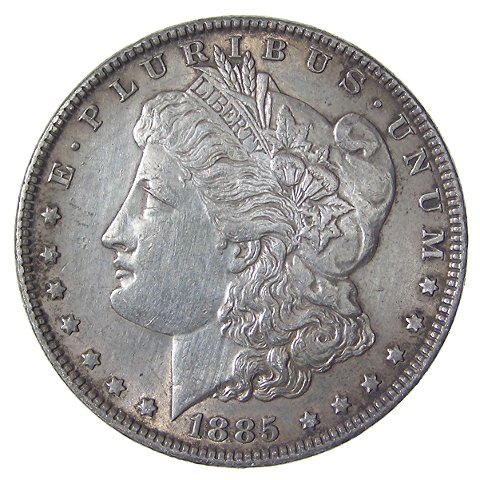 The best scannner in the world... well.... wouldn't have come close to getting it. 2. Proof CoinsSelf explanatory....  Never come close with a scanner, in fact, it would look horrible more than likely. 3. AccuracyI used to have 2 images of the same Franklin half (I'm still looking), one a photo, and one scanned at 1200 dpi. The photo showed all the hairlines from a past cleaning. The scan showed clear fields. You would've paid triple for the scan.  Here's a morgan photo... 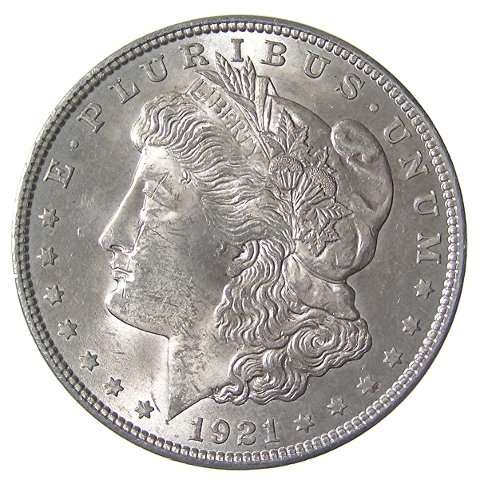 Here's a scan of the same coin... 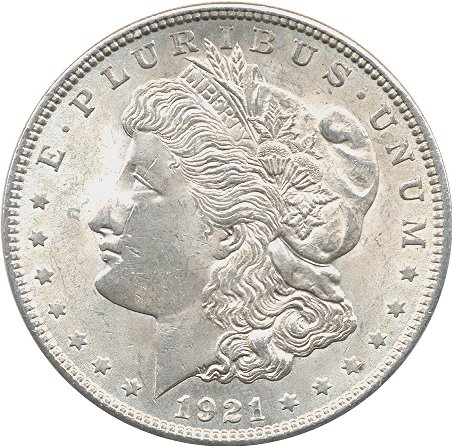 Where'd all the neck & cheek chatter go?  Scanners just don't cut it, IMHO. |
|
Rest in Peace
United States
2684 Posts |
We went through this scanner vs digicam discussion in some depth more than a year ago (I can't find the specific archived thread) but the very obvious conclusion was that digital cameras are superior to scanners in virtually all aspects needed for coin imaging (luster [cartwheeling], contrast, color, and detail to name a few). I came to the same conclusion with my own experience with my (expensive) HP 3970 scanner which couldn't hold a candle to my Canon S2IS digicam and now sits unused except for my Boy Scout patch ebay sales. There are always exceptions and some expert scanner users' results can compete with less expensive digital cameras albeit it's tough to adjust lighting on a scanner. However, I have yet to see a scanner which will show BU luster as well as a digicam. To belabor the point even further, I have contacted ebay sellers whose high quality uncirculated coins' images were obviously made by a scanner but were not drawing in the bidders due to poor scanner results. I asked them why they continued to use scanners when a digicam would pay for itself in a single auction with a high quality image. Best answer: "I don't know anything about digital cameras.". |
|
Pillar of the Community
United States
717 Posts |
Edited by yechi7
05/27/2007 3:35 pm
|
|
Rest in Peace
United States
2684 Posts |
Yechi7, I'm not sure what you want from us. Every time you've asked a question and received an answer, you have sniped and sharpshot us down. If you want to get your S1 fixed, fine. If you want to upgrade to a newer model, fine. If you want to switch to another make and model, fine. We've tried to be helpful, but you clearly don't want help. You just want to argue and denigrate our observations and opinions. Make up your mind. Just what do you want?
|
|
Pillar of the Community
United States
717 Posts |
Fred,
I'm very sorry you took it that way. I appreciate very much all your input & opinions, from you & other members. I'm not intending to "sharpshoot & snipe." I thought I was just making conversation, in search of info & feedback. I don't "want to argue and denigrate your observations and opinions." I do want help. I thought the more feedback & input to my questions, the better, to help me make an educated choice.
I don't expect my S1 will be fixed & that's why I'm planning ahead. I want to upgrade & that's why I asked my initial question: What's the best inexpensive digital camera for coin photography that's available now?
Like I said, the links to previous threads on this topic were full of great camera suggestions of models that are no longer available. That's why I re-posted my questions. I was adding additional info in further posts so that feedback from others would be geared towards answering my question.
I greatly value the answers I get, especially from experienced collectors/photographers like you, SuperDave, Susan & Bobby, etc. Please don't view my desire to know & learn, in a negative way. Have mercy on a newbie.
|
| |
Replies: 15 / Views: 16,328 |
|
To participate in the forum you must log in or register.
Disclaimer: While a tremendous amount of effort goes into ensuring the accuracy of the information contained in this site, Coin Community assumes no liability for errors. Copyright 2005 - 2026 Coin Community Family- all rights reserved worldwide. Use of any images or content on this website without prior written permission of Coin Community or the original lender is strictly prohibited.
Contact Us | Advertise Here | Privacy Policy / Terms of Use
|
| Coin Community Forum |
© 2005 - 2026 Coin Community Forums |
| It took 0.61 seconds to rattle this change. |
 |
|
| |
| |







 Posted 05/22/2007 01:07 am


