| Author |
 Replies: 15 / Views: 1,512 Replies: 15 / Views: 1,512 |
|
|
Pillar of the Community

United States
4051 Posts |
I've been concerned lately with having an accurate method to set my overall brightness and exposure level. I don't know what the rest of you do to achieve an accurate level, but in general it's been fairly hit or miss for me. I tend to gravitate to a middle ground of exposure which unfortunately makes all coins look about the same. The issue is that many coins are bright, while some are very dark, and I want them to look correct in comparison with each other. I can't compensate for other folks' monitor settings or the viewing progams used (they can give very different results) but on an absolute basis I want to know my images are color and exposure level "accurate". So, I decided to try shooting directly on a calibrated gray surface. This has the added advantage of giving a white balance reference (using the gray surface for MWB) as well as exposure reference. The exposure reference comes from taking a shot of the surface, typically right after MWB, and using the resulting exposure level as the reference for subsequent shots that have coins on that surface. If you set the Ev levels to "0", and shoot a gray surface using an auto exposure mode like Av, the camera will attempt to set the level at 128,128,128. I usually set my exposures a little darker than that by setting my Ev level a bit negative (-1/3 or -2/3 Ev) so in practice my gray card target level ends up being 100,100,100. This is then my target level for the gray background in my coin shots. Here is a quick example. I will be taking a few more example shots with some very bright and very dark coins to ensure the method holds up well, but thought I'd get comments first in case someone has a good idea to improve the method. Exposure-Calibrated Lincoln Cent:  If you download this image, and view the RGB levels of the gray background, you should see it hover around 100,100,100. |
|
|
|
Pillar of the Community
 United States
4051 Posts |
Here is a dark coin:  And a bright coin:  Both use the same technique to set a calibrated (nominal) 100,100,100 background level. Interestingly, the background level has shifted in color somewhat from shot to shot, probably due to in-camera processing more than any bleed-through from the coins. |
|
Valued Member
United States
374 Posts |
Interesting, my copy stand is gray. I did try to set the exposure by taking a picture of the grey background. This was the setting that they give me in my PS camera. I couldn't really see a difference from just letting the camera pick it. Your pictures you can see a difference in each shot.
|
|
Moderator
United States
23522 Posts |
I just eyeball it and adjust taking parameters until I get something onscreen that looks like what I have in-hand. The next time I do anything with Ev on a coin will be the first - since, as you say, it'll vary between coins of differing luster (and the same will apply between coins of same luster and different metal), it's just one more step which (to me) duplicates others.
|
|
Pillar of the Community
United States
4051 Posts |
Well, so far in using this method I've been pleased that the guesswork in setting levels is removed. I adjust the background until it hits the target RGB and I'm done. The differences in the look of the coins is then due to the differences between coins, not my level-setting technique. Plus, I sort of like the gray background on Copper, though it won't look good with Silver and probably horrible with Gold. I can still crop the coin out and put in whatever background color I want, knowing the coin itself is the correct brightness...Ray
Contact me for photographic equipment or visit my home page at: http://macrocoins.com |
|
Moderator
United States
23522 Posts |
I'm not sure I really hate it for silver: 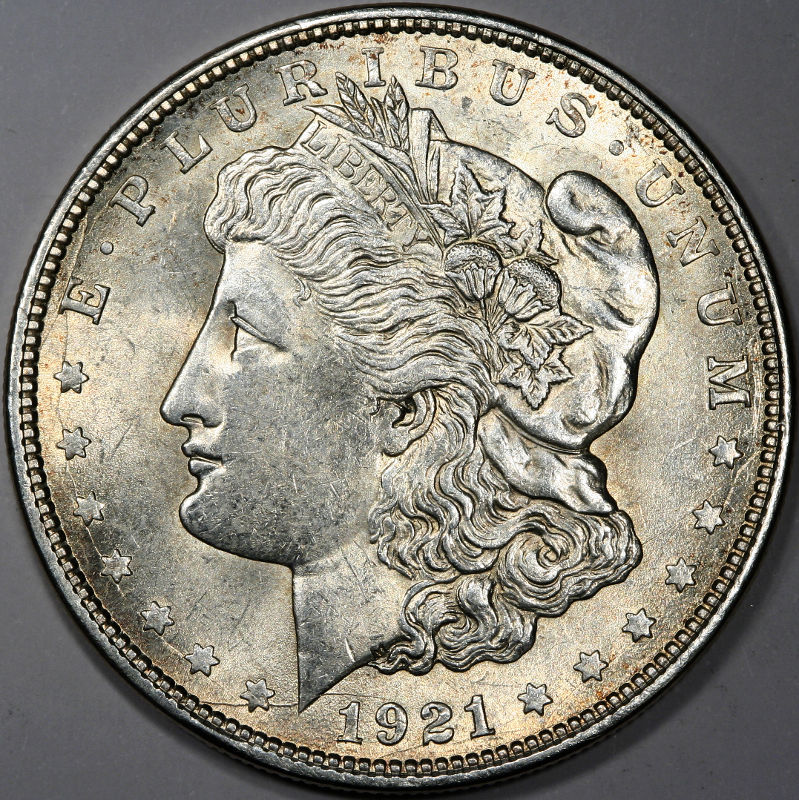 |
|
Pillar of the Community
United States
4051 Posts |
Not bad at all!
Nice to be able to quickly confirm that your WB is correct.
Contact me for photographic equipment or visit my home page at: http://macrocoins.com |
|
New Member
United States
6 Posts |
rmpsrpms, please contact me regarding Thermo Arts coins or check your last update post. Sorry for the hijack but I'm new here and they won't let me send you an email.
|
|
Moderator
United States
23522 Posts |
Quote:
rmpsrpms, please contact me regarding Thermo Arts coins or check your last update post. Sorry for the hijack but I'm new here and they won't let me send you an email. I looked at that a little oddly, until I saw your first post. Ray, he shares your interest in those plaques. Floridabuilder1, we prefer that information of this type remain in public; it's one of the reasons we do not allow PM's on this forum. That way others can benefit from your knowledge. With that said, Ray, if you give me permission I'll supply floridabuilder with your email addy. |
|
Pillar of the Community
United States
4051 Posts |
SD...yes, please send my email to FB1. FB1, what interest do you have in the TAP plaques? BTW, I've come across several new ones since I last posted. I ended up with the $20 reverse (only had obverse before), both obverse and reverse of the Franklin half, obverse of the Washington quarter, and several duplicates of others I had before. I STILL NEED the $2.50 and $5 Gold, but I have all the others I know exist. My den walls are full of them! |
|
Valued Member
United States
477 Posts |
What lens do you use to shoot coins?
Rick
|
|
Moderator
United States
23522 Posts |
Quote:
What lens do you use to shoot coins? You've wandered into the midst of a hardcore group of numismatic shooters who specialize in dSLR/bellows setups, using duplicating lenses rather than "regular" photographic lenses to shoot coins. Although we're converting others to the style as quickly as possible, right now the specialty is pretty much concentrated at CCF. Using a bellows and duplicating lens is not only cheaper than buying a bespoke Macro lens for a dSLR - good examples of those run $500 when you can have a perfectly good bellows for well under $100 on ebay and acceptable lenses can be found even cheaper than that - you can also vary magnification with the setup and use anything including microscope objectives for truly massive magnification. The taking lens of choice is the Rodenstock 75mm APO-Rodagon-D. It's as good as it gets, but isn't found for sale often and usually runs between $200-300 when you can get one. But that's about getting the last 5% in terms of quality; with a setup like this you can be a superstar forum photographer with a $35 Omegar. These setups are usually Canon-based because of advantages the Canon design has over the competition, including an electronic first shutter which minimizes vibration and Canon's included remote-shooting software which allows you to run the whole show from your keyboard/mouse without ever touching the camera after initial setup. It's highly accurate, hugely efficient, and you can be in business for less than $400 from scratch with a used Canon dSLR and judicious shopping. There's no beating it. Edit: Ray, I provided your email to floridabuilder1. |
|
New Member
United States
6 Posts |
rmpsrpms,
Where should I post regarding the Thermo Arts coin placques? I never rec'd your email.
|
|
Pillar of the Community
United States
4051 Posts |
Quote:
Edit: Ray, I provided your email to floridabuilder1. Thanks SD! Quote:
rmpsrpms,
Where should I post regarding the Thermo Arts coin placques? I never rec'd your email. It's best to post on the original thread. I added some pics on there so folks would know what we're talking about! You should have my email address from SsuperDdave, but I won't have yours til you write me... |
|
Valued Member
United States
477 Posts |
Thanks for the info Dave. Of course I shoot Nikon because that's what I started with long ago. Most all the DSLR astrophotograqphers use Canon too. Nikon requires a $100 software program to process RAW, Canon does not.
I bought a Nikon 105mm f2.8 macro lens several years ago but wasn't really impressed, couldn't really get a good close up, or much better than my standard lenses.
I remember looking at bellows years ago when I had an interest in macro/micro, long before I became interested in numismatics and had pretty much forgotten about them until you brought them up.
My original question was more directed at rmpsrpms because he has a hot rod camera I've been drooling over. I kind of thought he may be using just a plain or macro lens because that camera is so advanced it should resolve flea hair.
I had lost most of the interest I had in terrestrial photography until I became interested in coins. Now it's time to revisit the facet of micro/macro photography.
Rick
Edited by shootnstarz
07/22/2013 12:56 pm
|
|
Pillar of the Community
United States
4051 Posts |
shootnstarz...SD's reply was so complete I didn't think I needed to add to it, but if you're interested in the specifics of my setup I will be happy to oblige...
The pics above were taken with the HRT2i, which is the highest-resolution configuration I know of in a DSLR with its 4.3um pixel pitch. You can of course increase resolution with CCD sensors but there are tradeoffs. I've recently seen some great shots of bugs taken with a Pentax Q, so I know CCD can produce.
My bellows is a Canon Auto Bellows, though the Pentax Auto Bellows is physically smaller and thus a better choice for wide range of coin sizes. In fact the 75ARD1 that Dave mentions can't go beyond about Half-Dollar size coins on the Canon, so I'm configured with the 105mm Printing-Nikkor (105PN). You can shoot Dollars and even ASEs with the PentaxAB and 75ARD1.
The shots above were with the 105PN at f3.3, and magnification around 0.7, so effective aperture was f5.6, well within the camera's DLA of f6.9. In fact, I probably should shoot at f4 to improve DOF. The 75ARD1 is f4 wide open and does a superb job with the HRT2i (or any camera) and is a bit cheaper than the 105PN...
Ray
|
| |
Replies: 15 / Views: 1,512 |
|










 Posted 07/18/2013 11:10 pm


