Hey now,
I like looking though
ebay listing, but the poor and sometimes horrible quality pictures, takes some of the fun out of it. Same goes for posts in this forum. Some ask about grading, and the picture is too blurry to tell. This is a non- technical guide for those that are very new to taking coin photos. This is a summary of what I have mostly learned here in the past few weeks.
1. Prepare your subject:
-Take the coin out of the case, 2x2, etc (graded coins sealed in a case are a more advanced issue.)
-Whatever is covering the coin is not going to help the photo and probably will make it worse.
-Lay the coin flat on a surface. Black, white or grey paper or a cloth surfaces of the same color may work best.
2. Focus: Make sure the coin is in focus before taking the picture!
- Cell phones and many cameras need to be held some distance away from the coin to get it in focus.
-If you hold the lens too close the coin, the camera can not focus on the coin. Try moving the camera back and retaking the photo.
-Take the photo straight over the coin, not on an angle. If it is taken on an angle, usually on one part of the coin will be in focus and the other part will be blurry.
3. Steadiness:
-Because a coin is a small detailed object, slight movements of the camera will cause the important details to be blurry.
-Even pressing the shutter can cause a blur.
-It is best to use a stationary object to steady the camera and then use the timer or remote to take the picture.
-A tripod works fine if you already have one. There are more advanced set- ups.
3. Lighting: desk lamps work well. There are inexpensive lamps from IKEA that folks use here, I do like them.
4. Cropping: I did not understand this at first, but now I do. There should be nothing in your picture except the coin. Crop out everything. The coin will appear larger in the screen. Seeing the background is not needed.
5. Color adjustment: This was the final piece that really helped. the idea is to get the photo to look as close to the actual coin as possible. Because different lighting gives the photos a different color, adjustments will usually be needed. I use Photoshop essentials to change the color but any photo program should work. You want the coin to look in the photo, as it looks in person. This goes for selling or asking for an opinion, or just sharing your new purchases.
I'm still working on more intermediate things, such as capturing the shininess or luster of a coin, but I think these tips will be helpful to the person who has no experience. You will easily be in the top 25% of photo takers on
ebay, with a little practice. I enjoy my coins much more, now that I have detailed photos of many them. It is easier to look though highly detailed collection of images, than it is to pull on the coin and take out a magnifying glass etc...
Below is a sample of a recent photo I've taken. The resolution has to be somewhat reduced to post here. The original file can be enlarged up to the size of a dinner plate and it is still very clear!
Good luck and let me know if this helps.
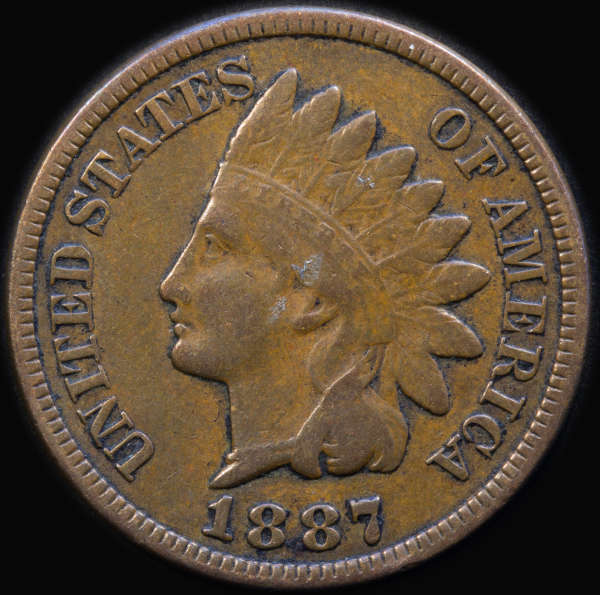
PS: I do have the advantage of having a nice camera and a lens for closeups that I took the above photo with. However, I feel even my cell phone coin photos have improved with following the above steps.









 Posted 09/02/2013 03:27 am


