| Author |
 Replies: 11 / Views: 2,257 Replies: 11 / Views: 2,257 |
|
|
Pillar of the Community
Canada
9882 Posts |
When reading the Forum I start at the top and go into each topic read and use the back button to get back out to the Forum. When you go into a topic there are red dots (buttons) on the left side that show you what you have not read, which work till I get to the Main Coin Forum, go in to read topics and all topics have a red dot.
So am I doing something wrong or is this common?
|
|
|
|
Moderator
 United States
196100 Posts |
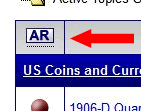
I use the Active Topics link. I open topics in a new tab. I never use the back button. After reading what I want to read, I use the AR button to refresh the Active Topics page. I never use F5 (browser refresh) to reload it. |
|
Administrator
United States
326 Posts |
Mike, they may have gotten messed up a bit when the forum time was off. Still doing it?
|
|
Pillar of the Community
 Canada
9882 Posts |
OK Admin, I will wait and see but will try jbucks way and see what happens.
|
|
Pillar of the Community
Canada
9882 Posts |
jbuck can you please explain a bit more for a dummy  on how you are doing this I tried and could not see what you are referring to. The AR button? |
|
Moderator
United States
196100 Posts |
Look on the Active Topics page, far left column in the message listing.
The AR button marks all messages before the last login (or before the last time you pressed AR) as read. That is, the active topics will only show those topics with activity since the last login or AR press.
|
|
Pillar of the Community
Canada
9882 Posts |
OK jbuck, I'm not the shiniest coin in the album but I can't find what you are taking about, do I have to have the CCF toolbar active, right now I don't. Always nerves to add new things.
|
|
Forum Dad
United States
24232 Posts |
|
|
Moderator
United States
14463 Posts |
jbuck is talking about using the Active Topics link to show topics updated since your last visit. Then looking at the list, right-click (in Windows) and select Open Link in New Tab. This will open that topic in a new tab, where you can read or respond. When done with that topic, close that tab and restart only this paragraph for other topics in the list. When you finish scrolling down through the Active Topics list, you can click the AR button on the top left (that Bobby is showing) to mark those listed as read. Then you could start this process again to see what threads were added after you looked before. |
|
Pillar of the Community
Canada
9882 Posts |
Thanks guys I think I have it.  I couldn't find Active Topics, you have to open the little window top middle that says Active.  Then I could see what you are all talking about.  Wow glad that's over.  |
|
Moderator
United States
196100 Posts |
Excellent.  Quote:
Then looking at the list, right-click (in Windows) and select Open Link in New Tab. Or you can CTRL/left-click or you can middle-click (the scroll wheel). I use Firefox with Tab Mix Plus add-on. With it I can lock/protect the Active Topics tab, allowing me to simply left-click on thread links and they will automatically open in a new tab (now you know why I have not moved to Chrome for CCF, it has no such add-on). |
|
Pillar of the Community
Canada
9882 Posts |
Thanks guys , I have been using this method for the last month and have got use to it now and works great. Now any thing less you know about that I don't that I can try. |
| |
Replies: 11 / Views: 2,257 |
|





 Posted 10/02/2013 1:23 pm