Coin Community Family of Web Sites Join Thousands of Coin, Bullion, & Money Collectors
Royal Canadian Mint products, Canadian, Polish, American, and world coins and banknotes. Coin, Banknote and Medal Collectors's Online Mall Specializing in Modern Numismatics Join Thousands of Coin, Bullion, & Money Collectors 300,000 items to help build your collection! Shop for APMEX Bullion on eBay!Vancouvers #1 Coin and Paper Money Dealer


Username:
Password:
Save Password
Forgot your Password?


This page may contain links that result in small commissions to keep this free site up and running.

Welcome Guest! Registering and/or logging in will remove the anchor (bottom) ads. It's Free!

My Coins Always Look Like They're Made Of Silly Putty

To participate in the forum you must log in or register.
Author Previous TopicReplies: 28 / Views: 4,869Next Topic
Page: of 2
Pillar of the Community
Chancellor Sutler's Avatar
United States
1372 Posts
 Posted 10/23/2013  3:42 pm Show Profile   Bookmark this topic Add Chancellor Sutler to your friends list Get a Link to this Message Number of Subscribers
I cannot, for the life of me, get the images of coins that I take to look like "metal" ... they look like they're beat up when they aren't.

I'm wondering if I should be experimenting with less light, or maybe smaller aperture?

Where is the best reading on the fundamentals of cameras regarding film speed, aperture settings, and the relationship between them. I think that without the basic understanding ... I'm spittin' in the wind.

F stops ... I don't know a thing about that ... so I need to start at square 1. "Point and shoot" ... ain't cuttin' the mustard.

For reference, I'm using a Fuji Finepix SLR. It should be capable of truly fine images, but not in my hands, and I've deleted hundreds upon hundreds of pictures.

Any guidance is appreciated. Just point me at a place I can read and learn. I have pretty good comprehension and retention skills ... provided I can read in the middle of the night when there's no external stimulus ... TVs, telephones .... see .... the phone's ringing.

Chance

Edited by Chancellor Sutler
10/23/2013 3:44 pm
Pillar of the Community
Night-Hawk's Avatar
United States
1002 Posts
 Posted 10/23/2013  3:46 pm  Show Profile   Bookmark this reply Add Night-Hawk to your friends list Get a Link to this Reply
Show some examples?
Pillar of the Community
Canadian-Banknotes's Avatar
Canada
4944 Posts
 Posted 10/23/2013  3:46 pm  Show Profile   Bookmark this reply Add Canadian-Banknotes to your friends list Get a Link to this Reply
Pillar of the Community
Chancellor Sutler's Avatar
United States
1372 Posts
 Posted 10/23/2013  3:48 pm  Show Profile   Bookmark this reply Add Chancellor Sutler to your friends list Get a Link to this Reply
It shouldn't be hard to find some crappy pictures ... gimme a minute...

Chance
Pillar of the Community
Chancellor Sutler's Avatar
United States
1372 Posts
 Posted 10/23/2013  3:57 pm  Show Profile   Bookmark this reply Add Chancellor Sutler to your friends list Get a Link to this Reply
Here are some attempts to capture detail that illustrate the "hammered" effect that I'm talking about. This coin is almost uncirculated ... and is not beat up.

Chance

My-Coins-Always-Look-Like-They're-Made-Of-Silly-Putty

Here's the reverse after dipping the coin (sorry, it was nearly black and had zero eye appeal)

My-Coins-Always-Look-Like-They're-Made-Of-Silly-Putty

and the obverse, also after (the first image is flooded with light, and "before" the sin.

My-Coins-Always-Look-Like-They're-Made-Of-Silly-Putty

Edited by Chancellor Sutler
10/23/2013 3:58 pm
Pillar of the Community
Canadian-Banknotes's Avatar
Canada
4944 Posts
 Posted 10/23/2013  4:09 pm  Show Profile   Bookmark this reply Add Canadian-Banknotes to your friends list Get a Link to this Reply
Your last image isn't too bad, I think you need to work on your lighting (Try blocking the light with a paper towel, or white sheet of paper). It also seems like the focus is off, usually what I try and do is zoom out a bit, and then crop the picture. (That usually allows the camera to autofocus better)
Pillar of the Community
Chancellor Sutler's Avatar
United States
1372 Posts
 Posted 10/23/2013  4:57 pm  Show Profile   Bookmark this reply Add Chancellor Sutler to your friends list Get a Link to this Reply
Actually ... I think even that picture's washed out ... too much light. That's got me thinking that a smaller aperture might be better ..

I can't remember offhand, what ISO that was taken at ... but I know that the higher the ISO number, the grainier the images tend to be.

Chance
Pillar of the Community
Chancellor Sutler's Avatar
United States
1372 Posts
 Posted 10/25/2013  04:02 am  Show Profile   Bookmark this reply Add Chancellor Sutler to your friends list Get a Link to this Reply
I did a bit of exploring tonight ... and found this tutorial, which looks like a great place to begin to understand the fundamentals. It's presented in layman's terms, and while I'll probably need to read it several times ... it's not all that long.

I think this will improve my results measurably.

http://photography.tutsplus.com/tut...--photo-3028

Chance
Moderator
Learn More...
SsuperDdave's Avatar
United States
23522 Posts
 Posted 10/25/2013  08:37 am  Show Profile   Bookmark this reply Add SsuperDdave to your friends list Get a Link to this Reply
Forgive me for not posting earlier; my work keeps me away from the keyboard for days at a time occasionally.

That's a good tutorial, Chance. A couple of added points:

The tradeoff for increased depth of field with smaller (higher numerically) apertures is diffraction. As the aperture closes, light has to travel at increasing angles through that aperture to hit the subject, forced by the edges of the aperture, to the point where some of that light takes a much longer path to reach the subject than the light going straight through. This introduces distortion into the image, costing sharpness. It's characteristic of every lens; all lenses run into diffraction at one point or another.

So there's going to be a "sweet spot" in your aperture setting - the one which will provide enough depth of field to show the whole coin, yet not be showing the effects of diffraction.

What's the model of your camera? I didn't know Fuji to manufacture SLR's.

Aperture, exposure and ISO are all simply settings which control the amount of light hitting the sensor of your camera. That's all. Aperture has the additional effect of depth of field; ISO has the additional effect of graininess at higher settings; exposure has the effect of making a stable shot tougher at longer exposures.

ISO, obviously, is going to want to be set at the smallest number (equivalent of the "slowest" film) which still allows you reasonable exposures with your lighting. It's my recommendation to always keep this at the minimal setting - 80 or 100 depending on your camera - although true dSLR's with excellent lenses can push this to 800 or even 1600 without introducing noise visible in a coin image.

So, exposure is obviously where you can have the largest range of impact on your images, and this is the real "variable" in coin photography.

Maximize your efforts thusly:

1) Stable camera platform. Either a copystand or tripod mount, with the camera pointed straight down at the subject. You can do this with a tripod by setting it up over the corner of a table or desk, or weighting the back end of a small board and extending that board off the table and under the tripod. I did this for a long time with good results.

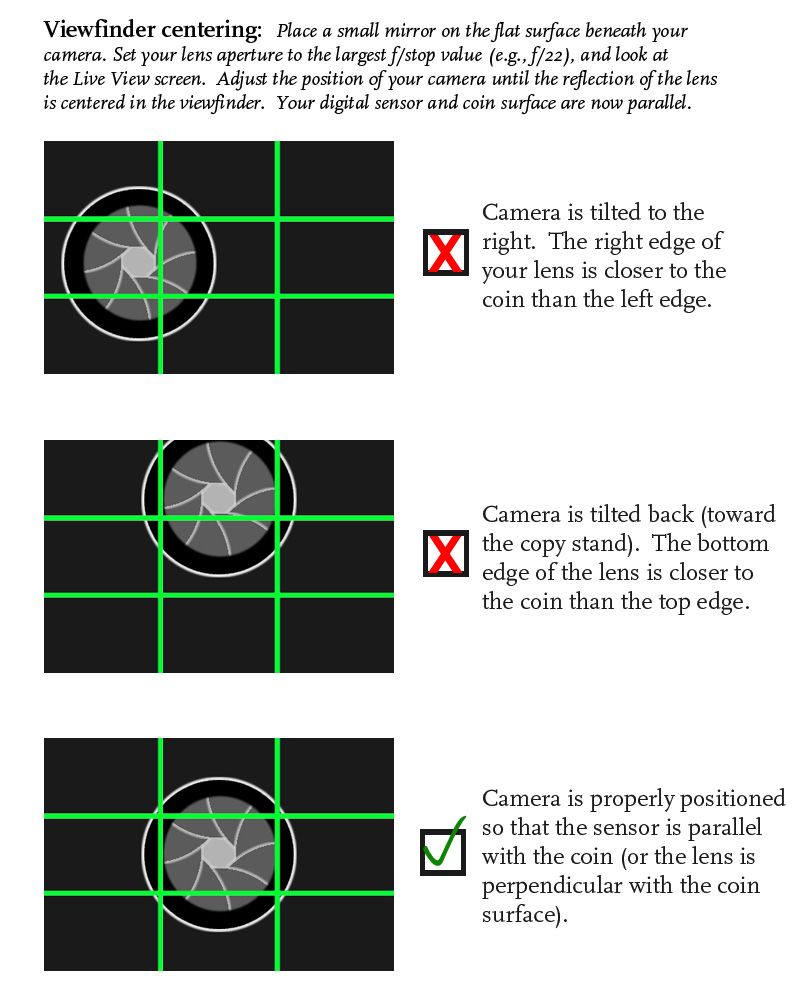
2) Camera lens and subject perfectly parallel. Set a small pocket mirror on the surface where the coin will rest. Adjust the camera, pointed at that mirror, so the lens is in the exact center of the resulting image. Instant plumb, square and level.

3) Delayed or remote shutter. Almost every camera has a delay function, usually two and ten seconds, some with a range of possible settings. Use them; don't activate the shutter with your finger. That can introduce vibrations which will kill the shot.

4) Relatively direct lighting. I'm greatly oversimplifying here; lighting is easily the most complex aspect of coin photography, and different situations can require vastly different lighting, and even worse there are usually multiple ways to successfully light a given coin. But, as a generality, the average coin is happiest with two lights, set as close to vertical over the coin as possible at the positions of 10:00 and 2:00 relative to the top of the coin. The weapon of choice around here for lighting is the $10 Jansjo LED gooseneck lamp from Ikea; it's a loss-leader for them and you'll see bins of them scattered all over the store. This lamp is infinitely adjustable and a near point-source light, which is highly recommended in the situations (lustrous silver, for instance) where it's effective. You can always add homebrew diffusion to it when such is called for, but you can't make a larger, more diffused light any smaller.

I really need to know the specific camera model before offering any more sharply-focused (pun intended) suggestions regarding your photography. It looks to me like you'll be able to get some excellent results from this camera, and we'll be more than happy to help get you there.
Pillar of the Community
brg5658's Avatar
United States
627 Posts
 Posted 10/25/2013  09:32 am  Show Profile   Bookmark this reply Add brg5658 to your friends list Get a Link to this Reply
With regard to SsuperDdave's point (2) above, I created this little picture to explain the process of making sure the coin is perfectly parallel to your digital sensor to someone on another board.

My-Coins-Always-Look-Like-They're-Made-Of-Silly-Putty
Moderator
Learn More...
SsuperDdave's Avatar
United States
23522 Posts
 Posted 10/25/2013  09:44 am  Show Profile   Bookmark this reply Add SsuperDdave to your friends list Get a Link to this Reply
That's nice, brg. Hope you don't mind me archiving that image so I can include it in later postings of a similar nature.
Pillar of the Community
brg5658's Avatar
United States
627 Posts
 Posted 10/25/2013  10:01 am  Show Profile   Bookmark this reply Add brg5658 to your friends list Get a Link to this Reply
Go for it Dave. I'm all about "how-to" schematics. Afterall, you and Ray taught me everything I know.
Moderator
Learn More...
SsuperDdave's Avatar
United States
23522 Posts
 Posted 10/25/2013  10:06 am  Show Profile   Bookmark this reply Add SsuperDdave to your friends list Get a Link to this Reply
Thank you. That will be a real aid in the explanation, characterizing how to correct for alignment. It's something I hadn't thought of.
Pillar of the Community
Chancellor Sutler's Avatar
United States
1372 Posts
 Posted 10/25/2013  10:34 am  Show Profile   Bookmark this reply Add Chancellor Sutler to your friends list Get a Link to this Reply
I was looking at copy stands. They don't look terribly complex. I build musical instruments and firearms, neither from kits. I think I can make a nice copy stand for basically the cost of the lights.

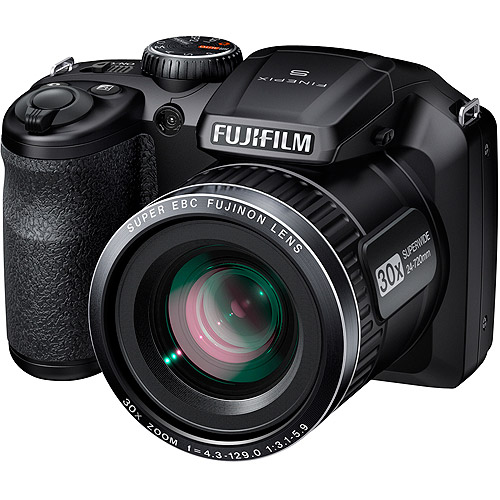
The camera is a Finepix 4830 as shown here. It has a "super Macro" mode that allows the coin to be as little as a few cms away from the lense. I forget exactly the distance just now. The Kodaks I was using ... I couldn't get very close with.

Chance

My-Coins-Always-Look-Like-They're-Made-Of-Silly-Putty
Edited by Chancellor Sutler
10/25/2013 10:38 am
Pillar of the Community
Chancellor Sutler's Avatar
United States
1372 Posts
 Posted 10/25/2013  10:45 am  Show Profile   Bookmark this reply Add Chancellor Sutler to your friends list Get a Link to this Reply
Oh ..... I forgot to say Thanks to SuperDave ..... and I do understand being out of things for a day or more at a time. I was away from this discussion for over 24 hours myself, and for the same reason.

Chance
Moderator
Learn More...
SsuperDdave's Avatar
United States
23522 Posts
 Posted 10/25/2013  11:45 am  Show Profile   Bookmark this reply Add SsuperDdave to your friends list Get a Link to this Reply
Excellent. I can offer some more tailored recommendations with your specific camera in mind. Fuji's manual for this camera covers three different series; given that yours is the "highest" model number in the range, I'm inclined to suspect your camera will have all of the settings mentioned. If there's any question regarding accessing these settings, of course just ask.

You've a Full Manual Mode available, which is a boon. I'm guessing you're already using it. I'll go through various settings in the order in which they're displayed in your manual, on Page 70:

Scene Position: Having chosen "M," you won't be using this.

ISO: You apparently have ISO64 available. That's a very low setting - most cameras stop at 80 - and I have to wonder if they're doing something "artificial" to get there. One goal is to absolutely minimize in-camera processing of your images; I'm going to suggest ISO100 as a start point and 200 should be OK if you need it to shorten exposure times.

Image Size: L(4:3). Chosen only because the resulting image is as close to square as possible, meaning you're going to get the most-possible vertical pixels and therefore the largest final coin size in the sensor.

Image Quality: Fine. Use every bit of the sensor's capabilities.

Finepix Color: Standard. Refer to the above "as little processing as possible."

White Balance: Here's where you start playing a bit. White Balance is the camera's adjustment to the color cast of your lighting (color temperature) and I think you're currently using it on Auto. That's OK, as your colors seem right, but I advise switching to a monochromatic background - black, white or grey - to make the camera's task all the easier. You have the ability to do Custom white balance. Your camera wants to use white as the "base" for this measurement; use a small stack of printer paper as the "white" for this setting if you wish to utilize the capability.

Sharpness: Standard.

Face Detection: Off. Yes, most coins have a face but that's not what they're talking about.

Photometry: Ugh. Why don't they just call this "metering" like everyone else? Use "Spot" so the camera takes all metering information from the center of the image, i.e., only the coin.

AF Mode: Center, for the same reason as above.

The other settings as described on those pages are irrelevant. However, you might want to play with bracketing - this is where you shoot a series of 3 images for each shutter press, each varying in brightness. It's a good way to avoid multiple shooting tries when you're unsure of exposure, although experience will teach you how the image in your viewfinder relates to what you'll see on the screen and eventually you'll probably nail the exposure first-time, every-time. If you use this setting, use 1/3EV.

OK. Experience with varying P&S-type cameras (yours is one, the alternative being interchangeable-lens types) makes me think you're going to find your camera's aperture "sweet spot" at about f/5.6. Maybe one stop lower or higher. Use the widest (lowest numerically) aperture which gives you a satisfactory depth of field; P&S cameras can do this with wider apertures than a dSLR. A wider aperture gives you more latitude for lighting and exposure, always a good thing.

Your camera has a self-timer; 2 seconds is enough.

You are working towards aperture and ISO settings which allow you to set an exposure of 1/100 or faster, roughly speaking. If ISO200 and f/5.6 don't allow you 1/100 or faster for a lustrous coin (for that, I'd hope for 1/200 or faster as duller coins will require longer exposures), you need more lighting. Longer exposures increase the chance of outside vibrations affecting the shot. This may seem nitpicky to some, but it's a definite factor in macro coin photography. You're pushing limits here which aren't normally pushed in photography.

That, in combination with my previous post, is a start. There are more refinements possible, but that falls into the category of "extreme tweaking" and we may not need to go there. This should give you enough to play with.

  Previous TopicReplies: 28 / Views: 4,869Next Topic
Page: of 2

To participate in the forum you must log in or register.


Disclaimer: While a tremendous amount of effort goes into ensuring the accuracy of the information contained in this site, Coin Community assumes no liability for errors. Copyright 2005 - 2026 Coin Community Family- all rights reserved worldwide. Use of any images or content on this website without prior written permission of Coin Community or the original lender is strictly prohibited.
Contact Us  |  Advertise Here  |  Privacy Policy / Terms of Use

Coin Community Forum © 2005 - 2026 Coin Community Forums
It took 0.4 seconds to rattle this change. Forums