|
This page may contain links that result in small commissions to keep this free site up and running.

Welcome Guest! Registering and/or logging in will remove the anchor (bottom) ads. It's Free!
To participate in the forum you must log in or register. | Author |
 Replies: 8 / Views: 1,997 Replies: 8 / Views: 1,997 |
|
|
New Member
United States
4 Posts |
Hello Everyone, Looking for some assistance and guidance on sharpening up my numismatic imaging. I use a Nikon D80 with a Sigma 105mm Macro lens over a tented stage area with two 40W bulbs on snake lamps. The lamps are positioned about 2-3" from the lens and at the same height as lens. On flashier, lustrous mint state silver coins, I encounter an aqua colored artifact in shadowed areas of the coin surface like what is depicted in the Franklin obverse image below. Could someone identify the cause of this and how I can correct it or give me a link to resource that discusses this? Thanks! 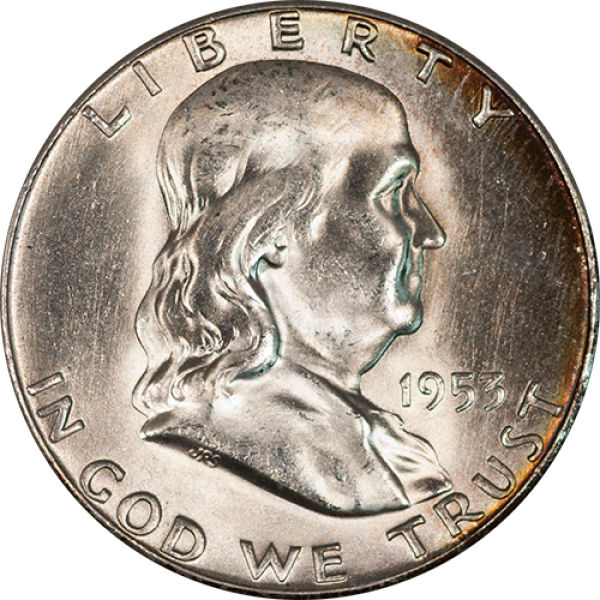 |
|
|
|
Pillar of the Community
United States
3520 Posts |
Ray, it's possible you were wearing an aqua colored shirt or there is something aqua colored that the reflective coin is picking up. Notice the reddish hue in my morgan picture below. Turns out I was wearing a red shirt at the time I took the shot. Highly reflective coins will pick up everything. Just a thought... I now have a trigger I use with my DSLR so I am no longer near the coin when I finally take the shot.  Edited by srs77
03/26/2014 2:33 pm
|
|
New Member
 United States
4 Posts |
Thanks for the reply srs. Wish I could remember what I was wearing that day. That's a very valid point. I also noticed especially on hyper-polished proofs, PL, and DMPL surfaces if I wasn't careful of my hand placement, the field would be flesh tone in places. I do have remote triggering through the Nikon software, but I have avoided using it in the past because it hadn't always focused properly.
|
|
Pillar of the Community
United States
3520 Posts |
Quote:
I do have remote triggering through the Nikon software, but I have avoided using it in the past because it hadn't always focused properly I have two remote triggers. One that is truly a remote and one that is wired. I find myself using the wired one more. It's got a 16ft cord so I can walk into another room if necessary  . You could always focus manually and then use your remote software. Just a thought. Good Luck! |
|
New Member
United States
4 Posts |
Did some more shots today and looks like the culprit could be the overhead lighting in the office. It's fluorescent lights.
|
|
Valued Member
440 Posts |
Ray could it be the mixture of 2 different types of lighting; your 40w lamps combined with the overhead fluorescents causing the camera confusion.
|
|
Moderator
 United States
23522 Posts |
Quote:
and looks like the culprit could be the overhead lighting in the office. It's fluorescent lights. This. The color correction required to get your dedicated lighting correct is what's casting the fluorescents as blue. Just re-emphasizes the point that one really has to eliminate all outside lighting when shooting coins - that's why I usually shoot after dark. |
|
Valued Member
440 Posts |
"that's why I usually shoot after dark". yeah that thought crossed my mind.
|
|
New Member
United States
4 Posts |
Until I can get a construction and budget allocation for a dark room ;-) I'll experiment with a soft hood or cover to shield the subject from the evil rays of the overheads.
|
| |
Replies: 8 / Views: 1,997 |
|
To participate in the forum you must log in or register.
 
- Counterfeit Detection: ANA Video - Introduction, With Brian Silliman And Jim Robinson Ep. 1
- Counterfeit Detection: ANA Video - Mistakes, Risk Factors, And Counterfeits & Alterations, Ep. 2
- Counterfeit Detection: ANA Video - Pimples And Pits, Looking At Cast Counterfeits, Ep. 4
- Counterfeit Detection: ANA Video - What Year Is That Cent? Key Date Coins, Ep. 5
- Counterfeit Detection: ANA Video - Diagnostics Of The 3, 5, And 10 Cent Coins, Ep. 6
- Counterfeit Detection: ANA Video, Counterfeit Quarter Dollar Diagnostics, Ep. 7
- Counterfeit Detection: ANA Video, Counterfeit Classic Commemorative Coins Diagnostics, Ep. 8
- Counterfeit Detection: ANA Video, Counterfeit Silver Dollar Diagnostics, Ep. 9
- Counterfeit Detectection: ANA Video, Classic US Gold Coin Diagnostics, Ep. 10
- Counterfeit Detection: ANA Video, Diagnostics Of Chinese Made Counterfeits Of US Coins, Ep. 11
- Counterfeit Detection: ANA Video - Wrap Up Recap With Brian Silliman And Jim Robinson Ep. 12
- 2026-P Jefferson Nickel Possible Die Chips, Die Cracks And Other Anomalies
- Commems Collection Modern: What If? 1993 Bill Of Rights Circulating Coinage - A 1990 Attempt
- Split Grading - An Idea That Would Drive Collectors Mad
- 1960 D Lincoln Memorial Cent (Small Date) BIE
- Is This 1888-S A VAM-10, 10A Or Something Else?
- 1994 Brazil 10 Centavo - With Die Clash
- US 1 Cent 1856 Altered From 1858?
- 2009-P Quarter, Puerto Rico, Reed / Edge Error Or PMD?
- 1937-D Walking Liberty Half Dollar. Set Upgrade.
- Post Your Coins And Medals Featuring A Snake.
- Counterfeit Detection: ANA Video - Introduction, With Brian Silliman And Jim Robinson Ep. 1
- Counterfeit Detection: ANA Video - Mistakes, Risk Factors, And Counterfeits & Alterations, Ep. 2
- Counterfeit Detection: ANA Video - Pimples And Pits, Looking At Cast Counterfeits, Ep. 4
- Counterfeit Detection: ANA Video - What Year Is That Cent? Key Date Coins, Ep. 5
- Counterfeit Detection: ANA Video - Diagnostics Of The 3, 5, And 10 Cent Coins, Ep. 6
- Counterfeit Detection: ANA Video, Counterfeit Quarter Dollar Diagnostics, Ep. 7
- How Far Back Can We Go? Ninth Edition!
- Counterfeit Detection: ANA Video, Counterfeit Classic Commemorative Coins Diagnostics, Ep. 8
- Counterfeit Detection: ANA Video, Counterfeit Silver Dollar Diagnostics, Ep. 9
- Counterfeit Detectection: ANA Video, Classic US Gold Coin Diagnostics, Ep. 10
- Counterfeit Detection: ANA Video, Diagnostics Of Chinese Made Counterfeits Of US Coins, Ep. 11
- Counterfeit Detection: ANA Video - Wrap Up Recap With Brian Silliman And Jim Robinson Ep. 12
- Post Your Coins With A "five" Denomination
- Is This 1888-S A VAM-10, 10A Or Something Else?
- Around The World With Coins - A Coin Geography Game
- Post Your Coins/Medals/Tokens That Are Intentionally Dual-Dated
- Post Your Coins Issued By The Mint As Colourised Coins.
- All Members, Post Your Most Recent US Coin Purchases!
- Post Your Coins With Coats Of Arms, Shields, Crests, Crowns, Etc.
Disclaimer: While a tremendous amount of effort goes into ensuring the accuracy of the information contained in this site, Coin Community assumes no liability for errors. Copyright 2005 - 2026 Coin Community Family- all rights reserved worldwide. Use of any images or content on this website without prior written permission of Coin Community or the original lender is strictly prohibited.
Contact Us | Advertise Here | Privacy Policy / Terms of Use
|
| Coin Community Forum |
© 2005 - 2026 Coin Community Forums |
| It took 0.26 seconds to rattle this change. |
 |
|
| |
| |





 Posted 03/26/2014 2:53 pm


