The following thread will answer 90% of your inquiries as well as address some interesting related topics:
https://goccf.com/t/88598Quote:
that have an actual dimmer instead of high low
Keep in mind, though, that USB microscopes typically come with three position LED intensity switches. Adding a separate ring light with dimming capabilities is only going to add unnecessary expense to your overall USB camera cost.
In the above USB thread 95% of the photos were taken without the use of the included/USB-attached LED light.
Another point to address is that dimming any external light source will not effectively eliminate a white or hot spot on a shiny coin, for example. The hot spot will only appear somewhat less intense as the light is incrementally dimmed.
The best way to reduce/eliminate the diameter of hot spots on a coin is to move the incident lighting source as far away as possible as previously discussed in other CCF threads.
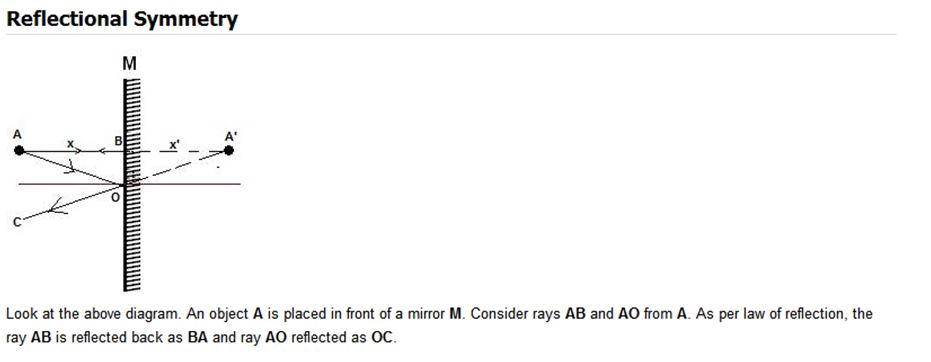
You also want to position your light as an incident ray AO and have it reflected back away from the camera lens as a reflective ray OC which still adheres to a concrete rule of physics:
'the angle of incident equals to the angle of reflection.'
Many frustrated users often struggle with hot spots since they fail to either slightly tilt the coin or position the incident lighting source at a different angle(instead of a 90 degree perpendicular position to coin substrate M in the illustration)
This corrective measure avoids the hot spot creation environment of having an incident lighting source ray AB being reflected directly back from a shiny coin surface onto the camera lens as a reflective hot spot ray BA etc...:










 Posted 04/06/2014 9:12 pm


