| Author |
 Replies: 13 / Views: 1,710 Replies: 13 / Views: 1,710 |
|
|
Pillar of the Community
United States
1300 Posts |
Does anyone know where the magic button is to change the white balance? My images all have a yellow ish tint to them.. The little white balance metter just makes it more prounced in the other color bands.theres another menu that I can change the monochrome of a image. How do I actually get it to a picture of what it sees? Can it be my light source? I am using white lights 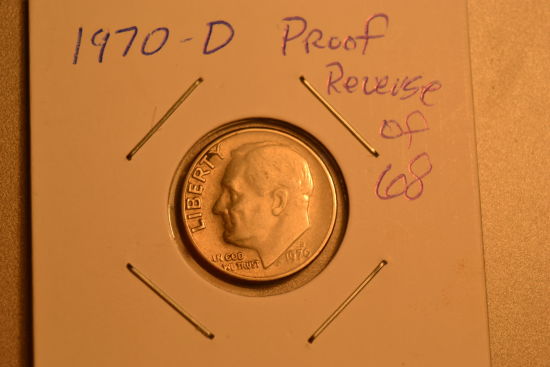 I took this picture on a grey back ground with a clear bulb nothing in the image is yellow the flip is white dime is well dime. And the background is grey |
|
|
|
Bedrock of the Community
United States
10045 Posts |
Our eyes will compensate for different light sources, but on cameras it needs to be set manually (if auto doesn't look good). On some Nikon cameras, white balance is set by a control on the body. On yours, it's set in the menu screen. Here's p. 87 of your manual.   Edited by DVCollector
07/05/2014 9:54 pm
|
|
Valued Member
United States
374 Posts |
The best way I have found is to use the RAW .NEF files and leave the image processing to software, not the camera (I use Photoshop CS6 here, but other software, including software from Nikon are just as capable). The camera will save the light temperature in the .NEF file, as well as shutter speed, F-stop and other information.
|
|
Bedrock of the Community
United States
10045 Posts |
Quote:
The best way I have found is to use the RAW .NEF files and leave the image processing to software, not the camera  You get the most flexibility shooting in RAW, provided you have the software to work with it--another CS6 user here.  Of course, it can't hurt to get the WB right in the camera--less work in ACR that way. |
|
Pillar of the Community
 United States
1300 Posts |
Great info gonna try it out found exactly what ya mean!! Thanks very much ill try a few options
|
|
Pillar of the Community
United States
1300 Posts |
well followed the instructions as posted PLEASE let me know what ya think maybe the subject is a tad dark but do think I got color and luster captured! 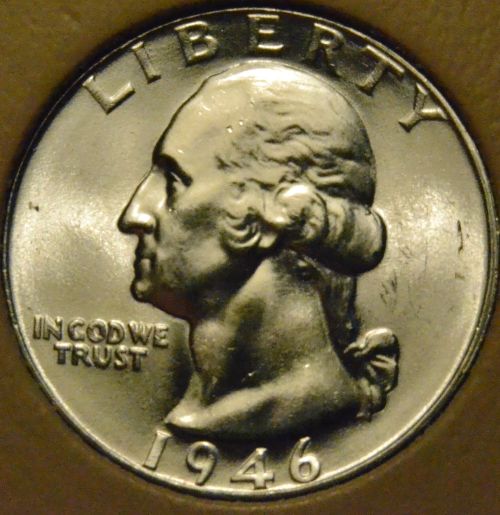 |
|
Bedrock of the Community
United States
10045 Posts |
I think WB is much better--the metal tone is more neutral. It's still a little high in yellow-green, but you could tweak that easy in software. |
|
Pillar of the Community
United States
5825 Posts |
Make sure your background is a non-reflective black or dark gray.
You want the light your camera collects to be as much from the coin as possible.
|
|
Moderator
 United States
23522 Posts |
Quote:
Make sure your background is a non-reflective black or dark gray.
You want the light your camera collects to be as much from the coin as possible. Not to mention, a monochromatic background makes it a ton easier to know if you got the color right. Don't look at the coin, look at the background to check color. If the background is right, the coin is right - at least to the extent that the camera sees it under the lighting conditions you've established. And this can "alter" the apparent color of the coin, leaving you beating your head against the wall trying to get the color right when it's the lighting arrangement and not the White Balance that's the actual problem. What's the actual background color for that shot? And is there any reason why you aren't using a Custom white balance setting? |
|
Bedrock of the Community
United States
10045 Posts |
Quote:
Don't look at the coin, look at the background to check color. If the background is right, the coin is right And it's easiest to tell color casts in neutral mid-grays. I could make a plug for the LAB color space here and mention it's really easy to determine (and correct) color casts in that mode. |
|
Moderator
United States
23522 Posts |
Or you could just use a Custom white balance setting and never have to care about color again. I just don't get why people don't do this. It's as elementary as focusing the shot.
|
|
Bedrock of the Community
United States
10045 Posts |
That works too--if your lighting is very controlled, not affected by time of day or different color temps leaking into your scene. |
|
Pillar of the Community
United States
4051 Posts |
If your lighting is changing so quickly that things change between the time you do manual white balance and then snap the shot, you need to work on a different lighting arrangement.
Contact me for photographic equipment or visit my home page at: http://macrocoins.com |
|
Bedrock of the Community
United States
10045 Posts |
I'm more talking about setting a custom WB--then going with that for extended shoots w/o adjustment. Course, this is coming from someone who does lighting setups--but mostly natural light, where light temp changes with cloud cover here. But anyway...not trying to be acrimonious here--I'm just super detail-oriented.  |
| |
Replies: 13 / Views: 1,710 |
|









 Posted 07/06/2014 12:07 am


