I should start by saying I am a professional and I take some things for granted, so if I don't make sense, just ask me and I will explain.
When I photograph people color balance is important but not critical, and even open to interpretation. So for the last couple years I have had it easy. When I went to shoot my first coin arrrrrrrrrgh I realized how far from balanced I was and how important it is with coins!
the first thing I did was shoot a color chart like this
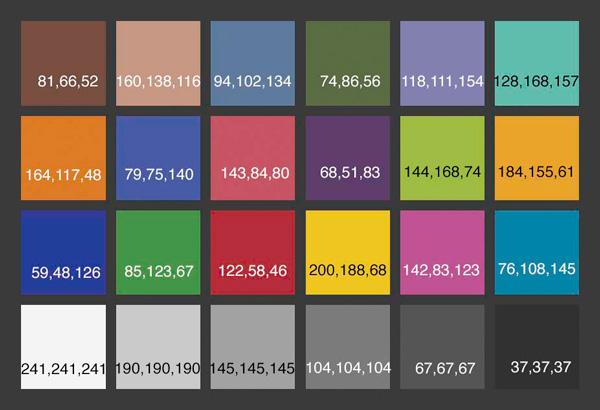
then set the white balance to the lightest grey notate the kelvin temperatures and process the rest of the images with that color temperature and tint.
All should be cool and groovy. No it wasn't
even though I had "fixed" the color balance the the whites were still very yellow or green
I'm embarrassed to show this but here goes
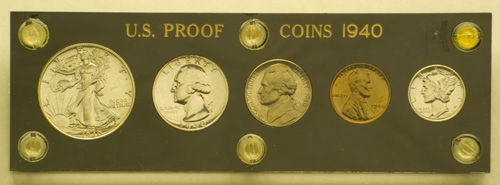
I tried again this time just correcting the raw by sampling behind Washington's head in the quarter. it's better but now the holder looks blue so I try balancing on the black holder and things are yellow again. I got problems My daylight balance flash system (5500k) is pumping out somewhere in the neighborhood of 3850k that's nearly tungsten but there is a green spike of 43 points magenta. this is more like a household fluorescent. or is it my lens or camera?
months go by and I'm shooting and pulling my hair out I create color profiles for the cameras, I try different software. I change out my lights. things get marginally better but being the anal retentive perfectionist I'm not happy.
Back in the film days color balance was corrected at the shoot time not in the computer. and I remember I own a Minolta color meter with a flash attachment (if it still worked)
I set up each light and read the kelvin temperature at high output low output and 3 points in between. every one of my lights were off reading 4900k to 5400 but not as bad as my images
when all was set up I still got readings in the 3900k zone
the problem was in the reflector board and the diffusion cloth I put in front of the lights these had yellowed A LOT with age.
I hit some reference pages on the net Rosco and lee filters were fabulous they have charts and calculations to get from any color temperature to another. according to the charts all I needed was an 80A filter on the lens or a blue correction gel for tungsten to daylight, a 1/4 blue to be exact.
I placed the gels over the lights ( I didn't want to put a filter on the camera) shoot away and voila on the mark. 5500K.
image processing is about 10 minutes now as opposed to a frustrating 2 hours.
What's the moral of this long winded tale you may be rightfully asking.
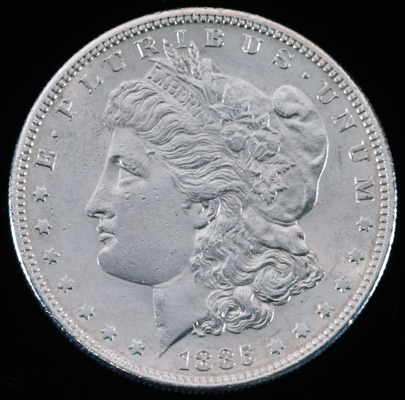
well here are three shots of the same
Morgan dollarfirst the semi balanced known lights at less than 4900K with out blue gels but color corrected in photoshop
now with the blue gel on the lights and yes some light movement I think I turned one of the lights away at the front of her face to add
more
contrast (I wish I had shot one with out moving the lights but this was a week later. perhaps after the holidays I will do some more "controlled" tests)
absolutely nothing was done to this in photoshop except sized down
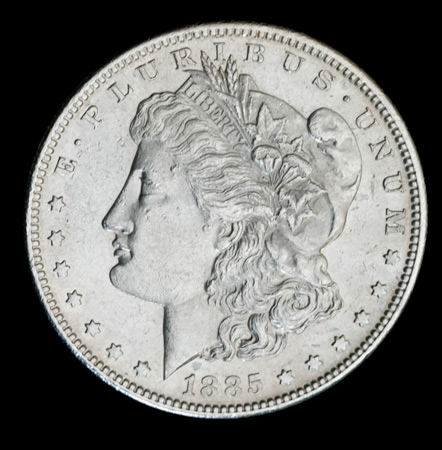
that's more like it this now looks like the coin it shines the color is good and there you can pretty much see the depth of the die strikes and the slight wear in her hair and cap.
to get from one to the other it took two thing
1 color balancing the lights to something the camera could understand.
2 lighting heavy to one side of the reflector board to get some shadows outlining the depth and contours of the coin.
Color balance through software or automatic camera settings are great but. If a color is missing or very low or the opposite very high. the the software whether in the camera or in the computer is trying to put something in the picture that isn't there in my case it was the color blue. In removing the yellow or adding blue it messes with the contrast by amplifying some color channels and throttling others.
to fix this you have to pump the contrast and do a sharpening. in my opinion pumping contrast and doing sharpening above the legal limit (all digital camera supposedly need to have unsharp mask run on the image as the last thing you do before saving or so they say) on a coin photo is a big no no your going to put things in and on the coin that aren't really there.
So do what you can to color balance your shot to tungsten 3200K or daylight 5500K before you click the shutter. perhaps with some of the digital models there is a well balanced fluorescent mode to but fluorescent lights are all over the board warm white cool white daylight etc etc each has a unique profile.
You can buy balanced 5600K fluorescent bulbs though but they are a bit pricey.
whew
ok
that was a lot more than I planned to write sorry if it was extremely long winded
(fyi people argue all the time in the photo world as to what to do a white balance on the middle gray or the white so don't ask me I'll say the closest to white you can get with out it being clipped) also those numbers on this chart are the corresponding Red Green & Blue levels for that color)








 Posted 12/12/2007 10:15 pm


