Welcome to Coin Community, Michael. I split this into its' own topic, because frankly it's inappropriate online etiquette to hijack someone else's topic in this fashion. Not to mention, you would have received far fewer looks there.

Second question first. Enhancing an image is absolutely no problem as long as the goal is to arrive at a more lifelike image of the specific coin being shown. In fact, it's so common we call it "postprocessing," not "enhancement," and although that also describes cropping and sizing, the sharpening and saturation steps you're likely wanting to use are accepted parts of the process. Just don't arrive at something which makes the coin look better than it is, only more faithful.
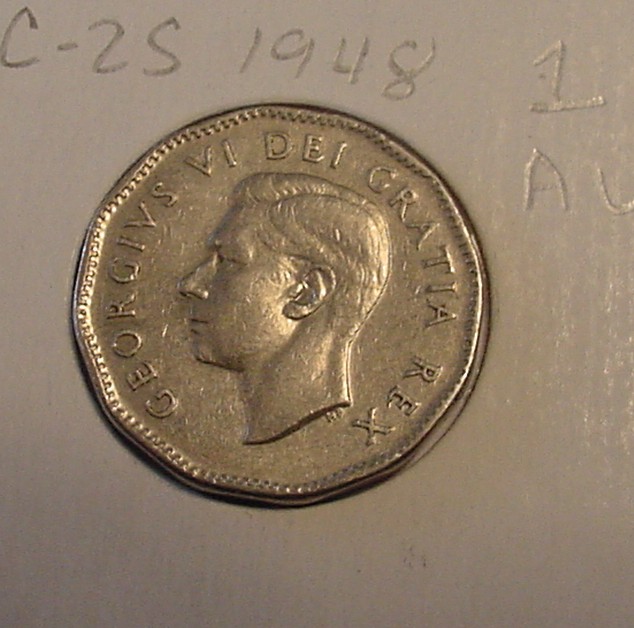
Your image here needs two corrections, white balance and squareness. The color is tilted too much towards the yellow, meaning the surface color is incorrectly skewed the same way. I'm guessing this is one of the things you wish to adjust in postprocessing, and it is no moral offense to do so.
Your image still includes EXIF data so I was able to see your camera and image settings. The camera automatically embeds this data for each shot, but includes absolutely nothing capable of identifying yourself or your surroundings unless it were a more modern model which has GPS tagging so there's nothing to worry about.
The camera amazed me, though. I've used one, but it was
years before CCF was even founded. It does not have any sort of custom white balance setting and downright primordial white balance presets (as befits the camera's age); of its' adjustments I would recommend trying Spot Metering - causes the camera to take all exposure data from the coin in the center - and the "Hold" white balance preset, although that may not work at all.
The second adjustment is to make coin and camera as parallel as possible. Angled shots like this quickly distort spatial relationships and present the coin in an imperfect light. Viewers will be able to give the coin a far better evaluation if the coin is square to the camera.
Solidly mount the camera on a tripod or something if possible. Near as I can tell, this camera has no shutter delay (the normal recommendation here), but there's such a lag between hitting the button and the shot actually snapping that you can likely get your finger away from the button, which will help minimize shake.
Keep the questions coming.










 Posted 04/26/2015 2:06 pm