| Author |
 Replies: 103 / Views: 10,637 Replies: 103 / Views: 10,637 |
|
Pillar of the Community
United States
717 Posts |
OK, I read a lot on this forum, and have made some purchases. While I was away for 5 days work, most of it arrived. I am still waiting for some, but can't wait to start taking pics if possible.
Here is what I have so far, hopefully you guys can help me put it together and get me taking pics!
Body - Canon EOS Rebel XS w battery and charger
Macro extension tubes M42 - 2 set
El-Omegar 75mm enlargement lens
Nikon M5 microscope lens
M42-M42 focusing helicoid ring adapter
42-39 mount adapter
Still waiting on:
RMS Thread to M42 Adapter for microscope objective flat
DSLR Camera Mount Adapter T-Ring for Canon EOS M42x0.75mm for Telescope Adapter
I know I will want a memory card, no manual, so what do I need?
I have a tripod, want to upgrade soon.
on Canon website you can download drivers and software, what should I be looking for?
Am I forgetting anything?
|
|
|
|
Moderator
 United States
23522 Posts |
Wow. Somebody did their homework.  Did the camera come with the 2 factory software discs? It should be your right to own a set of the appropriate factory software suite. Drivers would have to be updated for your OS but the important add-on, the Canon Utilities suite, is all you need to run the camera professionally for our applications. I'm guessing you came across enough information enroute to also give you some ideas about lighting, as often as these system build threads also involve extensive feedback about lighting. Questions are obviously desired around here. There are a pretty good number of excellent photographers prowling this forum these days, and most of us would have to cop to being zealous in the pursuit of perfection, since we have access to cheap equipment which can shoot with remarkable precision. You're about to have some fun. |
|
Pillar of the Community
 United States
717 Posts |
Unfortunately, no. The camera body, charger and battery only.
I am currently downloading a software pack, I had to enter the serial number of the camera to do so. Hopefully that will do the trick. I forgot to mention that my two Ikea Jansjo lights arrived and were assembled immediately after the first post was made! Can you tell I am excited?
|
|
Pillar of the Community
United States
717 Posts |
After installing the download, I have a tab on my start menu named Canon Utilities, which includes about 8 sub directories. What specifically should I be looking for?
|
|
Pillar of the Community
United States
717 Posts |
Rapid fire questions here..
Can the mount for the 75mm lens be removed? it is a two eared ring held on by a retaining ring. Or should I leave that as is?
|
|
Valued Member
United States
430 Posts |
Ok, I'm the most newbie here but I'll take a shot. Your setup will go camera body-EOS to M42 adapter-M42 extensions 1 or 2( I use a bellows)-focusing helocoid-42 to 39 adapter-El-Omegar lens. My M39 threads on the lens came with a thin ring. I believe this is to mount the lens on a square sheet to mount in an enlarger. Since you will not use the lens this way set it aside and mount the lens directly on the 42 to 39 adapter.
then mount the camera on the tripod, connect the camera to your computer. turn the camera on and EOS utilities should start up. click on Live view and your there.
|
|
Pillar of the Community
United States
717 Posts |
That makes sense, because the eos to M42 adapter hasn't arrived yet! Thats ok, still need a memory card, and is it just a USB cable to the computer?
|
|
Valued Member
United States
430 Posts |
No memory card is needed. The tethering software EOS utilities gives you the option to save to the computer or to both the computer and the card. My nikons by default need a card to turn on, but the canon does not.
|
|
Pillar of the Community
United States
717 Posts |
That will be a sweet set-up then! No transferring files at all. Will probably use the camera for other uses, so I still need a card, and need to get a long USB. It is USB A (normal that plugs into computer) to USB B (mini - 5 pin, not micro, which is smaller) in case someone else looks this up to find out what cable is needed.
|
|
Moderator
United States
23522 Posts |
The cable is USB Mini, not Micro (which is the type used with smartphones).
Zoom Browser is the software you want. It not only does the remote shooting, but you can direct each shot to a specific location. I create a new folder for each coin, and direct the shots of that coin straight into the folder.
Get a Class 10 SD card at least, to allow you wo maximize the camera's burst and video capability.
|
|
Pillar of the Community
United States
1476 Posts |
Quote:
After installing the download, I have a tab on my start menu named Canon Utilities, which includes about 8 sub directories. What specifically should I be looking for? What I DL'd was - EOS Utility - Digital Photo Pro - Picture Style Editor - Image Browser EX - EOS Movie Utility Don't know if you have the ability to do movies with that camera, but if you do you might want the last I mentioned. I would look at the version numbers of the software pack you have already downloaded and see if the newer versions are what you need and are compatable with your model. Hope this helps. You might also want to see what your firmware version is and see if they have an update. You might be able to find it in your menu's once you switch to a setting other then the 'auto' modes. like switch to Av mode and check. Mine is located in the 4th 'wrench' over in my menu selection. Don't know if it's the same for yours. I would also recommend going to YouTube and searching for tutorials for your model camera if you need to. The Canon tutorials are pretty basic but can help as well. It has helped me get started. Hope this helps. |
|
Valued Member
United States
430 Posts |
EOS utility is the launch program for all the canon programs. I did do a firmware update as well. You need a formatted memory card in the camera to do that, but you can run the firmware update through the camera or the computer. Do not turn off the camera during the firmware update or you can brick your camera (render it unusable).
|
|
Pillar of the Community
United States
4051 Posts |
Quote:
DSLR Camera Mount Adapter T-Ring for Canon EOS M42x0.75mm for Telescope Adapter This adapter may give you problems. The M42 extensions, helicoid, and adapter you bought are all M42x1mm. T-mount is M42x0.75mm, so will only thread on so far before interfering. Some adapters are sort of in-between and can take both. You might try each of your components to see if any of them work better than the others. If not, you can use the T-mount adapter in a pinch but I recommend getting an M42x1mm for long term use, perhaps one like this: http://www.ebay.com/itm/For-Black-A...em462fd7ef4cContact me for photographic equipment or visit my home page at: http://macrocoins.com |
|
Pillar of the Community
United States
717 Posts |
Thanks Ray for catching that, New one has been ordered. Patience
|
|
Pillar of the Community
United States
717 Posts |
Ok, the eos adapter arrived today, so I was able to play around with pixels today! The adapter fit perfectly, the threads felt fine, and tightened completely. (I am a hobby mechanic for 30 plus years, so I am confident they are correct. Maybe a misprint on the item listing?) So anyway, I took this picture with the following: 75 mm el-omegar helicoid full set of three extension tubes I believe I set the shutter at 1/100th, and aperture at 5.6 I used 2 jansjo lights roughly 10 and 2 just above and close to the lens. with this set up I was unable to fit the entire coin in the viewfinder. Maybe a dime would fit nicely. Do I need to add extension and raise the camera to fit the cent? I was unable to find a long (10 ft due to my arrangement) usb cable, so one is on the way. So no tethering at this time. God I need more patience. Anyway, suggestions, next step, etc 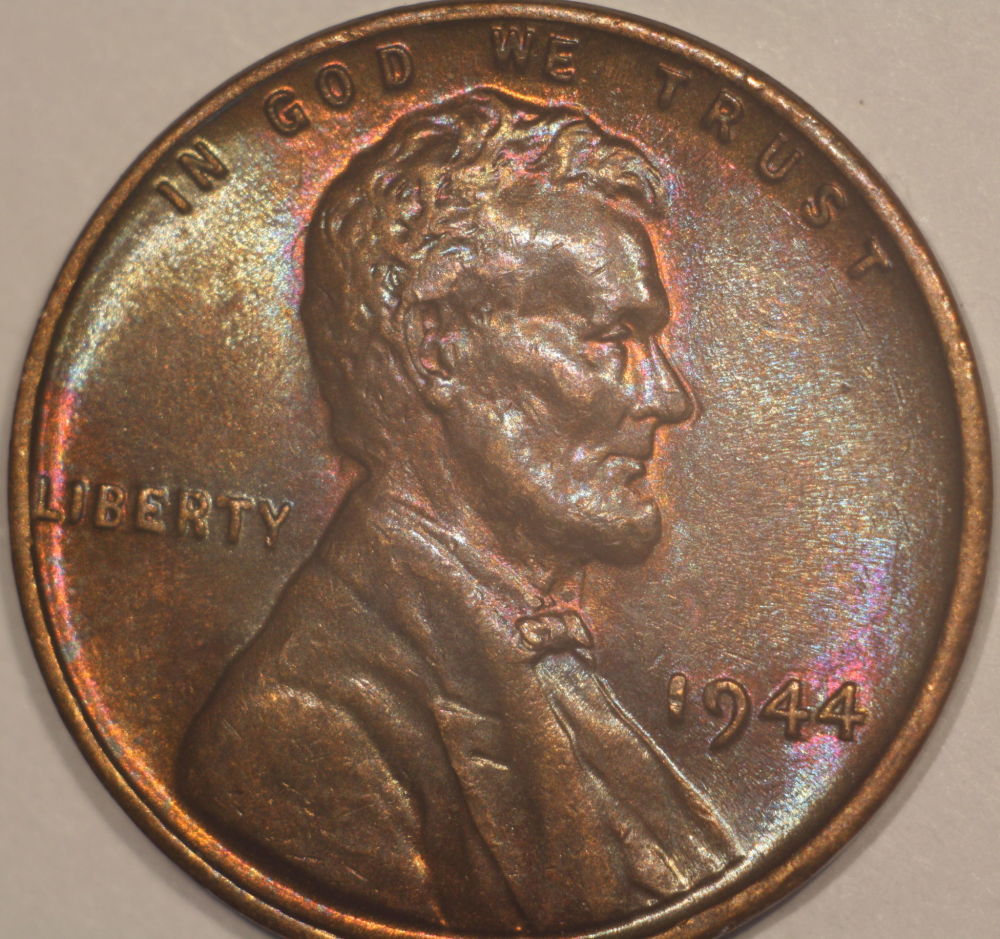 |
|
Pillar of the Community
United States
717 Posts |
After I posted, I realized I needed to shorten the focal length, so the following shot, same as above except: 55mm macro extension reduced to 30 mm diffused the jansjo's with tissue and moved them closer to the coin still 5.6 and 1/100th used only the image optimizer on the site 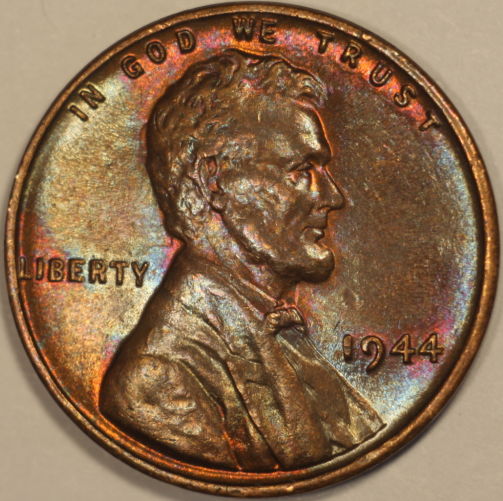 |
| |
Replies: 103 / Views: 10,637 |








 Posted 05/17/2015 8:07 pm


