| Author |
 Replies: 10 / Views: 1,686 Replies: 10 / Views: 1,686 |
|
|
Pillar of the Community
United States
663 Posts |
I'm going to go back to trying to figuring out my USB Microscope while trying to build my digital camera set up. Maybe you guys can help me?
My ultimate goal is to have a set up that will allow me to get good pictures of mint marks. The microscope I have zooms in really well on mint marks, but the microscope has to sit right on top of the coin in order to get the shot. It has lights built into it that are controlled with a dimmer turn dial that goes from off to bright. The problem is the dimmest setting is still too bright and I get bad glare and weird colors. It is a 200x power scope.
I have the feeling that if I could just back the scope off of the coin, then I could use an outside light source instead of the USB lights. The problem is, of course, the picture goes out of focus when you pull the scope up off of the coin.
Would a stronger scope zoom in on a mint mark yet still be off of the coin enough to get an outside light source on the coin? I have seen 800x power scopes. Would that do what I want it to do?
Thanks for the help!
|
|
|
|
Moderator
 United States
56855 Posts |
200x is already too much,800x would be out of the question. Lower x is what you need,maybe 5x-50x. Have you tried putting the scope on top of some books maybe? John1  |
|
Pillar of the Community
 United States
663 Posts |
Yeah, when I raise the scope away from the coin then I can't zoom in on the smaller devices on the coin. It goes blurry and out of focus. How far away from the coin should the scope be if I had it set up correctly?
|
|
Moderator
United States
56855 Posts |
Congrats on your 500th post  ,contest time? What scope are you using? I have a Celestron 44302 and I had to take the clear end off and block all but one led and that bulb I put a filter on. When I need a whole coin pic I put the scope on a book or two. John1 |
|
Pillar of the Community
Canada
9780 Posts |
Can you put Kleenex on the lights to defuse them?
|
|
Pillar of the Community
United States
3552 Posts |
Quote:
...dimmest setting is still too bright and I get bad glare and weird colors. An entire discussion exists on this thread covering just about every issue confronted when using USB cameras: https://goccf.com/t/88598 |
|
Pillar of the Community
United States
3552 Posts |
Quote:
Can you put Kleenex on the lights... In terms of diffusive lighting for proofs etc. I have had acceptable results by simply taping on a CFL bulb casing a piece of simple copy paper. Tissue paper will provide sufficient results as well but tends to degrade a bit more rapidly... |
|
Pillar of the Community
United States
1476 Posts |
Can you adjust the lighting after you shoot in the processing software that came with your Scope?
|
|
Pillar of the Community
United States
3552 Posts |
Quote:
Can you adjust the lighting after you shoot... I avoid these types of bundled software programs only because www.gimp.com is free to download and allows the user to alter a vast array of features more helpful in producing the best depiction of the coin in question. |
|
Pillar of the Community
United States
3552 Posts |
It's worth mentioning that in addition to altering the light intensity in question using GIMP, for example, any user can also easily modify some of the more often encountered 'primary' colors of the visible electromagnetic spectrum such as blue, green, and red. The abbreviation for all of the colors of the 'visible' electromagnetic spectrum is ROYGBIV, which stands for: Red Orange Yellow Green Blue Indigo Violet This is important to at least mention since all colors originate from a white light source and are sometimes an annoyance on the photo of the coin. rgbworld has an illustrative diagram that visually depicts this relationship: 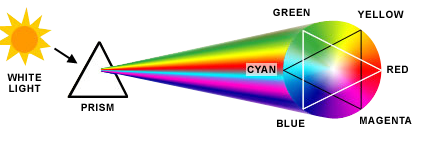 mdpmedia |
|
Pillar of the Community
United States
663 Posts |
Whoa! I hadn't even noticed I was that close to 500! Thanks! :)
I have a USB Microscope called a "Plugable USB--200x". My wife got it for me for Christmas. I've been trying to figure out how to take the clear plastic light guard off without breaking it (didn't want to break it with it being a gift and all....). I finally gave it just enough of a twist and I got the light guard to come off. I'll have to experiment with the guard off now to see if I can use my diffused lights that I have. If that doesn't work then I'll try blocking them out with tape as you guys described. I probably could mess with post shot editing, but I'd really rather just have something that gets me close without have to do editing. I'm not looking at doing super high quality like some of you guys get. I just want something that lets me see close up (to save my eyes) and then something that allows me to document the coins I find for my own fun. :)
Thanks for all of the help and tips guys! Again, another reason why this forum is one of the best!
Edited by Agrippa
06/15/2015 10:13 am
|
| |
Replies: 10 / Views: 1,686 |
|










 Posted 06/13/2015 10:24 am


