|
This page may contain links that result in small commissions to keep this free site up and running.

Welcome Guest! Registering and/or logging in will remove the anchor (bottom) ads. It's Free!
To participate in the forum you must log in or register. | Author |
 Replies: 14 / Views: 2,131 Replies: 14 / Views: 2,131 |
|
|
Pillar of the Community
United States
1179 Posts |
Hello all. I did a search hoping someone else has this camera, no luck. I'm a complete newbie to taking coin pics, and for the life of me I cannot get a good shot. Here are some specs: * Resolution: 6 megapixels (2832X2128) * Lens: f2.8--f4.8/5-60mm Schneider-Kreuznach Variogon 12x optical zoom * Exposure: Auto, program, shutter priority, aperture priority, and manual * White Balance: TTL Auto, Daylight, Tungsten, Fluorescent and Open Shade * Auto Focus: TTL 5 AF point multi-zone, Center AF point, and Selectable Zone AF (5 zones selectable) * Exposure Compensation: Yes (+/-2EV in 1/3 stop increments) * Auto Exposure Bracketing (AEB): Yes * Sensitivity: Auto, 80, 100, 200, 400, and 800 ISO Ive tried other peoples settings they used in some other threads, but I cannot get close to this coin without it getting blurry. I want to practice taking some pics before I sell some extra coins on ebay. Anyone know of some settings to try, or even what these settings mean/do? I'm lost... Thanks P.S - I read this on some review which might be an issue? "The Z612's minimum focusing distance (in macro mode) is 3.9 inches/9.9 centimeters - not nearly close enough for dramatic macro shots."  |
|
|
|
Moderator
 United States
23522 Posts |
The minimum focusing distance is not an issue for you - 10cm is too close to get good light on to the coin, anyways - you're going to want to be a minimum of 6" from the coin, preferably more, to get it lit properly. OK, here's what to concentrate on right now, and you can tweak stuff later once you get the focus right:
1) Make sure the coin and the lens are absolutely square to each other. That's Job #1, and nothing else will be right until you get this right.
2) Use the delayed shutter to snap the pic - your hand should be nowhere near the camera when the shutter snaps. These first two items are imperative - you'll never get what the camera is capable of giving you without them.
3) Use as much manual control over the shot as you possibly can. I say this because the difference between a good shot and a great shot might be as little as one step of adjustment of one single parameter.
On the bad side, your camera isn't the best on the market when it comes to White Balance adjustment. On the good side, it's pretty good with automatic white balance right out of the box, and that's the easiest thing to twiddle after the pic is taken anyways. So leave the White Balance at Automatic for your first efforts, and don't worry about the color for the moment. Set the shot up as I described above, making sure the camera is square to the coin and let's start at about 10-12" away. The easiest way to do it is with a tripod and the edge of a table - I learned to shoot coins in exactly that way - with the camera pointing straight down at the coin. Use a solid-color background for the coin, either white or black - using Auto white balance you'll probably get the best results with a sheet of printer paper as a background.
A little gooseneck desk lamp, or just plain sunlight, is the best place to start for lighting. Remember, we're just wanting to get a sharp pic right now, and we'll worry about color and luster later. You'll want plenty of light, although in this case a single 60-75w buld qualifies as "plenty." With the camera and light set up properly, use these as your starting settings: ISO 400, f/5.6, exposure at about 1/125 if under a lamp and 1/200 if under sunlight. Depending on what your first shot looks like, vary the exposure faster or shorter to get the best result. Change it by one step (1/125 to 1/160 or 1/80) with each shot, until you get the best possible pic.
It's going to take a few tries, unless you're very lucky. For each pic, view it full size on your monitor (I know it'll be bigger than your screen), so you can see if the focus varies over the face of the coin. If the focus varies top to bottom or side to side, you'll know you aren't square to the camera. If it varies from the center to the outside, you're going to want to use a narrower (higher numerically) aperture, because that will increase the depth of field and get the whole depth of the coin into focus at once. I believe that f/5.6 with your camera will focus the whole coin, though.
So, go play. Take pictures. Worry about the color later.
|
|
Pillar of the Community
 United States
1179 Posts |
Wow thanks a lot Superdave. I did mess around more last night and did get a couple pics to turn out. I will have to find something to mount the camera to in order to get the correct angle. Currently using a desk lamp with a 60watt bulb, but like you said, get the shot right first. I will work on this and see if I can get a couple pics posted so you can see my results. Thanks again, appreciate your input. :)
|
|
Moderator
United States
23522 Posts |
Glad to be of help. Please do post pics - you're over 50 posts, and you're eligible for hosting here at CCF, if you don't have it already. That will let you post stuff up to 800px wide right from Coin Community. Email Bobby or post in the Coin Community Support forum, and he'll set you up. Just remember what time of year it is, and don't expect a reaction in minutes.  Just remember, all we want is sharp pics right now. It doesn't matter if they're green, or dark, or only 300px wide. We can tweak that later. I have to socialize today, so I probably won't be around if you post anything further. However, tomorrow it's business as usual and back to regular habits. |
|
Pillar of the Community
United States
1179 Posts |
Well this is a start. Complete newbie here. I picked up some tripod from Walmart today, seems like it will work great for vertical pics. These were shot from about 7.5 inches away with a touch of zoom. Seems like if I get further away, it gets blurry when the pic is zoomed in on. Above the pic is the settings I used. I'm not using ifranview, instead I use Photoshop to crop etc. Only problem is getting this file under 100k in size without losing too much quality. These are pretty yellowish, not sure what to do about that. I'm sure its the light. I can adjust the settings on the camera, but then they come out blueish lol. Oh, and just a random coin, nothing special obviously. Well, any advice would be great. Thanks Edit: White paper was used on the backgroud, my white balance is horrid? @5.6, 1/125, ISO400 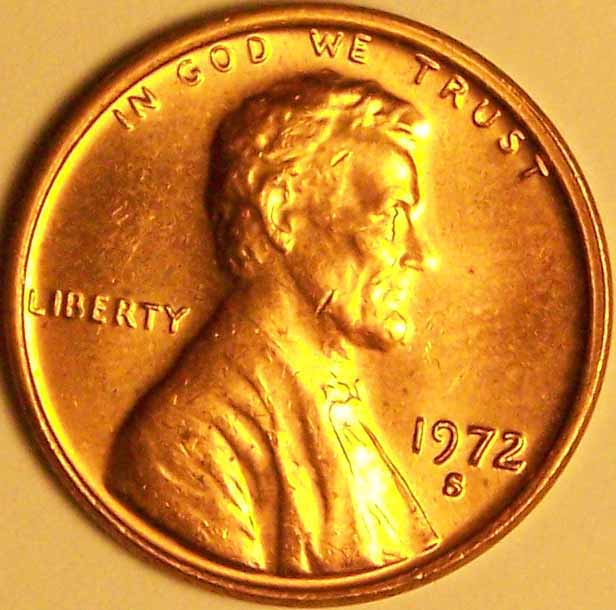 @3.6, 1/125, ISO400 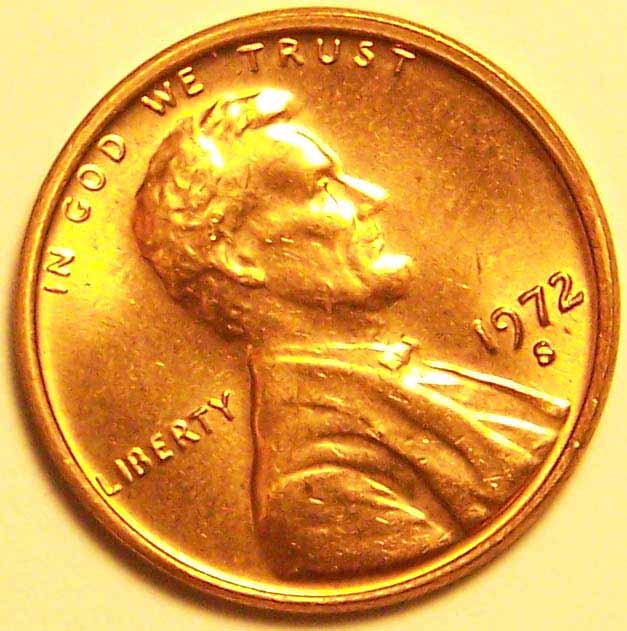 @3.6, 1/200, ISO400 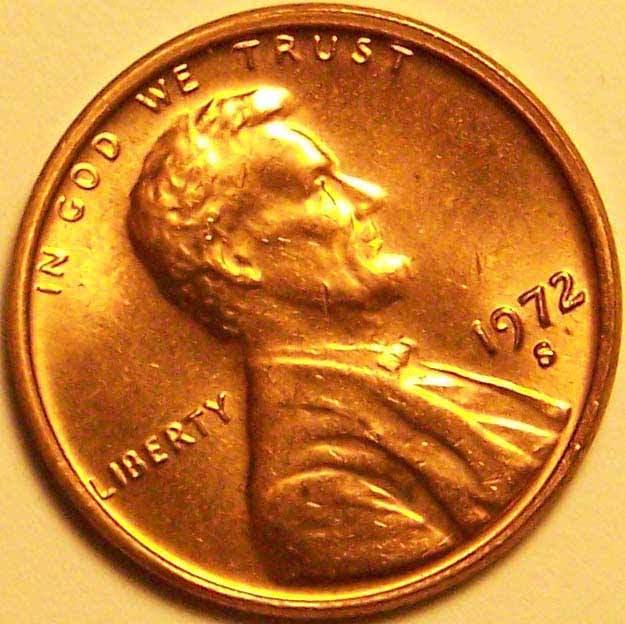 Edited by ceaton
01/01/2008 9:19 pm
|
|
Pillar of the Community
United States
1179 Posts |
Well now this is funny. I searched for my old thread for when I was trying out taking pics, almost exactly a year ago :) Anyways, here's round 2 of giving this a shot. I think I have found a decent setup to take raw coins, I have alot of work to do I'm sure, but what do you think so far? I think its a good improvement :D Oh, and the coin is nothing great obviously, just one I can finger up and toss around for testing :) I had the camera setup on auto with macro and here are the settings this one produced. f/3.2, 1/320, ISO 80. One 60watt CFL bulb. I have this sitting on a toddler plugin plastic protector lol! Suggestions please :) I'm actually happy with these results so far, I thought my camera wouldnt take pics for me!  Image Insert: Image Insert: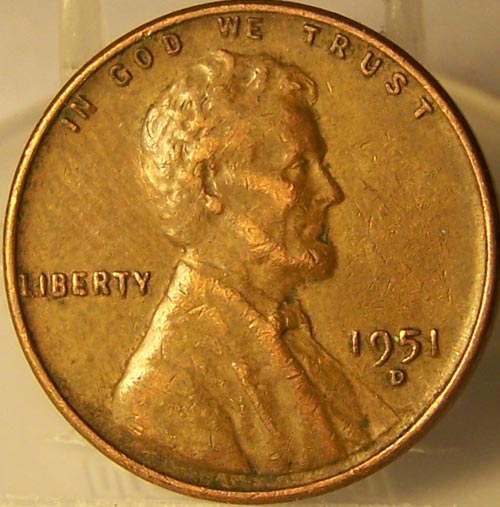 Edited by ceaton
01/02/2009 8:31 pm
|
|
Moderator
United States
23522 Posts |
I just reread this thread half a dozen times, thinking, "It's dated a couple days ago. I didn't type that then!" Then I looked at the year. You, sir, have well and truly figured it out. That is a great picture for grading purposes - the focus is sharp, and the lighting is able to show all the details without washing out enough to matter. Your only remaining goal is to work on white balance; for this, use a pure white sheet background and play with the white balance settings until the paper is right. Then the coin will be right. Are you familiar with any post-processing software? One trick I sometimes use is to deliberately underexpose the shot and then add a little to Levels and Contrast in postprocessing; it brings out details without washing out the fields. |
|
Pillar of the Community
United States
1179 Posts |
Thanks! Its amazing what different light will do. I did use a pure white piece of paper, but I'm struggling to find the settings for white balance, which I dont think my camera is very good at. I'll keep plugging away, thanks for the confidence boost :)
I must have been bored last new years weekend too lol!
|
|
Pillar of the Community
United States
1179 Posts |
Oh and I forgot to mention I am very good with photoshop, CS2 mainly. I havent messed with any of my coin pics though. I want to learn my camera as much as possible first.
|
|
Moderator
United States
23522 Posts |
Quote:
Oh and I forgot to mention I am very good with photoshop, CS2 mainly. Good. Photoshop (in my opinion) is the better tool for adjusting color than the Gimp; I use the Gimp myself and prefer it for sharpening. Do not be afraid to make use of Photoshop for final sharpening and color. You want an accurate image of the coin, and the camera doesn't have to do 100% of that. |
|
Pillar of the Community
United States
1179 Posts |
Do you just sharpen and adjust the color/hue then?
|
|
Moderator
United States
23522 Posts |
That and, as I've mentioned, sometimes levels and contrast. My current living situation does not lend itself to dedicating a lot of space and effort into perfecting my lighting, and I'm sometimes forced to compensate.
|
|
Pillar of the Community
United States
1179 Posts |
Well, I think I fixed the color. I didnt have the best lighting on this one, but I'm pretty pumped that I got this far! Here is the same pic edited a bit. 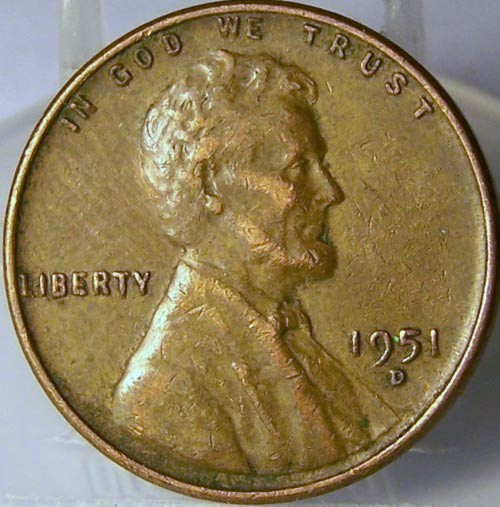 |
|
Moderator
United States
23522 Posts |
Quote:
and for the life of me I cannot get a good shot. So, in one year, you've gone from "I cannot get a good shot" to sharply focused, color-consistent, gradable images without changing anything except your level of knowledge. I hope you don't mind if I use your work in the future as an example of what I'm talking about when I say, "It's the photographer, not the equipment."  |
|
Pillar of the Community
United States
1179 Posts |
LOL, feel free to use me as a example!
I learned that my camera after hitting 2 buttons on auto mode can do these pics just fine. Before, I was manually trying all these settings and pretty much gave up. Now its the lighting that is the challenge, I think its about %80 of taking pics. I'm finding that different coins require different lighting/angles etc. Its tough, but at least I know I have the equipment capable.
Thanks again Dave for all your expertise.
|
| |
Replies: 14 / Views: 2,131 |
|
To participate in the forum you must log in or register.
Disclaimer: While a tremendous amount of effort goes into ensuring the accuracy of the information contained in this site, Coin Community assumes no liability for errors. Copyright 2005 - 2026 Coin Community Family- all rights reserved worldwide. Use of any images or content on this website without prior written permission of Coin Community or the original lender is strictly prohibited.
Contact Us | Advertise Here | Privacy Policy / Terms of Use
|
| Coin Community Forum |
© 2005 - 2026 Coin Community Forums |
| It took 0.35 seconds to rattle this change. |
 |
|
| |
| |







 Posted 01/01/2008 12:38 pm


