| Author |
 Replies: 11 / Views: 1,862 Replies: 11 / Views: 1,862 |
|
|
Valued Member
United States
134 Posts |
Hello all, I am taking my pictures with my Motorola Droid IV. I know my photos will never be great with this but I'm sure they could be a lot better. I really can't afford to buy a camera right now, so will be using my phone for now. I usually lay the coin on white paper and lay the phone on a stack of books to take the shot. I do this near a window for light, as my house is rather dark. Lighting is probably my biggest issue, have a look!! 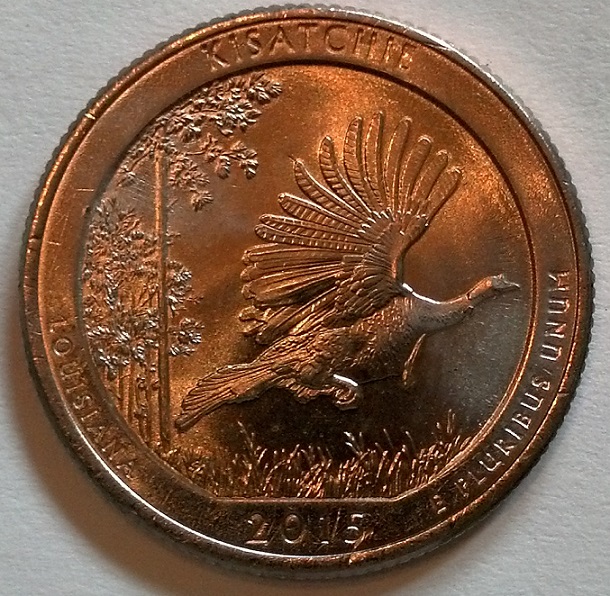 Why does this 2015 quarter look toned? It has no toning whatsoever. 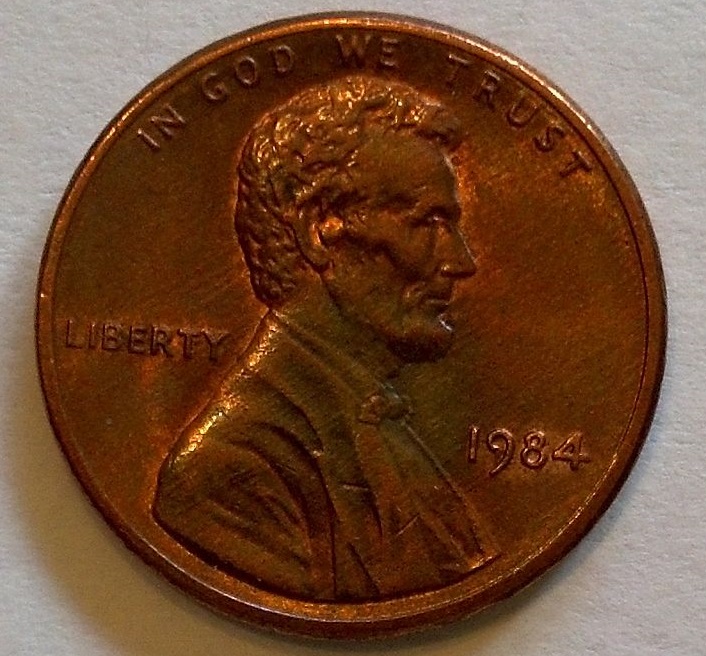 This 1984 LMC has gorgeous rainbow toning, however, the photo does not show it. What can I do to capture the toning of this coin? |
|
|
|
Pillar of the Community
United States
711 Posts |
I use my el cheapo Droid phone for photos also.
Using the books to hold the phone above the coin helps. If you can set in a shutter delay to eliminate vibration from pushing the button even better.
I think you are good there.
I use a black sock for my background, it seems to help.
I also shoot outdoors for natural light which seems to help too. Not sure about toning though and it does seem to wash out luster.
I imagine the color you are seeing on the quarter is reflecting on the coin from somewhere, perhaps the books you have stacked up. Maybe block that color with the white paper and replace the background with a black sock and try again. Watch out for shadow being thrown off from the phone / books also.
Good luck.
|
|
Moderator
 United States
56855 Posts |
Check your white balance. Also,a gray background is best,IMHO. John1  |
|
Pillar of the Community
United States
1037 Posts |
I would put more light on the coin for next time, also use a black background.
Are you using the phone's flash?
|
|
Moderator
United States
56855 Posts |
|
|
Valued Member
Canada
491 Posts |
I use Picasa3 to photo shop all my coin's picture user friendly and it's free to download.
|
|
Valued Member
 United States
134 Posts |
Quote:
Check your white balance. Really not sure what white balance is, or if my phone has a setting for it. I will check, if it does have a setting for it what should I set it to? Quote:
Are you using the phone's flash? The flash is set to auto, however, I haven't seen the flash go off while shooting coins. My main light source is sunshine through my kitchen window. Would a cheap desk lamp or something like that help? Should I be using the flash? Quote:
I also shoot outdoors for natural light which seems to help too. I will give this a try tomorrow and see if it helps. I will try some different colored backgrounds as well. |
|
Valued Member
United States
134 Posts |
...also I am using the macro setting, I read somewhere that it is good to use for photographing coins. Is this correct?
|
|
Moderator
United States
56855 Posts |
The macro setting is right for coin pics,should be a little flower icon. I am not sure where to set your white balance,practice a bit. John1 |
|
Valued Member
Canada
491 Posts |
Have to use the marco I have light I turn on above the object I shooting, nature like works just as good. I have friend that only takes pictures outside and his pix's turn out great
|
|
Pillar of the Community
United States
3512 Posts |
The white balance setting will depend on what type of lighting you're using. Incandescent bulbs vs. leds, vs. the many other options out there. Based on the color cast I would expect you shot these with some type of incandescent bulb. The white balance setting (if you have that) should allow you to match the setting to the type of bulb you're using.
|
|
Valued Member
United States
134 Posts |
I don't see a white balance setting on my phone, I will just keep trying with different backgrounds and lighting until I discover what works. Thanks to all for the advice!!
|
| |
Replies: 11 / Views: 1,862 |
|







 Posted 07/27/2015 3:31 pm





