| Author |
 Replies: 10 / Views: 1,779 Replies: 10 / Views: 1,779 |
|
|
Pillar of the Community
United States
1599 Posts |
Bought an AmScope microscope about a year ago and tethered my Canon t1i to it. Worked for months before becoming to frustrated with it because of focus issues. Love the AmScope for searching varieties, etc. Most of the pictures that I have posted of rpm's, DDO's, etc have been with my iPhone and olliclip. Anyway, have been working on shooting pics with the AmScope again lately. The pics below are my latest. They still look out of focus to me. I have about decided that my problem is either my tired, old eyes or maybe more of a lighting issue. Any opinions on whether it is my eyes, lighting or just plain not focused properly. Thanks! 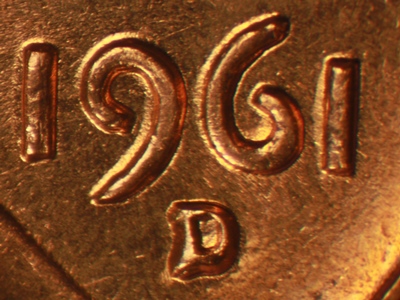 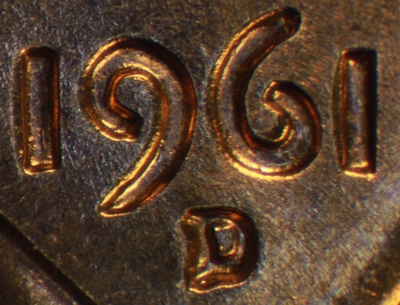 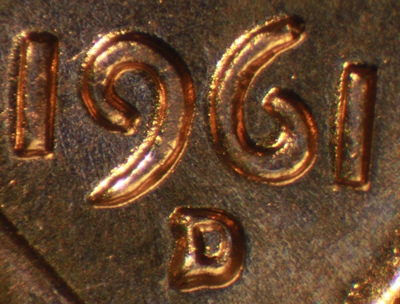 |
|
|
|
Pillar of the Community
United States
9395 Posts |
For magnification that high, would focus stacking help? With a DSLR and microscope objective, I always have to stack for closeups like that.
|
|
Pillar of the Community
2087 Posts |
I think pepactanius has probably nailed the issue. Your iPhone sensor is so small it will have a much deeper dof than your canon(for the same field of view).
Edited by austrokiwi
02/21/2016 03:30 am
|
|
Moderator
 United States
56855 Posts |
My non pro opinion,1st pic out of focus 2nd pic, better focused but has glare and last pic good focus but a lot of glare. What AmScope model do you have? John1  |
|
Pillar of the Community
United States
1299 Posts |
Looks to me that the top photo is better focused at the left, and as you move to the right, it becomes out of focus. Leeds me to think that you need to check the alignment of the camera with the coin?
|
|
Pillar of the Community
Canada
2784 Posts |
I agree with ham. so if you are mounting. your canon to the am scope. I would say your camera is slightly tilled. if it is not that. then your staging plate is slightly tilted. great photos. with a little adjustment your photos will be wow
|
|
Pillar of the Community
United States
4050 Posts |
Stereo microscopes like the AmScope and the Bausch & Lomb were designed to have a fairly small NA (aperture). This allows you to view objects with good depth of field and a reasonable level of resolution. It is also critical for stereo viewing since the focal plane is always a little tilted, with optics from one eye tilting one way, and the other eye tilting opposite. The small NA means there is a lot of diffraction in the image, so these microscopes are always going to be strongly diffraction-limited. This means the fuzziness you're seeing in these images is most likely due to diffraction, not focus, though diffraction does make it harder to find critical focus since the image is just a little fuzzy across a wide depth of field. Focus stacking can help to eliminate the focus problem due to tilt, but the end result will still lack clarity, since there is not a narrow range of sharp focus, but a wide range of fuzzy focus. This is also the case with most all USB microscopes. Their optics are optimized for good depth of field with minimally-acceptable sharpness. Contact me for photographic equipment or visit my home page at: http://macrocoins.com |
|
Valued Member
United States
67 Posts |
Have you sharpened these photos? It looks like a simple sharpening might get rid of the anti aliasing effects from the camera. Here's your image sharpened, which looks a fair bit better, to my eye: 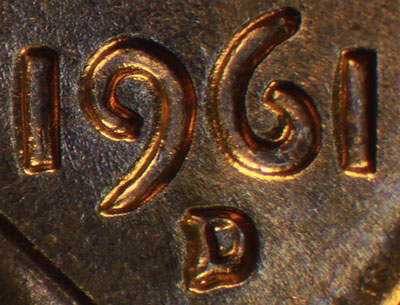 Here's your non-sharpened version, easier to compare them right next to each other: 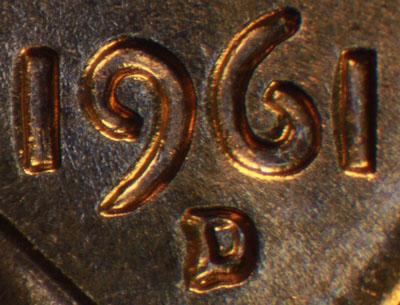 Edited by Dave M
02/24/2016 7:08 pm
|
|
Pillar of the Community
2087 Posts |
Quote:
It looks like a simple sharpening might get rid of the anti aliasing effects from the camera. Dave M tell us more please.... My camera is absent an anti aliasing filter so I don't have to contend with such effects...although on rare occasions I have been frustrated by Moire( that an anti aliasing filter is designed to prevent). I tend not to think about anti aliasing effects but it would be nice to know more |
|
Valued Member
United States
67 Posts |
Quote:
Dave M tell us more please.... My camera is absent an anti aliasing filter so I don't have to contend with such effects...although on rare occasions I have been frustrated by Moire( that an anti aliasing filter is designed to prevent). I tend not to think about anti aliasing effects but it would be nice to know more Well *most* digital cameras have an anti-aliasing filter over the sensor, to help eliminate moire and other patterns created as a result of digitizing analog data. In many instances this helps, and I'm glad I have an AA filter on my camera, but it does leave you with an image that is more blurry than if you did not have the filter. There are two ways to improve the image. Firstly if the image is resized smaller of course the effects of AA become smaller, to the point of being negligible. So if this image of 1961D was originally the full sensor's size, and was reduced down to the 400px or so that we see, then most an effect of the AA filter has been removed. On the other hand, if this 1961D is a crop from a much larger image (which I suspect it is), then the AA is in full view and needs a pass through a sharpening process. I use Photoshop's unsharp mask, but I'm sure every decent program has a similar tool. It is a very common post-processing step in a photographer's toolbox for any image generated from a camera with an AA filter. |
|
Pillar of the Community
 United States
1599 Posts |
DaveM-your sharpened image does look much better. I will try to play with the originals later. Not sure of the model of my AmScope, but it was not one of the cheaper ones. My camera is inserted into one of the eye pieces rather than the port for the camera. I have not been able to get close to the shots from the camera port. I am not sure if this makes a difference since the camera port is perpendicular to the fields and the eye port is angled which might cause some of the distortion at such magnification. Still haven't figured out which rpm this one either. Either way, I feel more confident that I can produce better images after all the help, comments. Thanks! |
| |
Replies: 10 / Views: 1,779 |
|










 Posted 02/21/2016 03:28 am


