| Author |
 Replies: 15 / Views: 1,239 Replies: 15 / Views: 1,239 |
|
|
New Member
United States
15 Posts |
Has anyone heard about error coins in the 2007 American Legacy Collection?
|
|
|
|
Pillar of the Community
United States
954 Posts |
 No I haven't. Is it possible that you think you found one? We would love to see pics. |
|
New Member
 United States
15 Posts |
Yes my set has two in it. I have pictures but I can't post them yet. Guess I am too new here.
|
|
Pillar of the Community
United States
7629 Posts |
|
|
New Member
United States
15 Posts |
The Montana quarter has a die crack on the reverse that is very visible from the eye through the horn to the rim. The Sacagawea dollar has a horseshoe shaped mark between the F and A in that is visible without magnification. I took the set to a dealer who said they were definitely error coins. |
|
New Member
United States
15 Posts |
For all the non-believers out there, this set is real. Don't ask me how it happened, I don't have a clue. I am here looking for information. I am not a coin dealer. I am an unemployed construction worker who happens to be a casual collector. I have never sold a coin, once it is mine it is mine.
I thought this was a major find and I thought collectors would want to know about it. I stumbled upon this site while looking for information on photographing coins. I had to buy a digital camera and eye-clops to get the pictures I do have.
The question here is not if this set is real. It is. The questions are, how did it happen and what is this set worth?
|
|
Pillar of the Community
United States
7629 Posts |
A few things...
1. A dealer would be one of the last people I would go to for professional advice on errors. Most of them don't know errors fro basement jobs, and quite frankly don't care. A specialist is who you need to see the set - someone who actually knows what they are doing.
2. No doubt the set is real, but whether the 'errors' in the set are is something that would have to be confirmed by a specialist.
3. Without images of the set - and good ones at that - nobody here can help you. Most of the value of an error coin has to do with exactly what caused the error, and without being able to see it, nobody in the world can ascertain what caused it, if anything.
4. It's impossible to place value on any coin without seeing it.
The only way anyone here can come close to helping you is with good images of what you're reporting as errors. I don't doubt you found something that looks odd, but 95% of the 'odd' coins reported are nothing more than damage.
|
|
New Member
United States
15 Posts |
Thanks coppercoins. I will post pics as soon as allowed. I am by no means an expert but I do know a die crack when I see one and the one on this Montana quarter is dramatic. I have contacted Mint Error News and they are looking into it but I just e-mailed the pics to them late afternoon on 2/8/08. They did e-mail me back within an hour of receiving my pics and thanked me for the info.
|
|
Pillar of the Community
United States
673 Posts |
You should be able to post pics anytime, new member or not (I could be mistaken) I think maybe the files are to big, they have to be under 100kb I think. There is a pic post help thread- http://www.coincommunity.com/forum/...g_images.asp Hope that helps |
|
New Member
United States
15 Posts |
I am trying to upload pics but I don't know how to get it under 100kb. I am using the InfanView. Help!
|
|
Pillar of the Community
United States
673 Posts |
try re-sizing your pics to 500x500 that should bring them in below 100kb.
|
|
New Member
United States
15 Posts |
I tried that InfiniteInterest but I was still at 188kb and I went to 100x100 and was still at 188kb.
|
|
Pillar of the Community
United States
2797 Posts |
rjuhl, If you're using a PC with any MS operating system, open the picture with a program called "paint". Select "image", then "attributes" from the menu bar on top. Set the file size to 500 x 500 and save it with a new name. If it's still too large, you can adjust the size until it's small enough.  |
|
New Member
United States
15 Posts |
|
|
New Member
United States
15 Posts |
Thank you very much SeatedNut. I changed it to GIF file and it worked
|
|
New Member
United States
15 Posts |
|
| |
Replies: 15 / Views: 1,239 |
|






 Posted 02/09/2008 6:22 pm





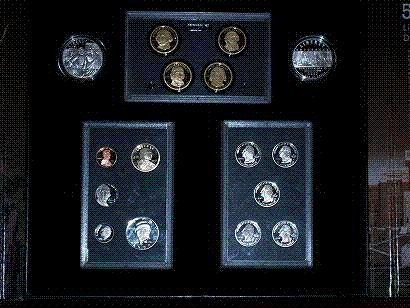 legacy.gif
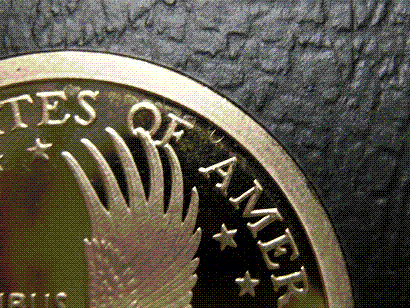 horseshoe.gif
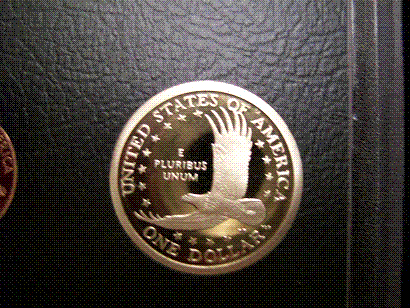 sac.gif


