Coin Community Family of Web Sites Join Thousands of Coin, Bullion, & Money Collectors
300,000 items to help build your collection! Join Thousands of Coin, Bullion, & Money Collectors Coin, Banknote and Medal Collectors's Online Mall Royal Estate Auctions - $1 Coin AuctionsVancouvers #1 Coin and Paper Money Dealer Royal Canadian Mint products, Canadian, Polish, American, and world coins and banknotes. Specializing in Modern Numismatics


Username:
Password:
Save Password
Forgot your Password?


This page may contain links that result in small commissions to keep this free site up and running.

Welcome Guest! Registering and/or logging in will remove the anchor (bottom) ads. It's Free!

Latest Set Up: Dual Monitors - Tether Capture - Axial Lighting -

To participate in the forum you must log in or register.
Author Previous TopicReplies: 9 / Views: 2,723Next Topic  
New Member

United States
5 Posts
 Posted 04/23/2016  1:36 pm Show Profile   Bookmark this topic Add TexasPilot to your friends list Get a Link to this Message Number of Subscribers

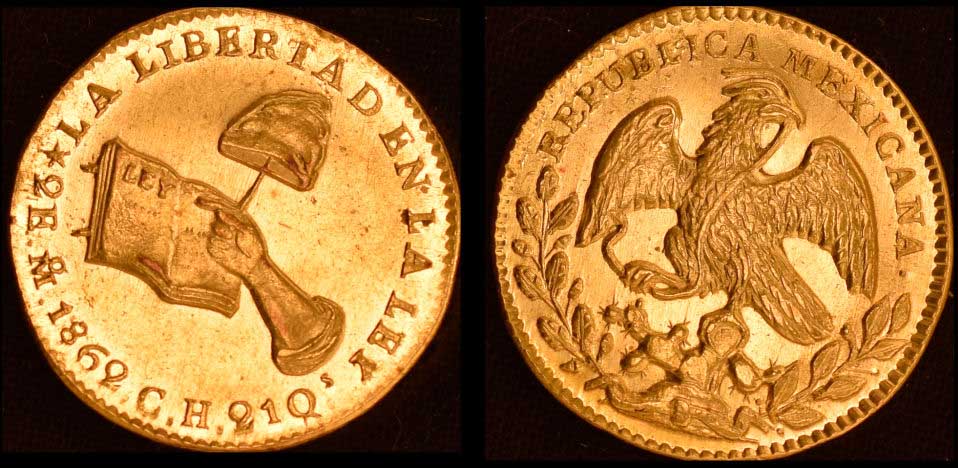
As an FYI and in the spirit of the wonderful sharing on this forum, here is an update on my entry into coin photography. (Let me know if this would be better posted elsewhere. I'll delete and re-post if needed).

Disclaimer: I am not nor ever have been a collector. My hobby/passion is photography. I'm helping a close friend who is a world-class collector. This has become an incredibly fun and educational experience and has sharpened my skills for other macro-photography.

Project: photograph a coin collection - over 2000 coins from the 1800s. 200 photographed thus far.

Setup:

Nikon D5500
Nikor Micro 40mm 1:2.8
Tether Capture using ControlMyNikon 5.2
Direct Capture Into Lightroom CC
Tripod

Settings (Generally):

RAW
1/100
f/5.6
ISO 100

Lighting:

Custom light box
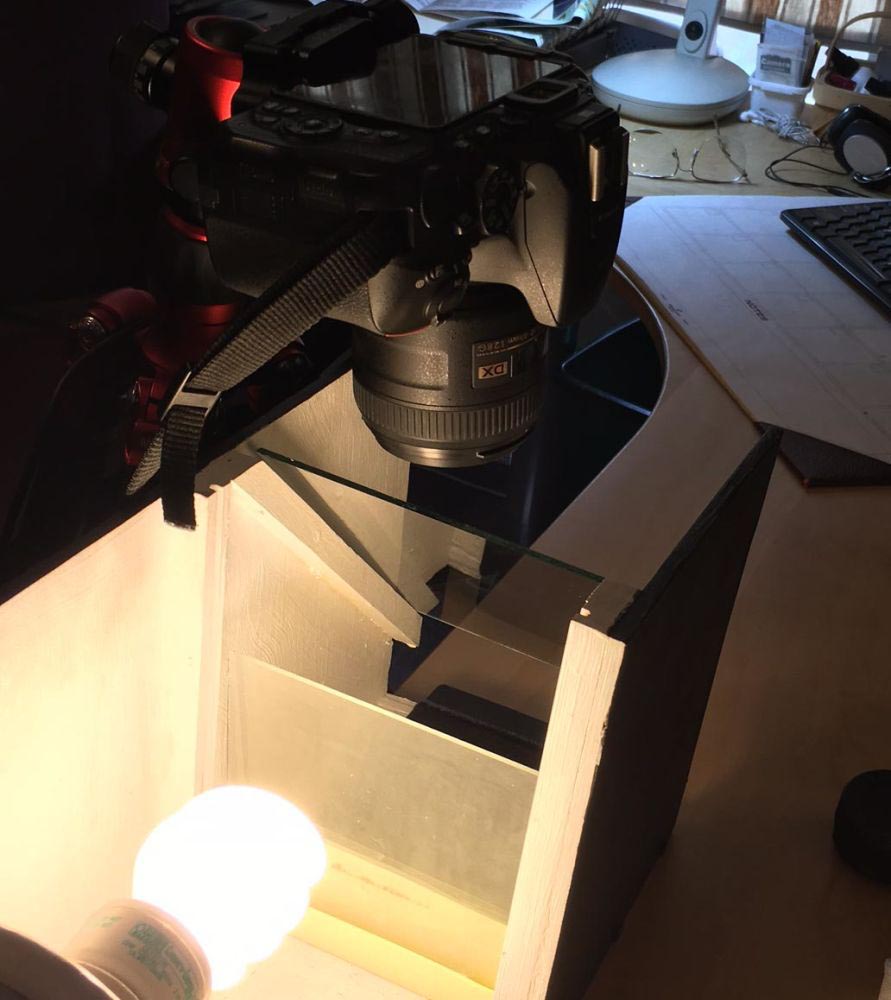
Axial Lighting using a glass plate at a 45 degree angle
13 Watt Florescent Bulb (we tried just about every other kind - OTT, LED, Incandescent, etc.)

Software:

Lightroom CC Subscription
ControlMyNikon 5.2
X-Rite ColorMunki Display Calibration (both monitors)
X-Rite Colorchecker Passport

Workflow:

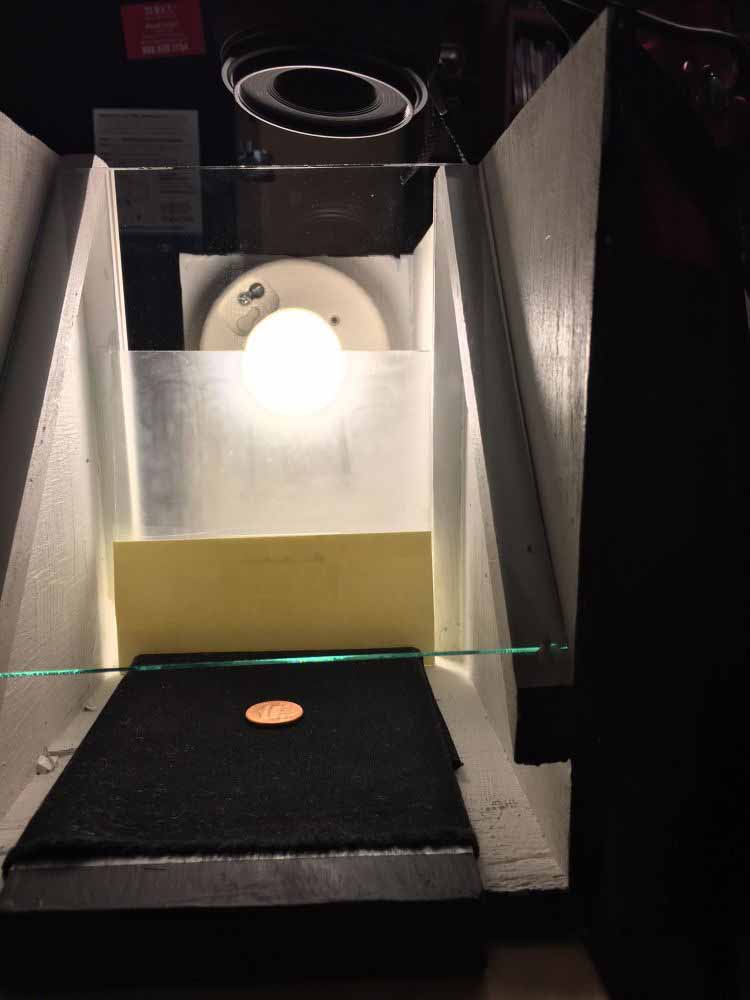
For me the key to getting really good photos has been the custom light box and the axial lighting. The camera shoots down through the glass. The light comes from the side at 90 degrees to the camera/lens to refract off of the glass plate down to the coin surface. Thus, the camera is shooting with/through the light

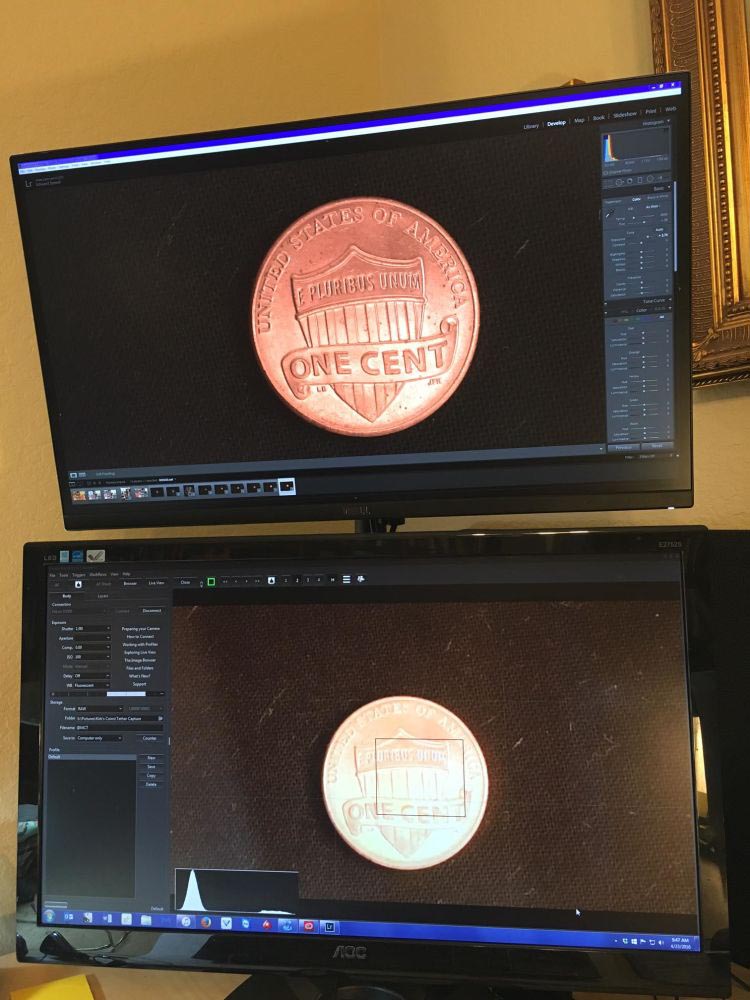
I use the ControlMyNikon software to tether capture each coin. It works with and integrates with so smoothly with Lightroom.

Each coin is placed (using cotton gloves) on the black velvet "tray." This is positioned in the light box. Because there is a grid overlay on the Live View screen of the ControlMyNikon (CMN) display, the person placing the coin can get each coin in exactly the same position every time by looking at the monitor displaying CMN. Each coin must then be turned over and captured again. When I see it is in position I click the capture button, the auto-focus engages and the captures are made. (This is much easier with two people.) White-balance and exposure are preset on CMN.

Prior to having the second monitor we had to minimize CMN and maximize Lightroom - back and forth and back and forth. We tried side-by-side windows but that was too small to see the detail we wanted to see to make sure we got the coin captured properly. With the second monitor (on top - 27" Dell U2715 Ultra Sharp LED) we can immediately see the coin in all of its beauty and detail. With seconds of clicking the button in CMN, the image appears in the top monitor in LR - and its new, proper file name. If all is good, we slip in the next coin and continue capturing.


The CMN software when in Live View has a feature that is absolutely necessary for quantity-level production and that is each capture can be given a new file name "on the fly." In our case each coin has a 4-digit inventory number. So when a coin comes up, I just type in xxxx followed by either an "O" for the Obverse (front) or "R" for the Reverse. Without this feature we would have to go back and re-label or keyword each image. Now the owner can simply search by his inventory number.

About the only post-processing we have to do is the cropping. That is fairly easy because each coin has been positioned using the Live View grid in the CMN software. Just do the first one and SYNC.

Any and all advice, feedback, suggestions or questions very much appreciated.

Latest-Set-Up:--Dual-Monitors---Tether-Capture---Axial-Lighting--

Latest-Set-Up:--Dual-Monitors---Tether-Capture---Axial-Lighting--

Latest-Set-Up:--Dual-Monitors---Tether-Capture---Axial-Lighting--

Latest-Set-Up:--Dual-Monitors---Tether-Capture---Axial-Lighting--
Pillar of the Community
austrokiwi's Avatar
2087 Posts
 Posted 04/23/2016  2:06 pm  Show Profile   Bookmark this reply Add austrokiwi to your friends list Get a Link to this Reply
nice set up
Pillar of the Community
pepactonius's Avatar
United States
9395 Posts
 Posted 04/23/2016  7:42 pm  Show Profile   Bookmark this reply Add pepactonius to your friends list Get a Link to this Reply
Looks like you're getting great results with that setup. How well does axial lighting work for slabbed coins?
Pillar of the Community
Learn More...
United States
4038 Posts
 Posted 04/23/2016  11:39 pm  Show Profile   Bookmark this reply Add rmpsrpms to your friends list Get a Link to this Reply
One thing that might improve your result is to put a black background behind the light box. It appears in the photos that the back of the box is open during capture. Any light coming from the back will reflect directly up to the lens, and cause reduced contrast. Now, you must be careful that whatever you put there actually is really black, since if it is reflective at all then light passing through the 45-deg glass can reflect off the back of the box, and cause the same problem with contrast. It may be that making the room really dark, so that the light doesn't reflect, may be a better solution. Experimentation is key.

Contact me for photographic equipment or visit my home page at:
http://macrocoins.com
Pillar of the Community
austrokiwi's Avatar
2087 Posts
 Posted 04/24/2016  02:08 am  Show Profile   Bookmark this reply Add austrokiwi to your friends list Get a Link to this Reply

Quote:
Now, you must be careful that whatever you put there actually is really black, since if it is reflective at all then light passing through the 45-deg glass can reflect off the back of the box, and cause the same problem with contrast. It may be that making the room really dark, so that the light doesn't reflect, may be a better solution.


I had that problem with my axial rig and also ghosting ( which all axial lighting rigs suffer to some degree( often its not noticeable)). I fixed it using Black out material from Edmund optics. I used the self adhesive material but Edmunds states the non-adhesive is better at absorbing light. Given the cost of your rig so far adding the non adhesive black out material is a minuscule price at US$20-$40.00

http://www.edmundoptics.com/lab-pro...terial/1502/
Edited by austrokiwi
04/24/2016 02:15 am
Pillar of the Community
Learn More...
United States
4038 Posts
 Posted 04/24/2016  09:11 am  Show Profile   Bookmark this reply Add rmpsrpms to your friends list Get a Link to this Reply
One way to keep light from reflecting back to the lens is to make a "black box" that goes onto the back of your light box. Instead of just putting absorbing material right at the back of the box, make another box that fits at the back of your light box and is lined with black material. Having the black material be a little crinkly, or maybe intentionally putting many creases in it, can also help since it can make any light that hits it reflect at an angle rather than straight back to the glass.
Contact me for photographic equipment or visit my home page at:
http://macrocoins.com
Pillar of the Community
austrokiwi's Avatar
2087 Posts
 Posted 04/24/2016  1:13 pm  Show Profile   Bookmark this reply Add austrokiwi to your friends list Get a Link to this Reply

Quote:
Having the black material be a little crinkly, or maybe intentionally putting many creases in it, can also help since it can make any light that hits it reflect at an angle rather than straight back to the glass
.

Before I used the edmund's black out material I used black toweling cloth, and now, thinking about it, I can't think of anything better than a black towel.
Edited by austrokiwi
04/24/2016 1:17 pm
New Member
United States
5 Posts
 Posted 04/25/2016  12:00 pm  Show Profile   Bookmark this reply Add TexasPilot to your friends list Get a Link to this Reply
Thanks for all of the terrific feedback and suggestions. And thank you for making this such a helpful and welcoming forum. I intend to put all of this to good use. As to question about axial lighting and slabs - it is terrible. Can't get it right.
Pillar of the Community
austrokiwi's Avatar
2087 Posts
 Posted 04/25/2016  1:44 pm  Show Profile   Bookmark this reply Add austrokiwi to your friends list Get a Link to this Reply
I am surprised at your experience with the slabs. I do think you should try out rmpsrmps's suggestion... it might help. If it doesn't then try putting some form of white diffuser over your light source( its not going to hurt to try.

Edit I just tried out my axial lighting rig on some slabs. I wasn't overly impressed but most of my collection is made up of Raw coins and the good slabs are in the bank. My rig has reasonable diffusion and a ( light abosrbing shroud after the beam splitter
Edited by austrokiwi
04/25/2016 2:03 pm
Pillar of the Community
pepactonius's Avatar
United States
9395 Posts
 Posted 04/26/2016  12:39 am  Show Profile   Bookmark this reply Add pepactonius to your friends list Get a Link to this Reply

Quote:
As to question about axial lighting and slabs - it is terrible. Can't get it right.


I've never had good luck with slabs and axial lighting or pseudo-axial lighting (bouncing light off the coin and using tilt/shift bellows), either. The light reflecting off the plastic produces lots of glare. I tried making the light source as even as possible, so I could subtract out the uniform glare in Photoshop. Unfortunately, the axial lighting seemed to accentuate all the tiny hairline scratches on the slab, so the end result was not good.

In a few cases, coins are crooked in the slab, so maybe you could tilt the slab so the coin is level. This way, the axial light might bounce off the coin but not directly off the slab?
  Previous TopicReplies: 9 / Views: 2,723Next Topic  

To participate in the forum you must log in or register.


Disclaimer: While a tremendous amount of effort goes into ensuring the accuracy of the information contained in this site, Coin Community assumes no liability for errors. Copyright 2005 - 2026 Coin Community Family- all rights reserved worldwide. Use of any images or content on this website without prior written permission of Coin Community or the original lender is strictly prohibited.
Contact Us  |  Advertise Here  |  Privacy Policy / Terms of Use

Coin Community Forum © 2005 - 2026 Coin Community Forums
It took 0.34 seconds to rattle this change. Forums