| Author |
 Replies: 81 / Views: 10,063 Replies: 81 / Views: 10,063 |
|
|
|
Pillar of the Community
2087 Posts |
Quote:
I think you misunderstood...... I won't be buying it. that's how I will be saving money Opps My bad I was the one who misunderstood. I note the conversation on the in Camera sharpening. I am very used to the Sony which doesn't have it, at least as far as I understand the menu functions. the olympus has it( I have just discovered) my real concern was with the quality of the 100% shots rocky posted I wan't that impressed with them and now that I know they were sharpened I suspect I would even be less impressed. My experience with mamiya 645 lenses on the sony has given me the impression that they tend not to resolve as well as lenses designed for smaller formats. My experience is limited to only 2 mamiya lenses. I know the 120mm has a good reputation but I am not convinced from the sharpened crops that Rocky posted that the 120 (For its price) would provide me with any advantage. I have a 35mm(the "N" version) wide angle, which also has a good reputation. Its resolution is less than ideal for a large MP FF sensor. I was only planning on using the 120 as a shift lens( for coins) .. and currently the Olympus OM 135mm bellows lens performs that function well (its image circle seems to approach that of a medium format lens). Edited by austrokiwi
05/05/2016 01:27 am
|
|
Pillar of the Community
 Canada
2784 Posts |
i agree completely austrokiwi.
|
|
Pillar of the Community
 United States
4051 Posts |
Quote:
I am very used to the Sony which doesn't have it, at least as far as I understand the menu functions You have probably just not found how to adjust it yet. For sure it is there. |
|
Pillar of the Community
2087 Posts |
Quote:
You have probably just not found how to adjust it yet. For sure it is there. Perhaps...I thought I knew the menus inside out...the only place I can think where in camera sharpening could be is in the image quality menu....Gives options of Raw, Raw and Jpeg, Then; Extra fine, fine and standard. The last three might be where in camera sharpening is occurring but in the manual it states it is related to the compression that is applied. Edit Found it hidden away in creative style menu( I never use it) default setting has sharpness set to zero on the Sony. Edited by austrokiwi
05/05/2016 2:14 pm
|
|
Pillar of the Community
Canada
2784 Posts |
first ray thank you for telling me. to change that setting here is the test done again with the mamiya 120mm. this lens is sharp without a doubt. the one thing it is not easy to focus. but when you get it in focus all I can say is wow. I used 1 ottlite no photo processing these are raw right out of the camera. the crop photo that is all I did was crop it 100%. so here we go 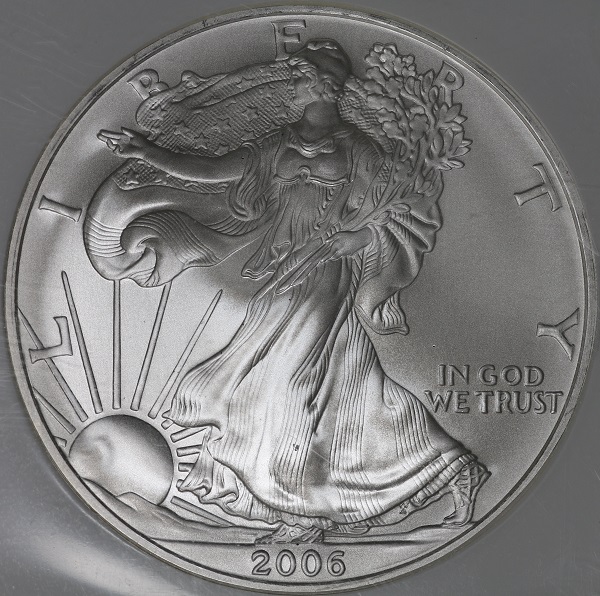 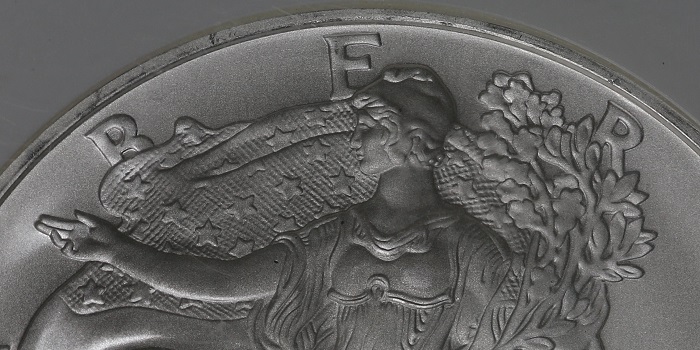 |
|
Pillar of the Community
Canada
2784 Posts |
i went back and checked the above photo. I mean the raw image. there is doubling on this coin. it is graded ms69 and certified. this lens is incredibly sharp. thank you ray. this lens is a keeper.
|
|
Pillar of the Community
Canada
2784 Posts |
austrokiwi this lens is sharp no doubt. but to focus it you have to be patient. just the slightest movement its out of fine focus. I can see doubling on this coin from the raw image. I did no editing on this coin image. wow is all I can say
|
|
Pillar of the Community
Canada
2784 Posts |
wanted to try a penny. no editing this is raw from the camera. a 100% crop this is a good lens. 1 single ottlite this is a great lens 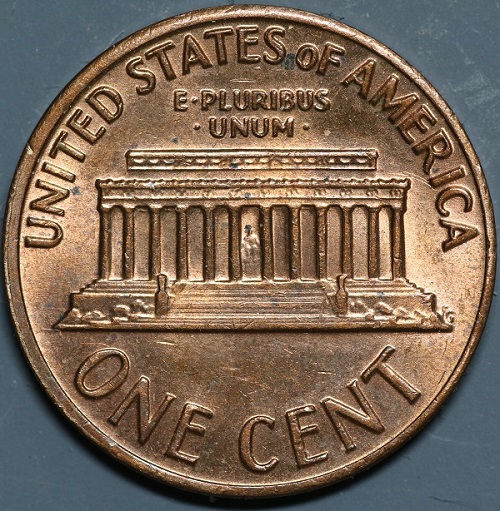 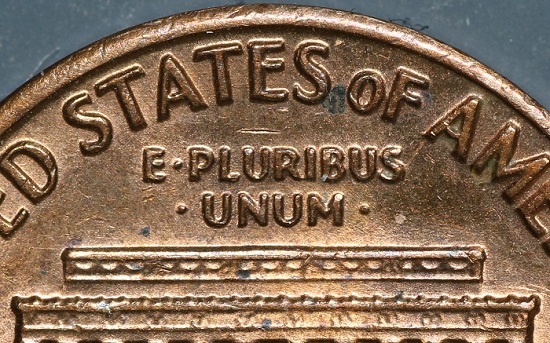 |
|
Pillar of the Community
2087 Posts |
My understanding of sharpness is that it is a balance of sharpness and contrast. It is possible to have a sharp lens with lower( but not too low) resolution and it is possible to have a high resolution lens that isn't sharp. For coins I mostly avoid using the lenses focusing Helicoid for fine focusing. I just adjust the Helicoid for the magnification I want and then use a focusing stage or the stack shot to focus ( with focus peaking on)
Edited by austrokiwi
05/05/2016 3:20 pm
|
|
Pillar of the Community
Canada
2784 Posts |
yes austrokiwi you are right. I need to start using my focus stacker. this is a good lens no doubt. have a great one.
|
|
Pillar of the Community
United States
4051 Posts |
Looks like a very nice lens rocky!
As far as sharpness/resolution is concerned, they are actually pretty similar. Sharpness is generally accepted as MTF50, ie it is where the contrast drops to 50% in the test pattern. Resolution is generally accepted as MTF10, where the contrast is only 10%, ie barely distinguishable. Because this is part of a continuum, I don't really see how you can have a lens that is sharp but low resolution, or not-sharp but high resolution. At least I've never run across such a beast with either characteristic.
|
|
Pillar of the Community
2087 Posts |
Perhaps my understanding of sharpness is due to a different interpretation of the definition. DXOmark defines sharpness as: Quote:
Sharpness is a subjective quality attribute of an image or a lens. Sharpness indicates the visually perceived quality of details of an image or details reproduced by a lens. It is associated with both resolution and contrast of reproduced details (within an image or by a lens). My comments re high resolution and poor sharpness are limited to a narrow band( if contrast is poor it will have the effect of reducing resolution), but within that band I believe the principle -that you can have a lens that resolves high frequencies but has such poor contrast(in relation to the lenses and cameras resolving ability) that its sharpness is reduced- does apply. I would also note it is my understanding that a lens can be sharp on a low megapixel sensor and be much less sharp on a high mp sensor. When I compare lens performance between different sensor formats ( MFT APSc and FF) I find the same lens produces different levels of perceived sharpness ( noting that sharpness is a subjective quality). The SK 45/4 produces sharp images on a FF sensor but it is not as good as other lenses in the same price range. Put the SK on a MFT sensor and the sharpness is markedly "improved" ( the SK 45/4 is optimized for small sensors despite its large image circle) Edited by austrokiwi
05/05/2016 11:36 pm
|
|
Pillar of the Community
United States
4051 Posts |
Quote:
My comments re high resolution and poor sharpness are limited to a narrow band( if contrast is poor it will have the effect of reducing resolution), but within that band I believe the principle -that you can have a lens that resolves high frequencies but has such poor contrast(in relation to the lenses and cameras resolving ability) that its sharpness is reduced- does apply. I think this is true only if external factors are limiting the lens, not the lens itself. If the basic contrast is bad due to excessive flare or light getting into the system, then sharpness will suffer, but resolution will also suffer. Quote:
I would also note it is my understanding that a lens can be sharp on a low megapixel sensor and be much less sharp on a high mp sensor. This is true but it is not a quality of the lens, but of the specific aperture settings. If the aperture is such that the lens is aperture limited on the high-MP sensor, but not aperture limited on the low-MP sensor, then you would get more "sharpness" when viewing the lens at 100% pixel level while projecting the image on the low-MP sensor. This is simply a difference in apparent magnification. The space of sharpness vs aperture and image format is a complex one that also involves how the image is being viewed. Sometimes it all seems a bit arcane. |
|
Pillar of the Community
2087 Posts |
Quote:
This is true but it is not a quality of the lens that doesn't always apply. Some lens just can't match the resolution ability of some sensors. I sold off a group of legacy lenses when I jumped from a 14mp camera to a 24mp camera. On the 14 they were great on the 24 the pictures looked as if the lenses were made from the glass from the bottoms of bottles. I don't think this comment of mine would apply to the mamiya. From Petapixel( covers what I am saying much better): Quote:
Perceptual Megapixels, P-MPix for short, can be described as the "equivalent" number of megapixels when using a particular lens. Just as lenses offer different equivalent focal lengths when paired with different sensor sizes, sensors can have different equivalent megapixels when paired with lenses of various optical qualities.
If you stick a horrible lens onto a high-megapixel camera, your photographs may pop out with a large megapixel "size", but the sharpness of the photo may be equivalent to the sharpness of a photo taken with a much smaller sensor and a "perfect" lens.
For example, say you're shooting with a 24-megapixel camera, but are using a lens rated at 18 P-MPix. This means that the resulting photos are equal in sharpness to an 18-megapixel camera shooting with a optically perfect lens. Edited by austrokiwi
05/06/2016 06:11 am
|
|
Pillar of the Community
United States
4051 Posts |
Quote:
On the 14 they were great on the 24 the pictures looked as if the lenses were made from the glass from the bottoms of bottles When you went from 14MP to 24MP, you actually only changed sensor resolution by 30% (14 * 1.3^2 = 24). If that small of a change made your images go from "great" to looking through "bottoms of bottles", then something else was going on. One way to tell what might be wrong is by simply downsizing the image to be the same resolution. Using the same lens, same subject, same lighting, same magnification, and same aperture, the same exact optical image will be presented to both sensors. The 24MP sensor will simply break that image down into slightly smaller pieces than the 14MP sensor does. If you downsize the 24MP image so it is the same final size as the 14MP image, they should be nearly identical.... I say "nearly" identical because there are a couple factors that can make the images look different. The downconversion process itself can introduce problems. I've often suggested that integer downsizing is best as it optimizes the downselect algorithm. So a tiny bit more blurriness may be present due to the non-integer downsize. The other factors are due to the cameras themselves. The downsized 14MP image from the 24MP camera "should" be a little sharper than the one from the 14MP camera since there should be more information in the 24MP image. But (for instance) if the 14MP sensor does not have an AA filter, and the 24MP camera does, then the 24MP camera may actually have less information due to the blurring of the AA filter. If the 14MP camera has EFSC/EFCS, but the 24MP camera does not, then there may be some shaking in the 24MP camera that causes blurring and reduced info. A similar issue would be created if the 24MP image was shot with the mirror cycling, while 14MP was done in Live View or is Mirrorless. Bottom line...if you shoot the same image with a 14MP camera and a 24MP camera, and then downsize the 24MP image to 14MP, the image taken with the 24MP camera "should" look sharper unless there was something wrong with the 24MP camera. |
| |
Replies: 81 / Views: 10,063 |






 First Page


 Posted 05/05/2016 09:43 am





