| Author |
 Replies: 10 / Views: 883 Replies: 10 / Views: 883 |
|
|
Pillar of the Community
United States
2403 Posts |
I'm not sure if this is aloud as it was already sent through. But I took new pics of my 1879s coin. Feel free to delete if necessary. The CCF consensus before was MS63+. The Obverse showed the PL complexion well before as it is less cloudy the reverse. New pics taken in my new light box show both side better. My question is does this make PL. There was mixed results before with more leaning toward not making it PL.  This Pic has not been edited, just trimmed and merged. Does it make PL? |
|
|
|
Pillar of the Community
United States
3210 Posts |
I say ms64 now and highly likely a proof like designation
|
|
Bedrock of the Community
 United States
18932 Posts |
going by your pictures the obverse has PL qualities but the reverse does not and both sides must meet the designation. MS64
|
|
Bedrock of the Community
United States
94367 Posts |
 - same position as last time. |
|
Pillar of the Community
 United States
2403 Posts |
Ok thanks guys. Was gonna send it in...but I think It will make a fine upgrade in my Dansco 7171 instead.
|
|
Bedrock of the Community
United States
12057 Posts |
Not fully PL, too many luster breaks and insufficient contrast on the reverse. In the old days, this would have gone into an ANACS PL Obverse holder quite nicely. Furthermore, your white balance is way off, or your photos are being over-lit, not sure which -- the detail captured is wonderful, but it makes it darn near impossible to determine luster. I took your photo and ran it through my fix macros in Photoshop to even it out, and the results probably look a bit better, I hope: 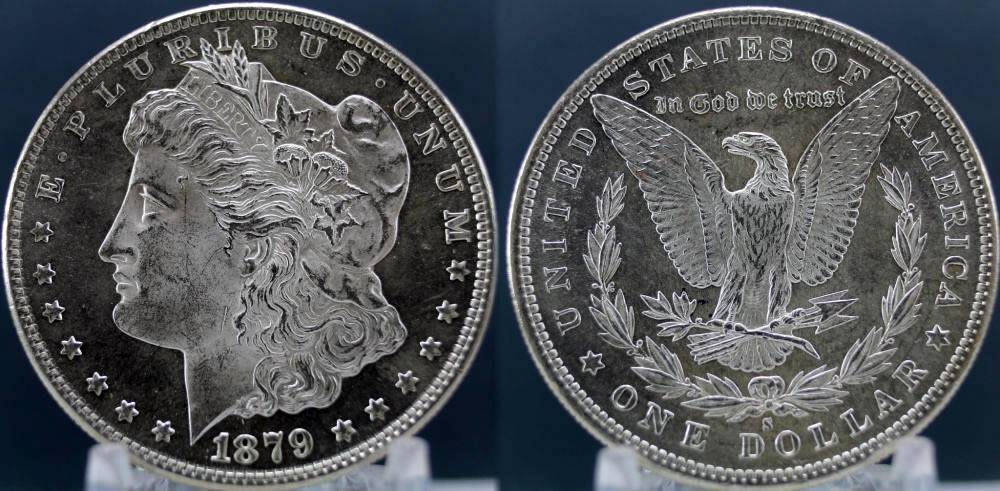 Member ANA - EAC - TNA - SSDC - CCT #890 "Most of the things worth doing in the world had been declared impossible before they were done." -- Louis D. Brandeis |
|
Pillar of the Community
United States
2403 Posts |
Quote:
your white balance is way off, or your photos are being over-lit, not sure which I probably have too much light. I have 2 ottlites (15watt) and a 5000k daylight light surrounding my light box. I use a Canon Eos T3 on close-up mode in Raw setting. The white balance is adjusted automatically. Cant figure out how to set it manually. Thanks for the edit. |
|
Bedrock of the Community
United States
12057 Posts |
White balance is easy on a T3, press the WB button (bottom arrow), then I would go with custom white balance option and set it to 5300k (ottlite kelvin spec, cool to full spectrum) -- You can try the range 4500 to 5500 to see what looks best. Fluorescent light setting on a T3 is 4500k which is a slight bit warmer. At 5300k it might look a bit too blue.
I use a Nikon 3200 & dual source illum. from a 5300k Ott-Lite and a 60W 3000k CFL. Takes quite a bit of playing with the WB to get things to not look either yellow or blue. Postproc is done on PC with Photoshop CS2. My avatar photo was taken with this setup.
Member ANA - EAC - TNA - SSDC - CCT #890 "Most of the things worth doing in the world had been declared impossible before they were done." -- Louis D. Brandeis Edited by paralyse
05/29/2016 9:14 pm
|
|
Pillar of the Community
United States
2403 Posts |
TY! I have been wanting those numbers. Understanding the WB numbers is what I've always had a problem with. Learned a lot the last couple of days about it.
Totally forgot to look at the buttons on the camera as I use my comp to take the pics.
Can I use this function while connected to my laptop? Display on camera blacks out when connected to computer..
|
|
Bedrock of the Community
United States
12057 Posts |
There should be a way to keep the OSD/LCD active while tethered but I'd have to go look it up, or you can just google T3 LCD on while connected to PC.
Member ANA - EAC - TNA - SSDC - CCT #890 "Most of the things worth doing in the world had been declared impossible before they were done." -- Louis D. Brandeis |
|
Pillar of the Community
United States
6370 Posts |
|
| |
Replies: 10 / Views: 883 |
|







 Posted 05/29/2016 3:50 pm





