Coin Community Family of Web Sites Join Thousands of Coin, Bullion, & Money Collectors
Coin, Banknote and Medal Collectors's Online Mall Vancouvers #1 Coin and Paper Money Dealer Royal Estate Auctions - $1 Coin AuctionsRoyal Canadian Mint products, Canadian, Polish, American, and world coins and banknotes. Join Thousands of Coin, Bullion, & Money Collectors 300,000 items to help build your collection! Specializing in Modern Numismatics


Username:
Password:
Save Password
Forgot your Password?


This page may contain links that result in small commissions to keep this free site up and running.

Welcome Guest! Registering and/or logging in will remove the anchor (bottom) ads. It's Free!

Contax Carl Zeiss 645 Apo-Makro-Planar 120mm F4 T* On A Canon EOS 70-D

To participate in the forum you must log in or register.
Author Previous TopicReplies: 21 / Views: 5,954Next Topic
Page: of 2
Pillar of the Community

Canada
2784 Posts
 Posted 06/04/2016  7:18 pm Show Profile   Bookmark this topic Add rocky to your friends list Get a Link to this Message Number of Subscribers
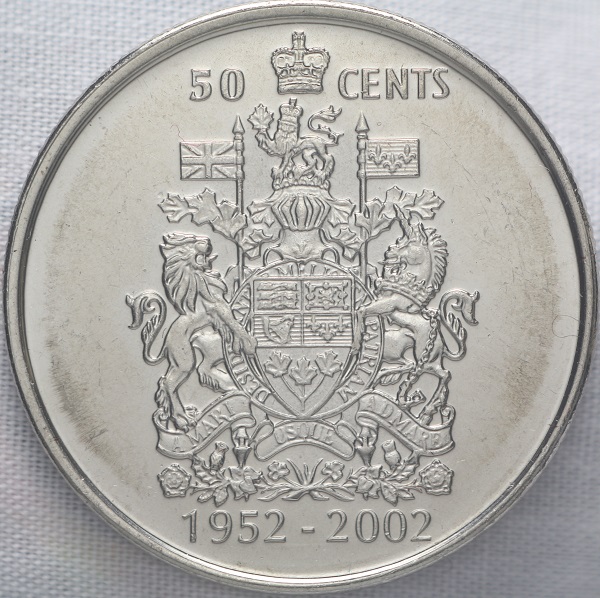
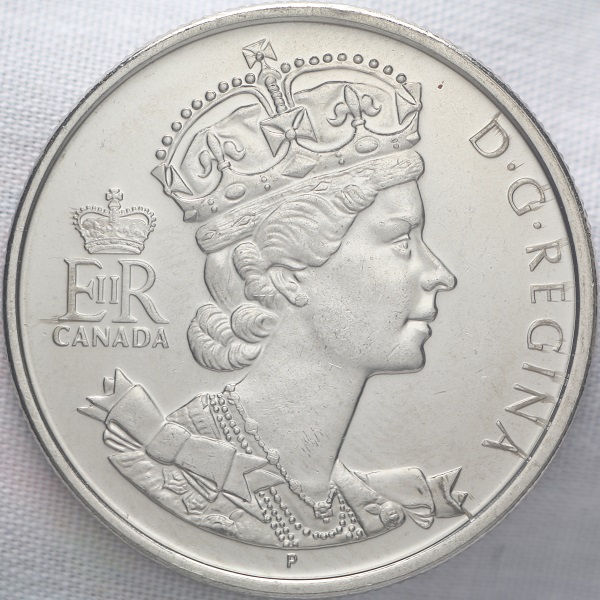
i had read a lot on this lens. so I decided to purchase one. it has a electronic aperture. so these images are taken wide open at F4. this lens is a very big animal. I did no processing. look at the queen see the die trails. this lens is very good. I can see I need to cut the light. but this is raw from the camera. I want to keep this coin bright for the die trails. see the doubling on the queens chin. plus there is doubling around the rim of this coin.

Contax-Carl-Zeiss-645-Apo-Makro-Planar-120mm-F4-T*-On-A-Canon-EOS-70-D

Contax-Carl-Zeiss-645-Apo-Makro-Planar-120mm-F4-T*-On-A-Canon-EOS-70-D
New Member
Greece
45 Posts
 Posted 06/05/2016  04:00 am  Show Profile   Bookmark this reply Add Nickos to your friends list Get a Link to this Reply
Very nice detail indeed! I wonder if you have tried Canon EF 100mm F2.8 L IS USM.

http://www.dpreview.com/products/co...0_2p8_is_usm

This a comparison with the newer Carl Zeiss lens.
Pillar of the Community
MontCollector's Avatar
United States
2403 Posts
 Posted 06/05/2016  04:13 am  Show Profile   Bookmark this reply Add MontCollector to your friends list Get a Link to this Reply
Very nice pictures. Nice even tone throughout and great detail.


Quote:
I wonder if you have tried Canon EF 100mm F2.8 L IS USM.


If I could afford it this would be my next lens purchase. For now my 55mm with tube extenders will have to do.
Valued Member
United States
441 Posts
 Posted 06/05/2016  11:26 pm  Show Profile   Bookmark this reply Add andywoj00 to your friends list Get a Link to this Reply
Do you guys mainly use prime lenses for your coin photography or do you also venture into the enlarging lens arena as well? IYO, which setup is better or not?
Pillar of the Community
austrokiwi's Avatar
2087 Posts
 Posted 06/06/2016  12:43 am  Show Profile   Bookmark this reply Add austrokiwi to your friends list Get a Link to this Reply

Quote:
Do you guys mainly use prime lenses for your coin photography or do you also venture into the enlarging lens arena as well? IYO, which setup is better or not?


I understand that a Prime lens is a lens of fixed focal length. A non-prime lens is a zoom lens. Most Enlarger lenses are prime lenses but there are some notable exceptions such as the Schnieder Kreuznach Betavaron. I tried the betavaron out. It was just too big and heavy and extremely hard to use with marginal results.

I think you were actually meaning Native lenses ( a Lens designed specifically for the camera you use) opposed to an adapted lens.

A native lens most often has the major advantage of Auto focus ( although for DSLRs its a good idea to fine tune the AF) At the same time the problem with Native lenses is price, and the magnification range. Also these days a native lens has a known performance profile that the camera can read and adjust for, making for much better shots due to in camera processing, or more streamlined processing in Light room etc.

Price: A high performing native macro lens costs anywhere from $600 - to a few thousand( depending on the camera system). A decent enlarger lens costing US$300-$400 will match or even exceed the performance of those top end native macros. Even a cheaper Enlarger lens will out perform many mid-price range macro lenses. Enlarger lenses are designed to have a flat field, so they can perform very well with coins.


Magnification: A native lens most often has a maximum magnification of 1-1 ( life sized). To get high magnifications you have to resort to extension tubes and quite often the native lenses performance drops with extension tubes.

All that said, I have three native macro lenses and they are very enjoyable to use with coins. Simple straight forward and having AF is really nice. One of the native lenses coupled to the camera will focus stack any where between 2 and 999 pictures( Olympus 60mm F 2.8 macro on the Olympus OMD-EM10II) with that lens-camera combination one does not need to go and buy a stacking system( another US$500+)

On the other hands for some coins and lighting set ups I prefer my enlarger lenses.

Now as far as this thread goes and some others I have to say that apart from appreciating the nice pictures I come away no wiser. Perhaps its lack of experience on my part but I can not tell what the strengths and weaknesses of the lenses are. The issue for me is my monitor and its calibration. I have no idea whether my view of the pictures posted is the same as Rocky's or any other forum members view. My point being that there is no reference point for me to compare to.

I enjoy seeing Rocky's posts as he has been showing lenses that I have been very tempted to buy. The problem I have is that I have no real means, from threads like this one, to judge whether the lens is better or worse than the lenses I already have. To explain further. Last week I had some posters printed they had been taken with the sony A7rII. It was phenomenal to see the printed results... what I had seen on screen was no where as good as the printed result.In the print I could see detail that my monitor only hinted at.

I, as I am sure a few others are, am waiting in anticipation for Rays 80mm shoot out. I won't know if I what I see on my screen is what Ray sees on his, but as he will be providing a consistent approach and clear comparison shots I will have a good understanding of how the lenses might perform on my system.

A suggestion for any one posting sample shots it would be really helpful if you also included 100 % crops from your unedited photo.

Edited by austrokiwi
06/06/2016 12:56 am
Pillar of the Community
MontCollector's Avatar
United States
2403 Posts
 Posted 06/06/2016  02:09 am  Show Profile   Bookmark this reply Add MontCollector to your friends list Get a Link to this Reply

Quote:
Do you guys mainly use prime lenses for your coin photography or do you also venture into the enlarging lens arena as well?


My setup is pretty simple. For coins I simply use a Canon EOS T3 with the 18-55 MM lens that came included with camera. This lens has AF and macro capabilities

I use "P"(programmable) mode. This allows my to adjust white balance for any indoor lighting and the ISO speed. I also had to purchase a set of tube extenders($15-$30) to get really close shots. This works well for coins from dollar size down to LMC's and dimes. For grading and showing errors/VAMS as well.

A tripod or something to hold camera still is a must.

Software wise the Canon utilities software is very useful for its remote shooting, and I use GIMP for any processing needed. This is a free downloadable Photo editing software that is supposed to be similar to Adobe Photoshop.

Lighting is key when shooting cons. I have found that Ottlites work very well for silver coins. I use one Ottlite and one daylight CFL light rated at 5000k.

Since getting the lighting under control I have had no complaints on any of my coin shots.

I have learned a lot from Rocky here on the CCF forum and have read a lot of good info from him. Always look forward to see what he comes up with next.

Hope this help ya out.
Pillar of the Community
Canada
2784 Posts
 Posted 06/06/2016  10:23 am  Show Profile   Bookmark this reply Add rocky to your friends list Get a Link to this Reply
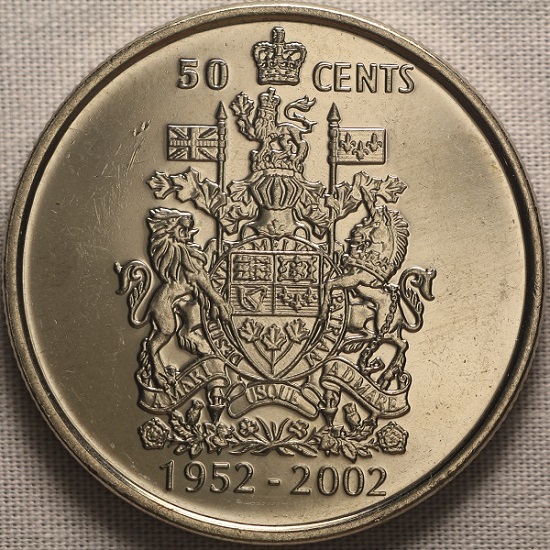
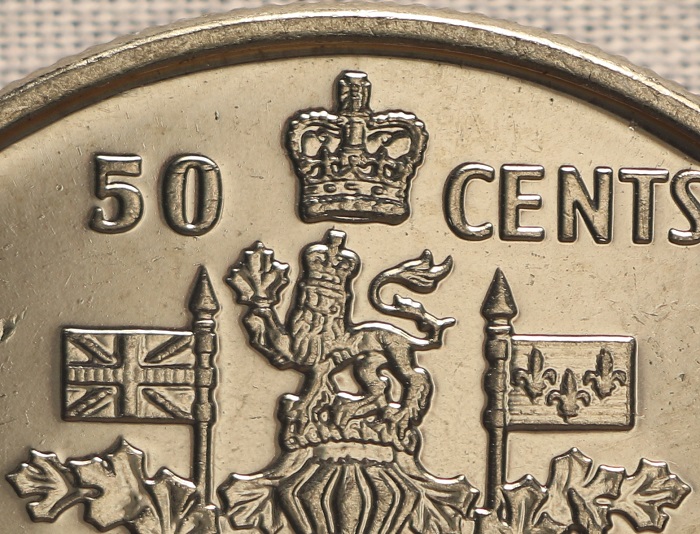
thought I would try this again. here is a different Canadian fifty cent coin. plus a crop of the photo. no editing this lens is a great performer. thank you all for your comments. this is where we all learn. I have learned so much form every one here. thank you all I really mean all of you

Contax-Carl-Zeiss-645-Apo-Makro-Planar-120mm-F4-T*-On-A-Canon-EOS-70-D

Contax-Carl-Zeiss-645-Apo-Makro-Planar-120mm-F4-T*-On-A-Canon-EOS-70-D
Pillar of the Community
austrokiwi's Avatar
2087 Posts
 Posted 06/06/2016  11:23 am  Show Profile   Bookmark this reply Add austrokiwi to your friends list Get a Link to this Reply
thanks for the 100% crop, I can now see whats going on. I knew the lens was a great performer. However at the price (a decent part of US$2000.00) I would have to do a lot more research before I would pull the trigger on one. I suspect I would purchase the PN 95mm long before I would get the zeiss 120mm

I have come to appreciate rmpsrmps's lens comparisons, and those of mark Goodman's ( coin imaging web site) We can get a good understanding of how to get the best performing optics for our budgets with those comparisons.

My rig with the A7rII does best with 80mm through to 135mm Lenses( I had an amusing fail with a 210mm a long time ago) and the hasselblad 140mm and Zeiss 120mm have been very tempting, but I do have coins to buy

I have also wondered if was possible to adapt the zeiss and the hasselblad so you can use the shutter that is inside the lens
Edited by austrokiwi
06/06/2016 11:27 am
Pillar of the Community
Canada
2784 Posts
 Posted 06/06/2016  9:10 pm  Show Profile   Bookmark this reply Add rocky to your friends list Get a Link to this Reply
yes austrokiwi you can adapted. the lens to work the electric shutter. but you has to do a continuity test first. there is a video on youtube. a young Chinese gentleman walks you right through it step by step. austrokiwi I agree there is no doubt. the sony is a great camera. have a great one
Pillar of the Community
austrokiwi's Avatar
2087 Posts
 Posted 06/06/2016  11:58 pm  Show Profile   Bookmark this reply Add austrokiwi to your friends list Get a Link to this Reply
I shoould have clarified my comment further: for a full frame sensor ( not necessarily my particular choice of camera) on my rig 80mm through 135mm seems to work best. For my micro four thirds camera 40mm to 80 mm becomes the optimum focal length range
Edited by austrokiwi
06/07/2016 12:04 am
Pillar of the Community
MontCollector's Avatar
United States
2403 Posts
 Posted 06/07/2016  12:34 am  Show Profile   Bookmark this reply Add MontCollector to your friends list Get a Link to this Reply
Your close-ups look awesome Rocky!! What detail and well focused.


Quote:
on my rig 80mm through 135mm seems to work best


What is the minimum focus distance for you 80mm-135mm if you don't mind me asking.

I have a 75mm-200mm that has a 3ft minimum focus distance, but also has Macro capabilities. I know I would need to throw my tube extenders on it to try it for anything coin related. Haven't tried it yet though.
Pillar of the Community
austrokiwi's Avatar
2087 Posts
 Posted 06/07/2016  01:08 am  Show Profile   Bookmark this reply Add austrokiwi to your friends list Get a Link to this Reply
olympus OM 80mm macro bellows lens at:
0.6X subject to sensor distance = 316mm ( working distance 160mm)
1.4X subject to sensor 256 mm ( working distance 90mm)

135mm bellows lens
0.42X subject to sensor 490mm
0.8X subject to sensor 480mm (169mm working distance)


Note figures are rough
Valued Member
United States
67 Posts
 Posted 06/07/2016  2:23 pm  Show Profile   Bookmark this reply Add Dave M to your friends list Get a Link to this Reply

Quote:
Now as far as this thread goes and some others I have to say that apart from appreciating the nice pictures I come away no wiser. Perhaps its lack of experience on my part but I can not tell what the strengths and weaknesses of the lenses are. The issue for me is my monitor and its calibration. I have no idea whether my view of the pictures posted is the same as Rocky's or any other forum members view. My point being that there is no reference point for me to compare to.


I feel your pain; I have no idea whether someone posting a picture that looks "off" on my monitor has calibrated theirs or not, or whether the photo has a color balance problem.

For those that haven't calibrated their monitors, if you continue to get comments like "the color seems wrong" when you think you've accurately set your white balance and to you the photo looks good, it could very well be that your monitor is not adjusted right, and you are the only one seeing the picture as you think it looks. I've had good luck with an older calibrator, but it looks like the current vendors of such tools are x-rite and spyder.
Pillar of the Community
MontCollector's Avatar
United States
2403 Posts
 Posted 06/07/2016  3:45 pm  Show Profile   Bookmark this reply Add MontCollector to your friends list Get a Link to this Reply

Quote:
I have no idea whether someone posting a picture that looks "off" on my monitor has calibrated theirs or not


This is the first I have ever heard of calibrating a monitor.

I thought white balance changed depending on light source. The white balance in a room changes from min to min unless sealed with no windows and fixed light source.

Do these things monitor your monitors white balance and make the little adjustments that are constantly needed?

Valued Member
United States
67 Posts
 Posted 06/07/2016  4:29 pm  Show Profile   Bookmark this reply Add Dave M to your friends list Get a Link to this Reply
White balance and calibrating monitors are two different things. You have the definition of white balance correct. All monitors don't display color the same, just by the nature of the different products. Monitors also change colors as they age. So calibrating one is the process of (re)setting its RGB such that it is as accurate as possible. It's done with a product that "sees" your screen, and software that displays different colors. So it can run through a series of "I'm displaying green, but it looks a bit yellow, so I'm going to change the color map to make that look more green" tests.
Pillar of the Community
austrokiwi's Avatar
2087 Posts
 Posted 06/07/2016  4:29 pm  Show Profile   Bookmark this reply Add austrokiwi to your friends list Get a Link to this Reply
I have calibrated mine...but am still not overly happy. Look under display settings in your computer menu. Computer monitors are some what like cameras they need to be told which color is which.

I am fast approaching the point of buying a 4k monitor

Edit: I am much happier reverted to a spare large screen VGA monitor. Color rendition is heaps better. To do it I had to buy a HMDI - VGA adapter
Edited by austrokiwi
06/08/2016 08:51 am
  Previous TopicReplies: 21 / Views: 5,954Next Topic
Page: of 2

To participate in the forum you must log in or register.


Disclaimer: While a tremendous amount of effort goes into ensuring the accuracy of the information contained in this site, Coin Community assumes no liability for errors. Copyright 2005 - 2026 Coin Community Family- all rights reserved worldwide. Use of any images or content on this website without prior written permission of Coin Community or the original lender is strictly prohibited.
Contact Us  |  Advertise Here  |  Privacy Policy / Terms of Use

Coin Community Forum © 2005 - 2026 Coin Community Forums
It took 0.39 seconds to rattle this change. Forums