| Author |
 Replies: 11 / Views: 1,847 Replies: 11 / Views: 1,847 |
|
|
Pillar of the Community
United States
1599 Posts |
Call me crazy, blind or whatever, but something is going on with live view that I cant figure out. After I get my coin in focus, magnify it and then do a fine focus, when I turn the magnification off, the coin on the screen immediately rotates ccw a slight bit. I am being particularly careful not to be moving the field while I am doing this, but the coin moves every time on the screen. The first pic is the coin after I remove the magnification without re-straightening it and the second is after I fix the rotation. Neither pic has had any post processing. Any ideas on what is going on? 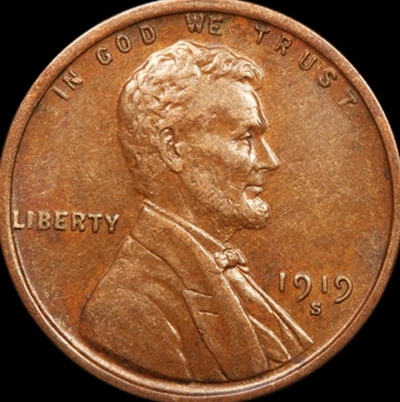  |
|
|
|
Pillar of the Community
United States
9395 Posts |
Is this with a Canon DSLR? (which would not have any anti-shake movement capability in the sensor)
|
|
Pillar of the Community
 United States
1599 Posts |
Yep, Canon T1i. I have gone as far as to remove the mouse completely off my desk before I remove the magnification. Still does the same thing. Go figure.....
|
|
Pillar of the Community
2087 Posts |
Just a very wild guess. Is it an issue with the software and Canons APSc size( canon has a smaller APSc sensor than every other manufacturer; Canon = 1.6 every one else = 1.5(crop factor))? For this wild guess to be near correct you would have to be using non-canon software for tethering.
|
|
Pillar of the Community
United States
1599 Posts |
I'm using the eos that came with my T1i and a canon 100mm macro lens.
|
|
Pillar of the Community
United States
9395 Posts |
Quote:
I'm using the eos that came with my T1i and a canon 100mm macro lens. Is this the new version of the 100mm lens with image stabilization, or the older one? Edited by pepactonius
10/24/2016 11:24 pm
|
|
Pillar of the Community
United States
1599 Posts |
|
|
Pillar of the Community
2087 Posts |
I am wondering if there is an issue with the focusing motor of the lens and/or the focusing helicoid. It might be possible that you are experiencing a lens fault that needs repair
|
|
Pillar of the Community
 United States
4051 Posts |
How are you doing the fine-focus? I assume you're doing this manually, correct? If you turn the focus ring on the lens, it's very possible the whole camera is rotating just a little. Note that if just the lens rotates, this won't do anything to the image. Only rotating the camera a little will cause the coin to shift vs the sensor, and that will make it appear to have rotated.
Contact me for photographic equipment or visit my home page at: http://macrocoins.com |
|
Pillar of the Community
United States
1599 Posts |
Manual focus. Fine focus using the magnification in the eos and the Z stage. Immediately after closing the magnification, I can see the coin rotate slightly ccw. As mentioned earlier, I have even taken my mouse completely off my workspace before closing the magnification to avoid moving the field. Still rotated.
|
|
Pillar of the Community
United States
1027 Posts |
The only thing that I can offer is to make sure that you have the Continuous AF box in Live View unchecked. If that box is checked, the camera might be doing a slight correction, basically undoing the fine manual focus that you just did and giving a slight push to the camera.
|
|
Pillar of the Community
United States
1599 Posts |
When I first pull up the eos, af is checked but when I hit live view it automatically changes to manual. What I did change was the manual/auto focus on the lens front auto to manual. This seems to have fixed the problem. I had never considered that change before. I have pretty good equipment but have had horrible luck with making decent pics. This is just another example. As rmpsrmps can attest to, the problem was with the operator and not the equipment (he recently helped me a lot).
|
| |
Replies: 11 / Views: 1,847 |
|






 Posted 10/24/2016 5:07 pm





