| Author |
 Replies: 23 / Views: 5,067 Replies: 23 / Views: 5,067 |
|
Pillar of the Community
United States
2858 Posts |
Thoughts on this?  |
|
|
|
Bedrock of the Community
United States
12477 Posts |
I don't have anything to add other than I like all of your images!  I've thought that if I need awesome pics of a coin, I know who to send them to.  In Memory of Crazyb0 12-26-1951 to 7-27-2020
In Memory of Tootallious 3-31-1964 to 4-15-2020
In Memory of T-BOP 10-12-1949 to 1-19-2024
|
|
Pillar of the Community
United States
9395 Posts |
Fantastic photo -- you really caught the luster. The only suggestion I can make is to be sure the "In God We Trust" motto in the reverse is level.
|
|
Pillar of the Community
United States
1300 Posts |
|
|
Pillar of the Community
United States
3506 Posts |
Well done, I really like your images.
|
|
Pillar of the Community
 United States
4051 Posts |
Very nice images!
I'll second pepactonius' input on leveling the IGWT on reverse, but also add that the obverse is not quite level. The reference on the obverse is the date, which should be centered at the bottom and level. If you turn on grids when you shoot, the center grid line should split the date and pass through the right wheat ear just to the right of the I in PLURIBUS.
And finally, it's disconcerting to see images which have been saved as png files. Most photo editors won't open them. If possible, saving as a jpg makes it possible to share useful editing techniques.
|
|
Pillar of the Community
 United States
2858 Posts |
Thank you all! I noticed the IGWT was a bit tilted while editing, but never went back to shoot the coin again. (I'd have to pull it back out and set everything up again.. I'm lazy ) I'll also be sure to use jpg, rather than png. |
|
Valued Member
United States
441 Posts |
WheatBack.....if you haven't already done so, would you please share some pics, specs and positioning on your lighting setup? Additionally, what are you doing in post to finalize those fantastic Morgan pics? Thanks in advance.
|
|
Pillar of the Community
United States
2858 Posts |
Quote:
WheatBack.....if you haven't already done so, would you please share some pics, specs and positioning on your lighting setup? Additionally, what are you doing in post to finalize those fantastic Morgan pics? Thanks in advance. I'm sorry I am just now seeing this. I will try to get some photos of the setup and get back to you soon. |
|
Valued Member
United States
103 Posts |
Very impressive imaging, looking forward to seeing more working examples.
|
|
Pillar of the Community
United States
1300 Posts |
|
|
Moderator
United States
54297 Posts |
You don't have to re-shoot it, just rotate the images with your editing software. 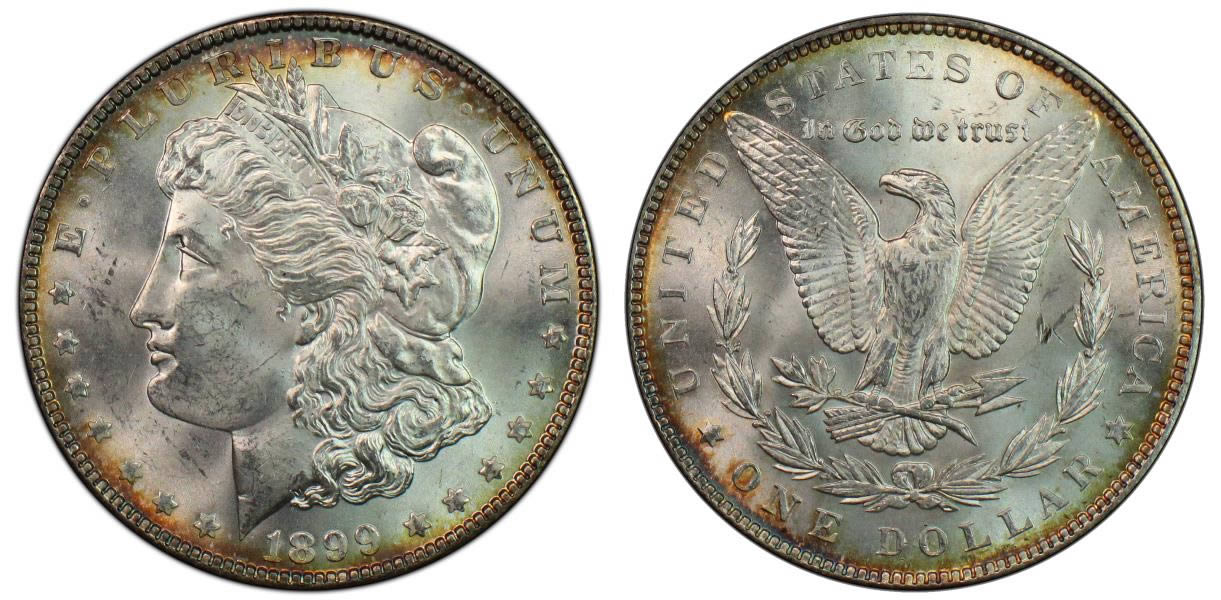 |
|
Pillar of the Community
United States
1300 Posts |
Quote:
I'm sorry I am just now seeing this. I will try to get some photos of the setup and get back to you soon. WheatBack, I bet you forgot about this. Sorry if I am rushing the response. Ham |
|
Valued Member
United States
103 Posts |
How did you get the bright white background? Are you imaging on a light table?
|
|
Pillar of the Community
United States
2858 Posts |
I'll try to remember to get a photo of my setup and get a screenshot of my camera settings next go around. As for this: Quote:
Additionally, what are you doing in post to finalize those fantastic Morgan pics? Thanks in advance. Quote:
How did you get the bright white background? Are you imaging on a light table? I use Photoshop to finalize my photos. I crop each coin using a circular crop. I will then adjust the sharpness and then the contrast (if necessary). I then take the obverse and reverse and put them onto a white background with a black outer glow to sorta bring it all together. That's really all I do. It's all in the lighting and your camera's settings. No fancy Photoshop tricks here. For the photo below I only adjusted the sharpness. No other post-processing was done -- It's all a product of the lighting.  |
|
Pillar of the Community
United States
1300 Posts |
Excellent, just outstanding.  Looking forward to pics of your setup and screen shot of settings. Ham |
| |
Replies: 23 / Views: 5,067 |







 Posted 07/07/2017 05:02 am





