| Author |
 Replies: 15 / Views: 1,237 Replies: 15 / Views: 1,237 |
|
|
Bedrock of the Community
United States
12477 Posts |
A little while back, I lost a lot of my original pics that were on a phone that crapped out. It is fortunate that all of my previous uploads are accessible, including many I lost on my end.
I ran into a minor problem recently when trying to find an old topic with a title I couldn't remember. I found my pics on CCF, but when searching through "Unarchived Topics", I couldn't find anything in the date range. I did eventually find it although it had been bumped a lot higher on the list because of a resurrection of sorts and the list is sorted by last reply.
Question:
Is there any way to find a topic using only the image that was uploaded to it?
In Memory of Crazyb0 12-26-1951 to 7-27-2020
In Memory of Tootallious 3-31-1964 to 4-15-2020
In Memory of T-BOP 10-12-1949 to 1-19-2024
|
|
|
|
Rest in Peace
10197 Posts |
Have you tried previous uploaded pix and correlating dates? Any pix you've posted is on that list. How I was able to resurrect mine after comp crashed.
Also it was emphatically put to me to use that feature(below) in stead of posting another of the same pic, which I do a lot. Each pic takes up server space, multiples add up. Just find it on page of previous, cut and paste in this dialog box, works great!
Edited by Crazyb0
12/14/2017 12:14 am
|
|
Forum Dad
 United States
24228 Posts |
Did you go a forum search for the filename?
|
|
Bedrock of the Community
 United States
12477 Posts |
I tried forum searches using all reasonable parts of the filename (and removing what may be unnecessary) and get no results. Quote:
Have you tried previous uploaded pix and correlating dates? That's what I tried first but the example topic I mentioned was not able to be correlated because it was bumped many months after I uploaded the pic and I can't sort the "Unarchived Topics" list by origination date. In Memory of Crazyb0 12-26-1951 to 7-27-2020
In Memory of Tootallious 3-31-1964 to 4-15-2020
In Memory of T-BOP 10-12-1949 to 1-19-2024
Edited by spru
12/15/2017 01:27 am
|
|
Moderator
United States
195559 Posts |
Quote:
I tried forum searches using all reasonable parts of the filename (and removing what may be unnecessary) and get no results. You need to use the full filename, including extension. |
|
Forum Dad
United States
24228 Posts |
Use the google search on the search page. Use the entire filename including the extension and put it in quotes like so... "imagename.jpg"
|
|
Bedrock of the Community
United States
12477 Posts |
Okay, I did some tests and it doesn't return any results. This is using the most recent image I uploaded.
I tried these using the CCF search function:
[\img]uploaded/spru/20171218_yoda-you-must-unlearn-ccfopt.jpg[/img]" ([img] edited to show text here)
uploaded/spru/20171218_yoda-you-must-unlearn-ccfopt.jpg
"uploaded/spru/20171218_yoda-you-must-unlearn-ccfopt.jpg"
spruett001/20171218_yoda-you-must-unlearn-ccfopt.jpg
"spruett001/20171218_yoda-you-must-unlearn-ccfopt.jpg"
20171218_yoda-you-must-unlearn-ccfopt.jpg
"20171218_yoda-you-must-unlearn-ccfopt.jpg"
That's as far as I can go without removing part of the original filename and/or extension. If you can tell me exactly how to use that example in a search to bring up the topic, it would be greatly appreciated! It's not a big deal, but made me curious.
In Memory of Crazyb0 12-26-1951 to 7-27-2020
In Memory of Tootallious 3-31-1964 to 4-15-2020
In Memory of T-BOP 10-12-1949 to 1-19-2024
|
|
Moderator
United States
14463 Posts |
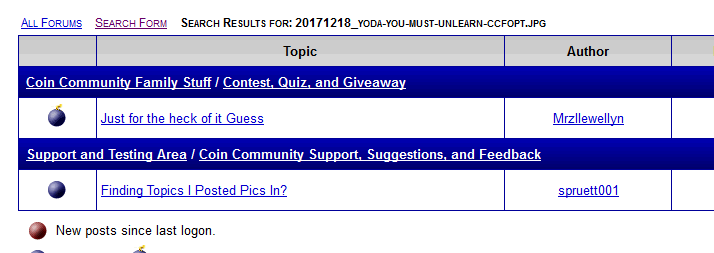
I just tried using the standard CCF search of the file name 20171218_yoda-you-must-unlearn-ccfopt.jpg 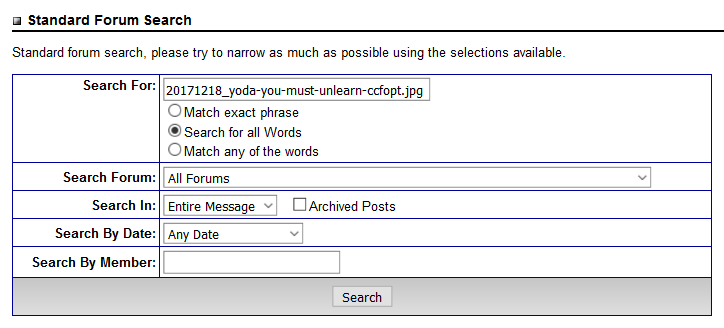 and it turned up two threads, this thread and "Just for the heck of it Guess" thread  should it be show more than two? |
|
Forum Dad
United States
24228 Posts |
|
|
Bedrock of the Community
United States
12477 Posts |
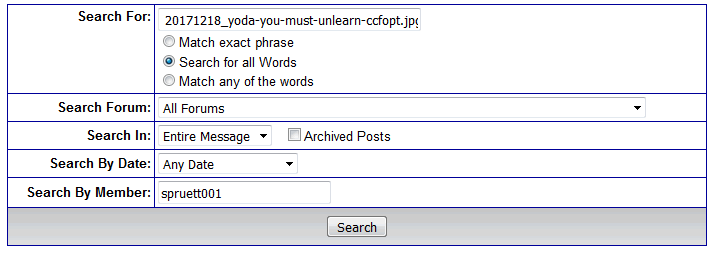
Thanks for the help, Bobby and Fuzzy!  It works, and seems I was using the wrong "Search" tool. I was using this:  When I should have been using this button:  This certainly helps me and I've tested it with an old post that I couldn't easily find by title before, but found it now with the pic filename. Thanks again.  In Memory of Crazyb0 12-26-1951 to 7-27-2020
In Memory of Tootallious 3-31-1964 to 4-15-2020
In Memory of T-BOP 10-12-1949 to 1-19-2024
|
|
Forum Dad
United States
24228 Posts |
Spruett, would it be beneficial to you if I could zip up all your images and give you a download link?
|
|
Bedrock of the Community
United States
12477 Posts |
Yes, that would be great! I probably have hundreds of images that are only on the CCF server now. Thank you for the help, Bobby.
In Memory of Crazyb0 12-26-1951 to 7-27-2020
In Memory of Tootallious 3-31-1964 to 4-15-2020
In Memory of T-BOP 10-12-1949 to 1-19-2024
|
|
Forum Dad
United States
24228 Posts |
I'll see what I can do today.
|
|
Forum Dad
United States
24228 Posts |
You've got mail.  |
|
Bedrock of the Community
United States
12477 Posts |
In case you didn't receive the PM, I've downloaded and extracted the files. All is good! Thanks.  In Memory of Crazyb0 12-26-1951 to 7-27-2020
In Memory of Tootallious 3-31-1964 to 4-15-2020
In Memory of T-BOP 10-12-1949 to 1-19-2024
|
|
Forum Dad
United States
24228 Posts |
|
| |
Replies: 15 / Views: 1,237 |
|






 Posted 12/14/2017 10:08 am