



Coin Community Family of Web Sites Join Thousands of Coin, Bullion, & Money Collectors
Shop for APMEX Bullion on eBay!Join Thousands of Coin, Bullion, & Money Collectors Specializing in Modern Numismatics Royal Canadian Mint products, Canadian, Polish, American, and world coins and banknotes. Coin, Banknote and Medal Collectors's Online Mall 300,000 items to help build your collection! Vancouvers #1 Coin and Paper Money Dealer


Username:
Password:
Save Password
Forgot your Password?


This page may contain links that result in small commissions to keep this free site up and running.

Welcome Guest! Registering and/or logging in will remove the anchor (bottom) ads. It's Free!

Canon Rebel EOS T3i Settings For Coin Pictures

To participate in the forum you must log in or register.
Author Previous TopicReplies: 6 / Views: 2,796Next Topic  
Pillar of the Community
Steelers72's Avatar
United States
1448 Posts
 Posted 07/28/2018  02:06 am Show Profile   Bookmark this topic Add Steelers72 to your friends list Get a Link to this Message Number of Subscribers
I recently bought a canon rebel t3i, a macro lens, two very high powered LED lights. The macro lens has the following specs:
Optical Power: 0.43X Time conversion factor of your current lens setting + MACRO
Color: Black
Optical system: 3 elemens in 3 groups conversion type
Mount system Optics Screw type in front of existing camera lens with 58mm filter thread Multicoated optical elements
Capabilities: 174 Degrees circular fisheye capability Full Panoramic shots capable
Maintains: all lens and camera functions Infrared capable Day and night optics

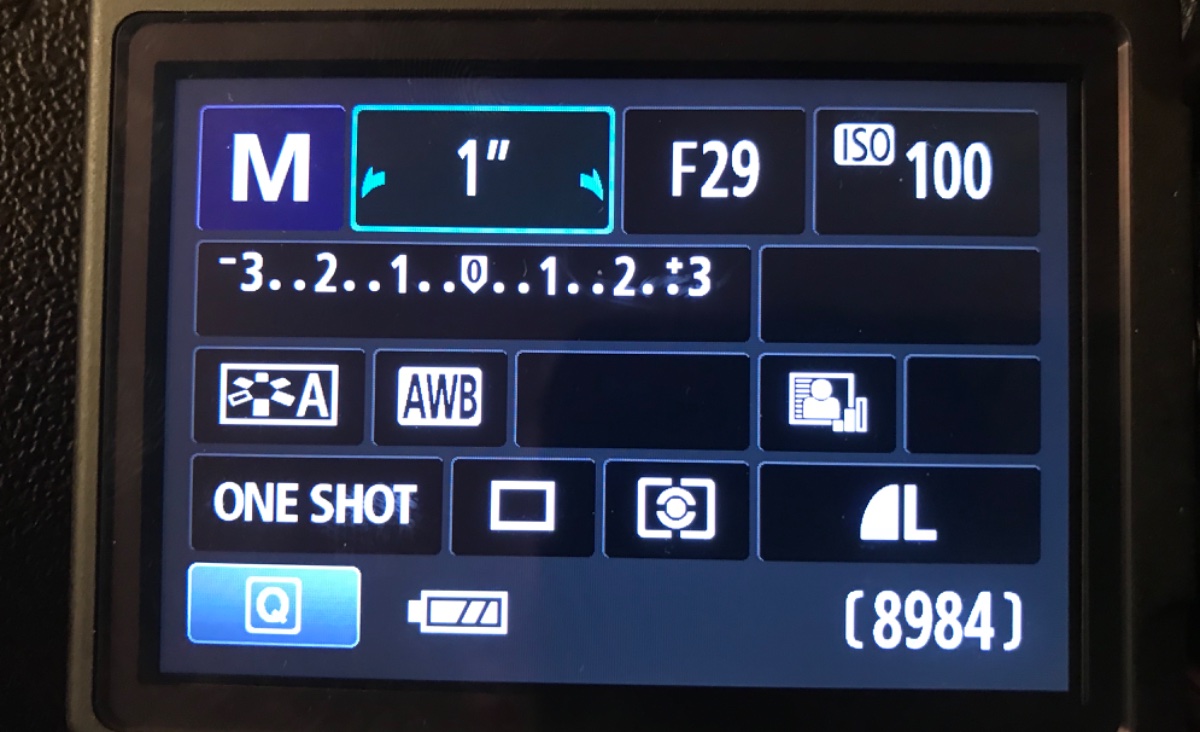
The problem I am having is when I finally take the picture, a red light on the bottom right of the camera goes on and causes the snap to pause, resulting in a blurry pic. When I switch to AV mode instead of Manual mode, sometimes I dont have the issue. These are my settings when I use Manual.

The view of the coins +lighting is perfect looking through the lens. Capturing a sharp picture is my only issue..


Canon-Rebel-EOS-T3i-Settings-For-Coin-Pictures
Edited by Steelers72
07/28/2018 02:08 am
Pillar of the Community
Learn More...
United States
4037 Posts
 Posted 07/28/2018  09:50 am  Show Profile   Bookmark this reply Add rmpsrpms to your friends list Get a Link to this Reply
I highly recommend only using Av mode for this type of shooting. Also, I see you are stopping the lens way down, to F29. What lens are you using? I would not go beyond f11, and generally would stick with f8. F29 will make your shots blurry due to diffraction. The long exposure time of 1sec may also be contributing to the blurriness. Going to f8 will speed that up a lot and make the shots sharper.
Contact me for photographic equipment or visit my home page at:
http://macrocoins.com
Pillar of the Community
BadDog's Avatar
United States
1374 Posts
 Posted 07/28/2018  10:17 am  Show Profile   Bookmark this reply Add BadDog to your friends list Get a Link to this Reply

Quote:
Capturing a sharp picture is my only issue..


How are you taking the photos? with a copy stand? or handheld? I believe that with those settings you'd definitely need to be using a copy stand in order to get a focused picture.

with Ray as well. Most lenses have a sweet spot somewhere between F5.3 and F11, typically F8 or F6.3. I wouldn't think you'd need to use F29 to get a good picture. The aperture is very small at that F stop, so you need the long exposure time to get enough light on the sensor. You do get more depth of field at F29 for focusing, but you shouldn't need it if you're using a copy stand. The DOF you get with a larger aperture (smaller F stop) should be sufficient provided the copy stand base is parallel to camera sensor.
Pillar of the Community
MontCollector's Avatar
United States
2403 Posts
 Posted 07/28/2018  3:19 pm  Show Profile   Bookmark this reply Add MontCollector to your friends list Get a Link to this Reply
I currently use a Canon Eos Rebel T3 with the 18-55mm macro lens with 2 diffused Jansjo lights. For extreme close-ups I use tube extenders. They usually come in sets of three, 13mm, 21mm, and 31mm. They can be used individually or in any combination of the three. Much cheaper than getting a larger macro lens or bellows. I also made a copy stand to hold the camera as still as possible. This is a must when shooting coin photos.

I would also recommend tethering your camera to your computer. This allows you to use the Canon Live shot mode. It lets you to control your camera with your computer. Takes a photo with 1 click of the mouse and allows you to see what you are shooting at on your computer screen instead of the little screen on the camera.

As for the settings, This is my weakness. I currently run close-ups on the "P" or programmable mode. I know this is probably wrong but it seems to take decent photos.. I think I will have to try using the AV mode and see what happens.

I hope this helps.

Mont.

Edit: I should add that in order to use the Canon Live shot feature you will need to install the software that came with the camera. It is part of the Canon Utilities Software package. If the software didn't come with your camera I think you can DL it from the Canon website.
Edited by MontCollector
07/28/2018 3:29 pm
Pillar of the Community
Steelers72's Avatar
United States
1448 Posts
 Posted 07/28/2018  9:54 pm  Show Profile   Bookmark this reply Add Steelers72 to your friends list Get a Link to this Reply
Thanks all! I will try to tinker with the settings based on your recommendations and get back to you with results. Much appreciated !!
Rest in Peace
Crazyb0's Avatar
10197 Posts
 Posted 07/28/2018  11:15 pm  Show Profile   Bookmark this reply Add Crazyb0 to your friends list Get a Link to this Reply


Canon-Rebel-EOS-T3i-Settings-For-Coin-Pictures
New Member
Greece
45 Posts
 Posted 07/29/2018  11:39 am  Show Profile   Bookmark this reply Add Nickos to your friends list Get a Link to this Reply
...by the way, I do not think you are using a (real) macro lens. What lens are you using? (i.e Canon EF-S 18-55)

MontCollector gave you the solution with extenders and copystand.

Stick on f/8.0 and iso 100.

It would be nice to show us a picture of the coin before and after and also to write the different techniques.


  Previous TopicReplies: 6 / Views: 2,796Next Topic  

To participate in the forum you must log in or register.


Disclaimer: While a tremendous amount of effort goes into ensuring the accuracy of the information contained in this site, Coin Community assumes no liability for errors. Copyright 2005 - 2026 Coin Community Family- all rights reserved worldwide. Use of any images or content on this website without prior written permission of Coin Community or the original lender is strictly prohibited.
Contact Us  |  Advertise Here  |  Privacy Policy / Terms of Use

Coin Community Forum © 2005 - 2026 Coin Community Forums
It took 0.27 seconds to rattle this change. Forums