Coin Community Family of Web Sites Join Thousands of Coin, Bullion, & Money Collectors
Vancouvers #1 Coin and Paper Money Dealer Royal Canadian Mint products, Canadian, Polish, American, and world coins and banknotes. Join Thousands of Coin, Bullion, & Money Collectors Royal Estate Auctions - $1 Coin AuctionsCoin, Banknote and Medal Collectors's Online Mall 300,000 items to help build your collection! Specializing in Modern Numismatics


Username:
Password:
Save Password
Forgot your Password?


This page may contain links that result in small commissions to keep this free site up and running.

Welcome Guest! Registering and/or logging in will remove the anchor (bottom) ads. It's Free!

Image Optimizer And Image Loader Help

To participate in the forum you must log in or register.
Author Previous TopicReplies: 10 / Views: 1,106Next Topic  
Pillar of the Community
Learn More...
Jadey's Avatar
United States
900 Posts
 Posted 11/24/2018  7:24 pm Show Profile   Bookmark this topic Add Jadey to your friends list Get a Link to this Message Number of Subscribers
I'm getting a bit exasperated loading images to the forum. When the optimizer works properly, its great. However, I routinely have problems with the optimizer and uploader flipping my images 180 degrees. I will view an image on my computer, but when I upload it to image optimizer or image upload it will flip it upside down.

Any ideas about how to avoid this problem? I have some images in my uploaded images directory that show a thumbnail upside down, and when I click the image, it flips over. I just can't figure it out.
Rest in Peace
T-BOP's Avatar
United States
18456 Posts
 Posted 11/24/2018  7:32 pm  Show Profile   Bookmark this reply Add T-BOP to your friends list Get a Link to this Reply
I feel your pain .
Pillar of the Community
Learn More...
Jadey's Avatar
United States
900 Posts
 Posted 11/24/2018  7:40 pm  Show Profile   Bookmark this reply Add Jadey to your friends list Get a Link to this Reply
I don't want to be "that guy" always posting upside-down images. Especially when the rules warn against it.
Forum Dad
Learn More...
bobby131313's Avatar
United States
24177 Posts
 Posted 11/24/2018  8:28 pm  Show Profile   Bookmark this reply Add bobby131313 to your friends list Get a Link to this Reply
I cannot reproduce this at all and I use it all the time.
Pillar of the Community
silverwolf's Avatar
Canada
3733 Posts
 Posted 11/24/2018  8:55 pm  Show Profile   Bookmark this reply Add silverwolf to your friends list Get a Link to this Reply
try the practice forum, when you post and see if you can figure it out. I am on a desk top computer, and have never had an image rotate on me..
Edited by silverwolf
11/24/2018 8:56 pm
Pillar of the Community
Learn More...
Jadey's Avatar
United States
900 Posts
 Posted 11/24/2018  9:25 pm  Show Profile   Bookmark this reply Add Jadey to your friends list Get a Link to this Reply
I am on a windows desktop as well. This happens probably 20% of the time.
Pillar of the Community
SilverDollar2017's Avatar
United States
8715 Posts
 Posted 11/24/2018  9:28 pm  Show Profile   Bookmark this reply Add SilverDollar2017 to your friends list Get a Link to this Reply
I use a mobile device and Windows/Mac systems to upload and haven't had this issue. When you are loading your pics into the Optimizer, you can rotate them in the optimizer - there are rotate buttons next to the image.
Pillar of the Community
Learn More...
Jadey's Avatar
United States
900 Posts
 Posted 11/24/2018  9:54 pm  Show Profile   Bookmark this reply Add Jadey to your friends list Get a Link to this Reply
@SilverDollar2017 Well holy mackerel. I've been so annoyed that mine does not have the ability to rotate, only crop and sharpen. When you mentioned that, I went and clicked the upper left hand corner of my image, and the rotate buttons popped up. It appears that if you click on the image within the image editor, the rotate buttons show up.

I'm not sure why this capability would be hidden so well, but ...
Thank you, thank you, thank you.
Edited by Jadey
11/24/2018 9:54 pm
Moderator
Learn More...
nss-52's Avatar
United States
54283 Posts
 Posted 11/25/2018  06:19 am  Show Profile   Check nss-52's eBay Listings Bookmark this reply Add nss-52 to your friends list Get a Link to this Reply
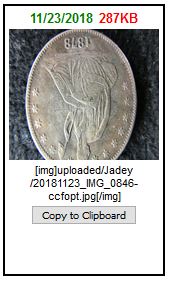
I reviewed some of Jadey's thumbnails.

The first few I reviewed that were upside down, stayed upside down when clicked upon.

Then I clicked on:
https://www.coincommunity.com/forum...6-ccfopt.jpg
Image-Optimizer-And-Image-Loader-Help

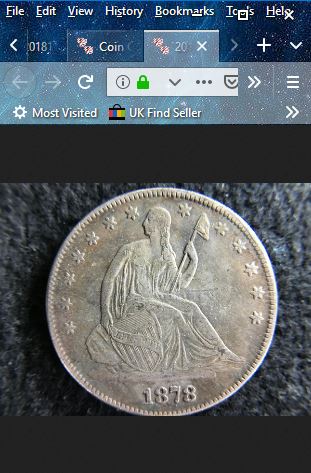
Viewing it, produces this, a 180 degree rotated image:
Image-Optimizer-And-Image-Loader-Help

These four produce a 90 degree rotated image:
https://www.coincommunity.com/forum...t-ccfopt.jpg
https://www.coincommunity.com/forum...IMG_0621.jpg
https://www.coincommunity.com/forum...t-ccfopt.jpg
https://www.coincommunity.com/forum...IMG_0622.jpg
Pillar of the Community
Learn More...
Jadey's Avatar
United States
900 Posts
 Posted 11/25/2018  4:52 pm  Show Profile   Bookmark this reply Add Jadey to your friends list Get a Link to this Reply
&nss-52
Thanks for investigating. Some of the images are also correctly oriented on my computer, and then they flip in either the image optimizer, or the image uploader. I have even saved images from the optimizer, flipped them on the computer, resaved them, loaded them to the optimizer, only to have them flipped again. But it is inconsistent, sometimes it works properly, and sometimes not.

Anyway, I'm hoping I won't have any more problems now that SilverDollar2017 has pointed out that Rotate buttons will pop up in the image optimizer tool if you click into the enlarged image. Hopefully that will end my frustration.
New Member
United States
42 Posts
 Posted 11/25/2018  5:44 pm  Show Profile   Bookmark this reply Add Fin to your friends list Get a Link to this Reply
I use three Android apps on my tablet
1 to take coin pictures
2 to save it as a JPEG
3 to compress it so it's below 300 for this site.

I'm waiting for the adapter so I could use the microscope silver dollar recommended.

Image-Optimizer-And-Image-Loader-Help
  Previous TopicReplies: 10 / Views: 1,106Next Topic  

To participate in the forum you must log in or register.


Disclaimer: While a tremendous amount of effort goes into ensuring the accuracy of the information contained in this site, Coin Community assumes no liability for errors. Copyright 2005 - 2026 Coin Community Family- all rights reserved worldwide. Use of any images or content on this website without prior written permission of Coin Community or the original lender is strictly prohibited.
Contact Us  |  Advertise Here  |  Privacy Policy / Terms of Use

Coin Community Forum © 2005 - 2026 Coin Community Forums
It took 0.28 seconds to rattle this change. Forums