| Author |
 Replies: 14 / Views: 2,571 Replies: 14 / Views: 2,571 |
|
|
Valued Member
United States
218 Posts |
I took this pic with my Canon S2 IS.  I would like suggestions on improving my images. PLEASE be critical |
|
|
|
Pillar of the Community
Canada
1931 Posts |
Looks like the picture is much too bright. I'm not a photo expert but maybe try indirect lighting instead of straight on lighting or if your flash is on turn it off? I'm sure someone here will give you much better advice.
|
|
Valued Member
 United States
218 Posts |
no flash was used and the lights werent actually facing the coin but they were positioned close to it. I will try to have them a little farther away. good idea.
|
|
Pillar of the Community
Canada
1931 Posts |
also, for better contrast when I photograph a light coin (silver color) I use a dark background, when I photograph a dark coin I use a white background.
|
|
Pillar of the Community
United States
2797 Posts |
Ferret Lord,
There are a couple of things you can do to reduce glare. Number one, either decrease the aperature or increase the shutter speed to reduce the amount of light captured in the exposure. Two, use a "diffuser" to soften the light. I took a one gallon off-white plastic milk jug and cut out the entire bottom and about 1/2 of the top. I put this over the coin and shoot down into it. Lastly, if you have some application software for photography, you could adjust the intensity after the shot. If you have MS Office, MS Office Picture Manager is an application you can use to "correct" the shot.
|
|
Valued Member
United States
218 Posts |
Okay, I adjusted the lighting so it was less direct, put a blue object under coin and adjusted distance for focus. This isn't the same coin but I think the pic overall came out better. What does everyone think?  |
|
Pillar of the Community
United States
632 Posts |
try another pic with the morgan on the blue background and the new lighting set up.
|
|
Valued Member
United States
218 Posts |
Okay, here's the Morgan again.  |
|
Pillar of the Community
United States
632 Posts |
Now try moving the light source from about 11 o'clock to 7 o'clock...higher angle...lower angle...farther...closer...loock for what angle gives you the best detail. When you find it...freeze aaaand click!.
Try multiple light sources to get rid of shadows. experiment.
|
|
Pillar of the Community
United States
632 Posts |
nice coin...I'm starting to see some subtle toning. Try and bring that out a little more.
|
|
Pillar of the Community
United States
891 Posts |
I too have a S2. I tool me alot of pictures to get it halfway figured out. I had quite a few problems when shooting in the macro mode. The distance the coin had to be away made it to small. By the time I cropped and resized it was distorted to be worth a flip. There wasn't to much room to zoom without it getting out of focus. The super macro took some good pictures, but I had a problem getting the light on the coin the way I wanted it. I went and bought a lens set (macro and closeups) for my S2 and it really helped. I got one of the less expensive ones and it did fine, but I had a problem of getting the rim to come into focus properly. Still took nice pictures. I broke down and purchased a more expensive one about 60 bucks. I should have bought this one first. You get what you pay for. With my S2 I get much better pics with ISO 50. 100 does good also but it is just a little to grainy. I use 2 13 watt Ott lights. Exposure time of 1/60 seems to work the best for my setup. The fstop I mainly keep it at 5.6. I use the fstop mainly to adjust the lightness and darkness of the coin. Once in a while yet not to often I adjust the exposure to 1/80. This is in the manual mode. I can't quite get the white balance right so I just use editing software to fix it. This is a cool site. It shows you pics of the different lens shots taken with the S2. http://www.lensmateonline.com/newsite/S2macro.htmlHere are some I have taken. Still a work in progress.    Here is my setup. 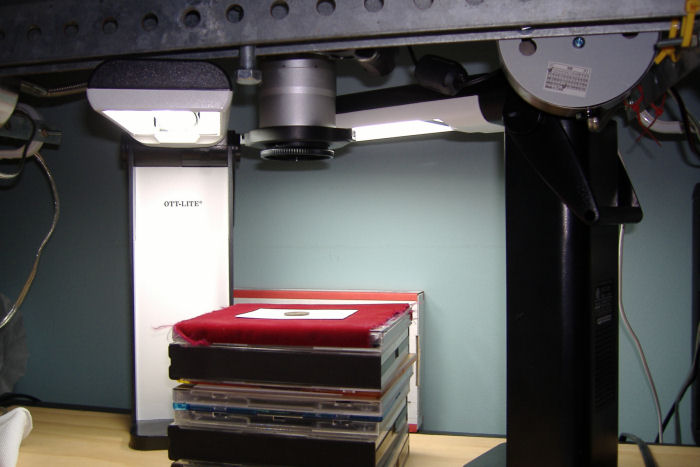 Hopefully some of this may help. |
|
Pillar of the Community
Canada
1931 Posts |
here is one of my morgans. I took this with a kodak easy share camera. 7.1 megapixels. macro setting with the light shining slightly indirectly from top and side. dark background of course.  Edited by malissadawn
08/10/2008 12:32 pm
|
|
Valued Member
United States
201 Posts |
I have been practicing taking my own coin photos lately and one thing that I've learned so far is to never use the "auto" setting. I have to adjust the exposure time, aperture, ISO rating and white balance to get halfway decent pictures. I probably take 10 pictures with various setting for every "keeper" one. Also, I have to adjust for each different coin. It can be a pain but it does produce much better pictures that way. Here's one I took yesterday:  The white balance was way off so I removed most of the color from the picture as it was not at all the correct color (probably due to my lighting as well as white balance). Edited by Steamwalker
08/12/2008 01:40 am
|
|
Rest in Peace
United States
2668 Posts |
When youse guys least suspect it, I'm agonna tie your shoelaces together.
I just have to get some sort of minimum set-up to take decent pics.
Oh, and then learn to use it.
Busy taking notes
|
|
Valued Member
United States
104 Posts |
I like to keep a journal of my camera settings, type of lite used, type of coin.....
It helps when I switch from copper to silver to gold.....
|
| |
Replies: 14 / Views: 2,571 |
|







 Posted 08/05/2008 10:46 pm





