Coin Community Family of Web Sites Join Thousands of Coin, Bullion, & Money Collectors
Vancouvers #1 Coin and Paper Money Dealer Specializing in Modern Numismatics Join Thousands of Coin, Bullion, & Money Collectors Coin, Banknote and Medal Collectors's Online Mall Royal Canadian Mint products, Canadian, Polish, American, and world coins and banknotes. 300,000 items to help build your collection! Royal Estate Auctions - $1 Coin Auctions


Username:
Password:
Save Password
Forgot your Password?


This page may contain links that result in small commissions to keep this free site up and running.

Welcome Guest! Registering and/or logging in will remove the anchor (bottom) ads. It's Free!

How Do You Keep The Pics Large After They Go Through The Optimizer?

To participate in the forum you must log in or register.
Author Previous TopicReplies: 3 / Views: 1,214Next Topic  
Valued Member

United States
100 Posts
 Posted 09/16/2020  09:56 am Show Profile   Bookmark this topic Add Coinstrike to your friends list Get a Link to this Message Number of Subscribers
How do you keep the pics large after they go through the optimizer? Mine have been small and so far I'm unable to figure out how to post the large, excellent pictures I see on the website. I asked how to do this in the coin grading forum and got an answer of "It's a matter of how you do it. I just have it encoded to save data without loss of image quality or size." The gentleman was trying to help me out, but it really didn't. It's the 'how to' part that I need. Can anyone suggest how I can take a photo from my camera and have it large when I post it? I ought to be able to do it, my camera is set to take 15 megapixel shots.
Thanks in advance for any guidance you can share, I appreciate it.

*** Split and moved by Staff to a more appropriate forum. ***

Moderator
Learn More...
jbuck's Avatar
United States
189340 Posts
 Posted 09/16/2020  11:46 am  Show Profile   Bookmark this reply Add jbuck to your friends list Get a Link to this Reply
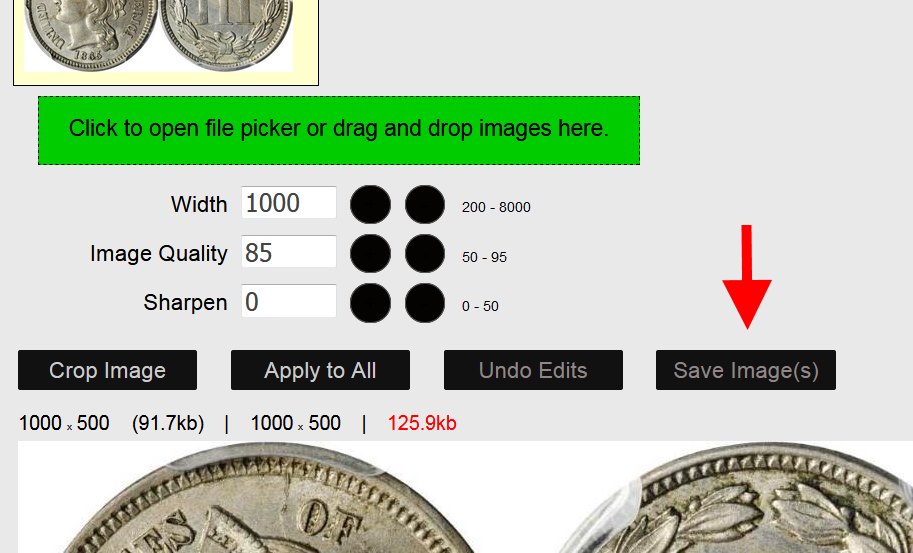
Make Widthas high as you can (in this example below, 1000 is good). This is the image size.

Adjust Image Quality down until the file size (in red, this example 125.9kb) is below 300kb.


How-Do-You-Keep-The-Pics-Large-After-They-Go-Through-The-Optimizer?
Valued Member
United States
100 Posts
 Posted 09/16/2020  11:49 am  Show Profile   Bookmark this reply Add Coinstrike to your friends list Get a Link to this Reply
I can't thank you enough. I saved the instructional image you posted to my coin folder for future reference.
Moderator
Learn More...
jbuck's Avatar
United States
189340 Posts
  Previous TopicReplies: 3 / Views: 1,214Next Topic  

To participate in the forum you must log in or register.


Disclaimer: While a tremendous amount of effort goes into ensuring the accuracy of the information contained in this site, Coin Community assumes no liability for errors. Copyright 2005 - 2026 Coin Community Family- all rights reserved worldwide. Use of any images or content on this website without prior written permission of Coin Community or the original lender is strictly prohibited.
Contact Us  |  Advertise Here  |  Privacy Policy / Terms of Use

Coin Community Forum © 2005 - 2026 Coin Community Forums
It took 0.23 seconds to rattle this change. Forums