| Author |
 Replies: 12 / Views: 1,421 Replies: 12 / Views: 1,421 |
|
|
Pillar of the Community
United States
1882 Posts |
Unfortunately, something rubbed up against Abe. The third pic gives an idea of what it looks like...I can't tell if it is wear. It is silvery looking, and it is also on some of the high parts of his face (part of the nose, around the eye, and high part of upper cheek). Also on some of the jacket, and a little bit on part of the date. The reverse looks fantastic, with a small rim ding at 9 o'clock. Thanks for looking. 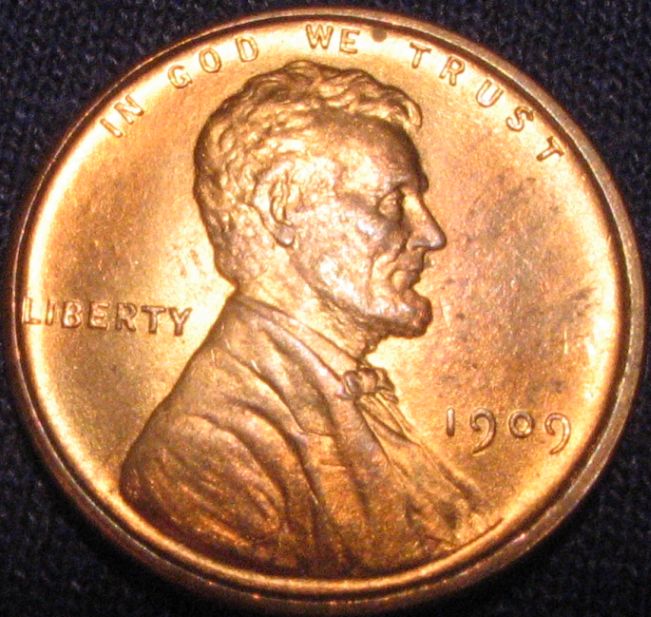 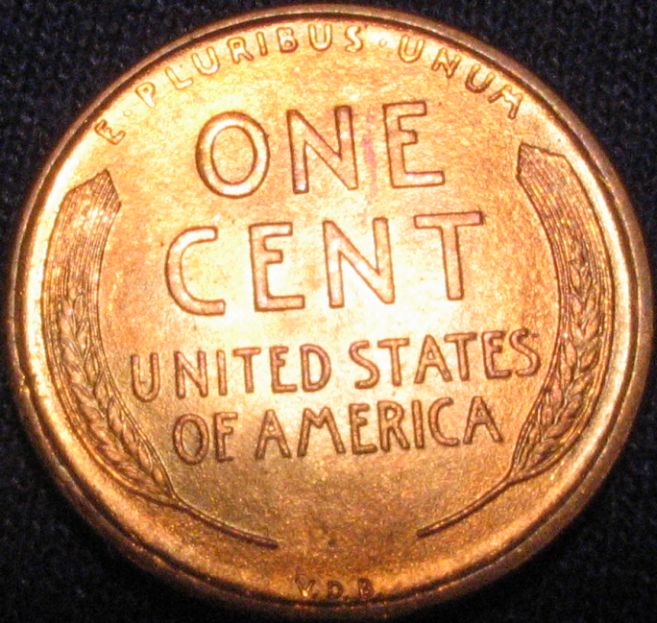 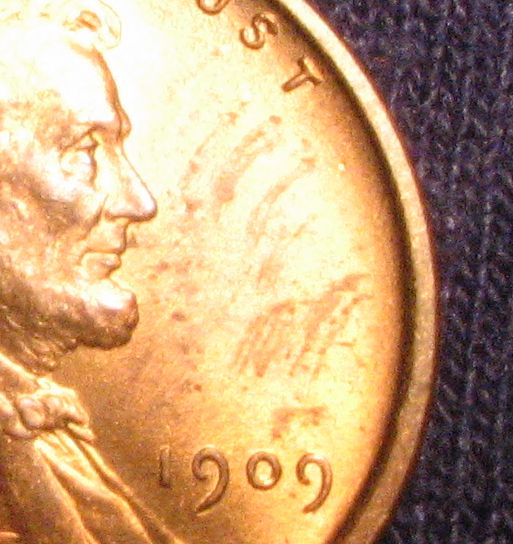 |
|
|
|
Bedrock of the Community
United States
20042 Posts |
Try placing a couple of sheets over your light source, it over-explosing....or you can try backing off your camera's exposure level....or both. When it come to marks on the coin, there's a big difference between a smudge and a contact mark. This looks to be more like a smudge from the picures.
I think I can pick out a few hits on the obverse and a light carbon spot by WE. The cheek is a little over exposed and the shot angled, but the cheek appears to have no rub. (This is EXTREMELY important and I can't see it well) The jacket looks like it may have some wear but with the cheek and jaw over-exposed wear is difficult to detect.
Trying taking the shot directly over the coin with no angle. On coins with a lot of luster, it's OK to use a shadow to subdue the light. I take my pictures free-hand, so it's kind of hard to describe, but I have multiple light sources and I'm able to shadow one or two of them with my camera position. I've found it cuts down the glare.
The reverse looks excellent, I believe the left wheat head lines are showing a reflection and those are not hits.
If you want to zoom in on an important area for grading, do the head and cut back the lighting. Don't feel bad, I have a bad habit of messing up my lighting in the exact same fashion. LOL
The higher grades are much more difficult to photograde. Without better shots of the head, I'm going to assume this is an MS coin. MS-63 BN. I bet this coin is darker in-hand.
|
|
Pillar of the Community
 United States
1882 Posts |
Thanks Thad, I was already working on another coin with paper taped across the bulb. 1995 DD LIBERTY...at least MS65, but in a 2x2 at the moment which is hampering the photo process. Okay, so back to this one. Tried a few more with paper; still not quite there with the glare problem. I think this coin really is RB, or possibly between RB and red. 'Bout to have to call it a night. 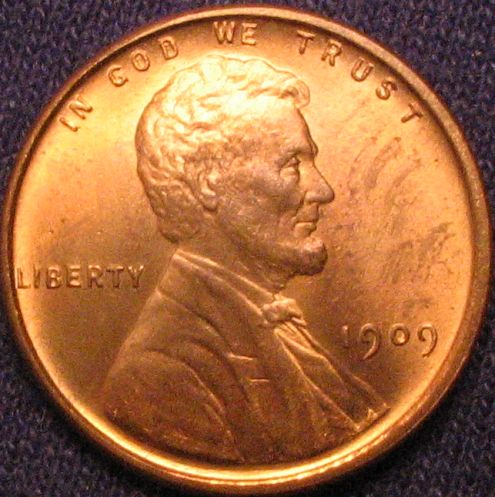 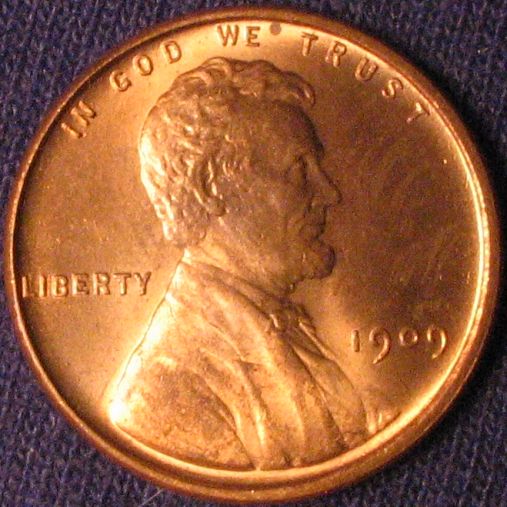 |
|
Pillar of the Community
United States
1882 Posts |
That silver stuff is all over the obverse of this coin. It is on the rim in sections, and some in the field to the left of Abe. In the field on the left, it is so even that it looks like toning...but it is something on the surface of the coin. 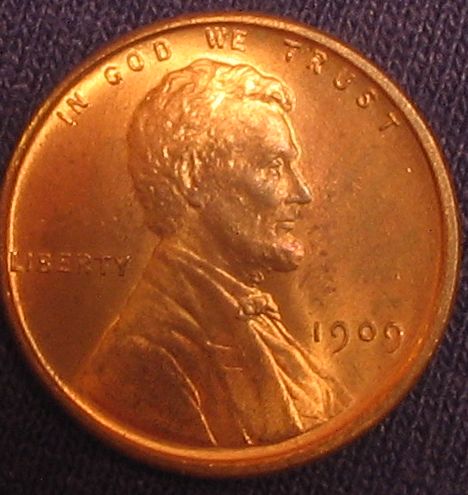 |
|
Bedrock of the Community
United States
20042 Posts |
Much better pics! The last one is pretty good! Now you need to work on increasing the size to about 800x600. To do this, use the optical zoom feature on your camera. I like to use 2.4x and 3.4X, hold the camera to fill the viewer frame and snap. Then use an image editor to reduce the file size to 800x600 and the pic should be under the forums 100k size limit. If it's still too large, use a small percentage reduction from 1 to 5 percent, doing this my pics come out in the 90k's area. I like PaintShop Pro for this.
The coin is definately MS! But now I agree with you, it's MS-63 RB. Did you try soaking the coin in some xylene? I might go 64 if you can remove some of the surface dirt and smudges.
Lincoln Cent Lover!VERDI-CARE™ INVENTOR https://verdi.care/
|
|
Pillar of the Community
United States
1882 Posts |
Nope, the coin hasn't seen any xylene. I'll have to look into that.
I guessed on the percentage reduction to get under 100K, guessed too low...and left it as it was.
I have not been able to get a good picture by using the camera's zoom. The best focus has been when I use macro mode, and put the camera close to the coin. That is one of the reason I've been having lighting problems; the camera is blocking a lot of light. Been taking dozens of pictures with camera a different distances, and different amounts of zoom (never digital zoom), to try to get the sharpest detail. Still room for improvement.
Canon A85. Have had similar experiences with other Canons.
|
|
Bedrock of the Community
United States
20042 Posts |
I use a Canon SD700IS, the optical zoom works great...in fact, I take no coin pictures without it. Zoom works fine in macro mode, that's exactly what I do. I had the same problem as you with light until I started using zoom to back away from the subject more. The trick is getting far enough away to let in the proper amount of light, setting the white balance/exposure and filling the view frame fully with the coin.
Lincoln Cent Lover!VERDI-CARE™ INVENTOR https://verdi.care/
|
|
Bedrock of the Community
United States
20042 Posts |
|
|
Pillar of the Community
United States
1882 Posts |
Thad, your pictures look great! Maybe it is a "feature" of the Canon "A" series. If the camera is zoomed in the slightest amount, the closest the camera will focus is at 20 cm (there is a bar on the screen that shows the distance you are focusing at). That is in manual focus mode. Then when zoomed all the way out, the camera can be focused closer than that. Much closer. Same behavior happens when autofocus is on...the camera will not focus clearly in macro mode if there is any zoom in play.
|
|
Bedrock of the Community
United States
20042 Posts |
If you go into the marco mode then Func Set, try center weighted average. Adjust zoom to about 2.8, fill the view screen with the coin, it may be out of focus at this point. Depress the shutter only half-way. It should focus, then fully depress the shutter. Always depress the shutter half-way before fully depressing Let know if that works. From a review: Quote:
In macro mode you can get as close to your subject as 5 cm at wide-angle (55 x 41 mm recordable area) and 26 cm at telephoto (92 x 69 mm recordable area). If you buy the close-up lens attachment, those distances drop to 3 and 13 cm, respectively.
http://www.dcresource.com/reviews/c..._a85-review/ |
|
Pillar of the Community
United States
1882 Posts |
Thad, you just found documentation that explains it! :) As soon as you zoom (telephoto), the closest you can put the subject is 26 cm. I thought the bar on the camera was saying 20 cm. I don't have the close-up lens attachment that would allow me to go to 13 cm whilst zooming. Thanks for that link. Had no idea that such a lens even existed. Putting the camera closer will make a huge difference. Here it is ($16 adapter also required): http://www.amazon.com/Canon-250D-52...80091&sr=8-2Edited by steve199
12/07/2008 3:05 pm
|
|
Bedrock of the Community
United States
20042 Posts |
Whew...that's expensive! I think you'd be better served buying a new camera. However, your pictures are much better now, so it's your call.
|
|
Pillar of the Community
United States
1882 Posts |
Yes, spending $100 is a lot, considering what $250 will buy in a new camera these days. However, at the store today every camera I looked at had this sort of limitation ($200-$300). The sales guy doubted me, and went to other camera's and said "this one will be able to zoom in and focus from that distance". Nope.
But the newer cameras have better optical zoom. Mine is only 3x.
Your camera has a leg up on mine...I didn't play with the Elph's. :)
|
| |
Replies: 12 / Views: 1,421 |
|










 Posted 12/06/2008 03:37 am


