| Author |
 Replies: 15 / Views: 2,091 Replies: 15 / Views: 2,091 |
|
|
Pillar of the Community
United States
3077 Posts |
white or black
wish we had a poll option but I cant find it
and do you use diffrent colours for diffrent coins?
|
|
|
|
Pillar of the Community
Canada
1931 Posts |
Hi Yotie. I usually use opposite colors for my pictures. for silver colored coins I use black or dark blue, for copper and such dark colored coins I use white. I'm not sure if this really improves the pictures but it allows the eye to focus in on the coin itself. At least for me anyway
|
|
Pillar of the Community
 United States
3077 Posts |
thanks Malissa what about cloth vs paper
|
|
Pillar of the Community
Canada
1931 Posts |
I try to use paper because cloth can sometimes leave little hairs on the coins. I'm sure some use certain fabrics but I'm not sure what the good choice would be. When I am doing a close up shot I wouldn't want little flecks of stuff on the coin.
|
|
Pillar of the Community
United States
3077 Posts |
|
|
Pillar of the Community
United States
5318 Posts |
I use a neutral, mid-tone gray background that's closest to the target gray of the dSLR sensor. That way, the background level will not skew the exposure for the coin. Too dark of a background can create hot spots on the coin as the camera will overcompensate and lighten the image. I also avoid colored backgrounds because the coin can pick up colored light reflections. I'll then remove the background completely in post-processing for a consistent white background that focuses on coin details.   |
|
Pillar of the Community
United States
3077 Posts |
|
|
Pillar of the Community
Canada
1931 Posts |
kurt,
How do you remove the background in the image later? I am limited with what I know how to do in photoshop. basically.... I know how to crop, turn to black and white, and lighten the exposure.
|
|
New Member
United States
34 Posts |
In Photoshop, there is a tool for selecting area. It's normally a square by default but if you click on the corner of the button (usually) you will get the choice of a circular one.
If you click and drag with the circle-select tool, you'll get an ellipse which is a bit random in shape. If you click and drag while holding the alt and shift keys, you'll get a perfect circle that radiates out from where you clicked.
Now, find the middle of your coin, alt-shift-click and drag until you have your selection circle just encompassing your coin image. Then press ctrl-I to invert the selection.
Take your Eraser tool and erase the background, or alternatively take the Paint Bucket tool with some white or black paint and fill the selected area.
Might be a bit of trial-and-error here but that's the basic idea.
|
|
Pillar of the Community
United Kingdom
1077 Posts |
You can get a more accurate circle to crop with if you use the ruler tool to measure the size of the coin in pixels, and then use the circle tool mentioned above, but put in the fixed size that you measured with the ruler tool.
|
|
New Member
United States
3 Posts |
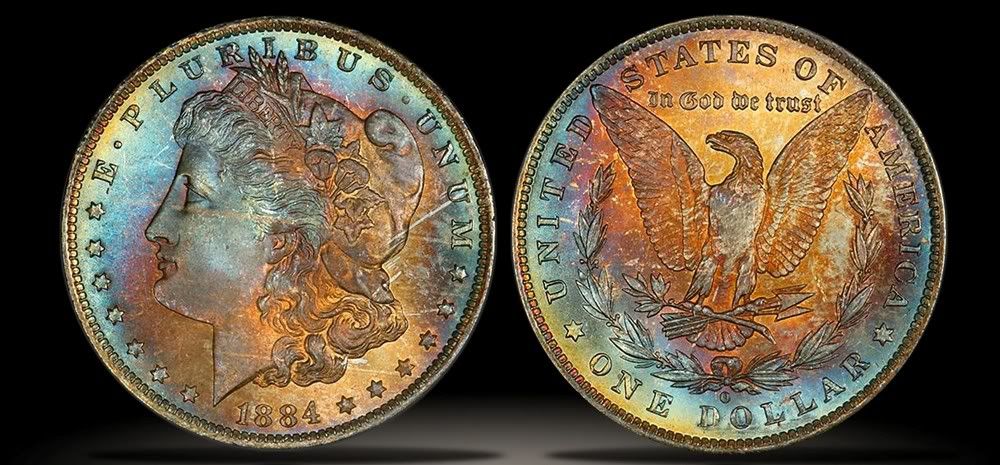
I use a black lens cap. It helps to eliminate stray side shadows and gives me good contrast. Here's an example of a recent one that I did:  |
|
Moderator
 United States
23522 Posts |
Quote:
I use a black lens cap. It helps to eliminate stray side shadows and gives me good contrast. Welcome to Coin Community, alohadave. I took the liberty of cleaning up your code; just enclose the pic URL in [img] tags here to inline it. Do I know you from somewhere?  |
|
New Member
United States
3 Posts |
Thanks for cleaning that up.
I'm from Ars. I saw the link from the thread in the Lounge.
|
|
New Member
United States
37 Posts |
|
|
Pillar of the Community
United States
3234 Posts |
I agree that placing coin photographs against a black background looks best. However, when photographing the coins, it's best to use (based on some professional photographers that I took an ANA class from) to use a photographic gray that the coin lays on. |
|
Pillar of the Community
Canada
1248 Posts |
Hello BRIDGESDG,
how in the world are you taking your pix?
they look just what I am trying to achieve....great.
care to let us in on your secret?
like camera, lens , exposure, lighting , whit balance etc....
woul;d be great..
hopefully it is easy...
thanks
HHB
|
| |
Replies: 15 / Views: 2,091 |
|






 Posted 01/03/2009 08:18 am