| Author |
 Replies: 15 / Views: 1,789 Replies: 15 / Views: 1,789 |
|
|
Moderator
 United States
6563 Posts |
At the risk of this possibly being used for illicit purposes I will monitor this thread Very closelyWithout tampering with the programing or hardware of a scanner is there a good way to take scans of US currency for the "legal" purposes of showing series, condition, etc. When one note is scanned it's fine but with multiples I get this Little Gem
|
|
|
|
Pillar of the Community
Canada
1931 Posts |
wow! I haven't seen that one before. You aren't getting clear digital images with a camera?
|
|
Moderator
 United States
6563 Posts |
I can take Amazing quality pictures of scenery, people, etc. But when it comes to macro and small things...even Helen Keller would be embarrassed to see the pics
|
|
Pillar of the Community
Canada
1931 Posts |
 I wish I had some advice for you there. I just use the old camera cause scanner settings confuse me to no end. |
|
Pillar of the Community
United States
3098 Posts |
I just use my camera. Remember to stamp SPECIMEN all over it so the feds won't get you! **Oh yeah, there's no real legal way to scan them without the rules of use thing because of the EURion Constellation (Small 20s for identification purposes? Yeah right...) unless you can find an older version of your scanning program. or... I can take them for you!  Edited by wd1040
06/13/2009 02:07 am
|
|
Pillar of the Community
United States
891 Posts |
I was using a program that would not let me scan any notes. The software that came with my scanner was a no go also. made me mad but I do understand why. I haven't scanned any notes in a while, but the last time I did I used Irfanview. Worked fine. Don't know if it still lets you. Worth a try I guess. |
|
Pillar of the Community
United States
891 Posts |
You had me wondering. So I gave it a try. Are you talking about something like this. I used xSane running on Linux. 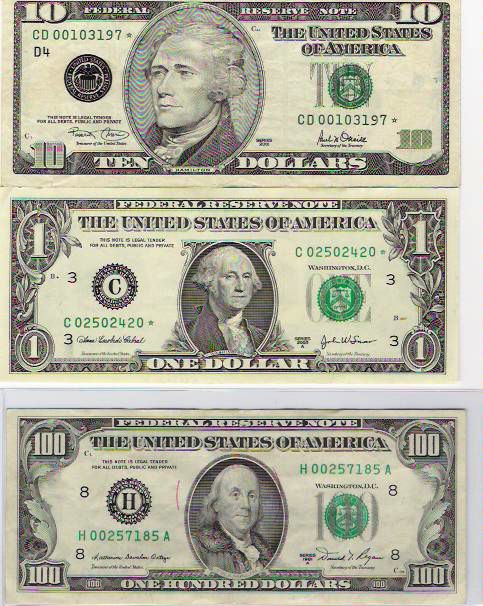 |
|
Moderator
 United States
56855 Posts |
I use a Dell AIO 924.I place the note on the scanner bed press scan and... woo-la! I have the photo in my Pictures and then upload them on Photo Bucket and then post them here on CCF,works fine. John1  |
|
Pillar of the Community
United States
3098 Posts |
Nope Southern Yankee, GO's talking about the new ones with the little yellow circles (in the 50s, 20s, 10s, and 05s.) The little circle in a 5-pattern constellation is what doesn't allow them to be scanned with a new scanner.
Try it! Get a new $20 and see what the scanner says.
**I mean the back. I just remembered the obverse of the 20 doesn't have it!
Edited by wd1040
06/13/2009 11:29 am
|
|
Pillar of the Community
United States
891 Posts |
Well these are all 2006 series. I did both front and back and they both worked. Are you talking about the little numerals on the back is what doesn't allow you to scan? I wasn't aware of this. 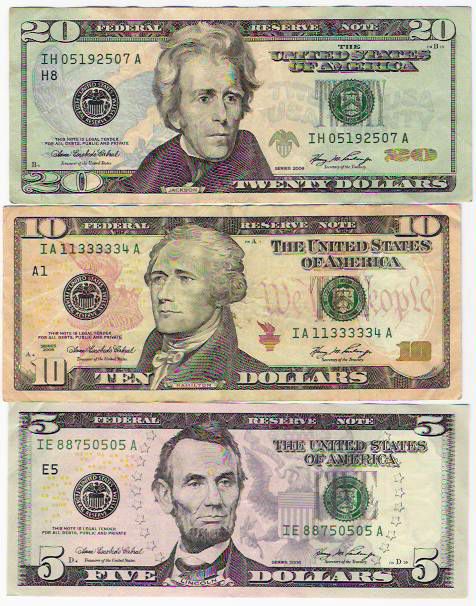 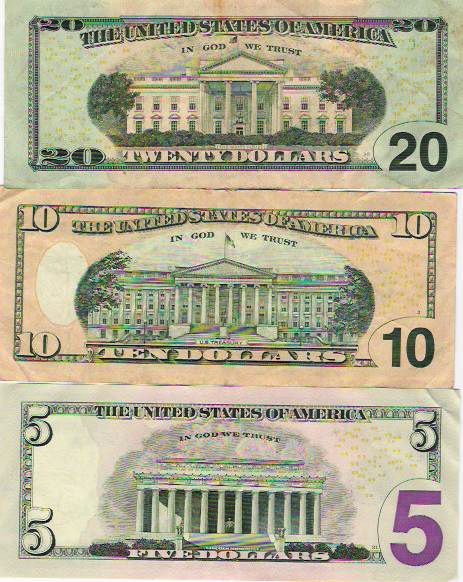 |
|
Moderator
United States
6563 Posts |
Interesting  I'm not sure what my scanner is picking up on that makes it know there are notes there. It's an Epson about 2 years old. |
|
Pillar of the Community
United States
3098 Posts |
huh... Southern Yankee's scanner must be special! And yeah, it's the little yellow numbers that doesn't let you scan them. That's why they had to include "0" with the 5. May we know the brand of your scanner? By the way, nice serial number on that 10!  |
|
Pillar of the Community
United States
891 Posts |
My scanner is a hp psc all in one printer copier scanner. I think it is the software that stops it from scanning. I tried scanning with Paint shop pro and it would not let me scan the notes. I can't remember what the message said. If I am not mistaken the software that came with the scanner wouldn't let me either. Been a while since I used the hp software or paint shop pro.
|
|
Moderator
United States
23522 Posts |
It's the Epson scanner software. I have an Epson V100; EpsonScan refused to let me acquire an image so I went in through Control Panel, used Windows' scanning software, and had no problem scanning a bill.
|
|
Pillar of the Community
United States
4541 Posts |
very interesting topic! I did not even know that they were made like that
|
|
Moderator
United States
195203 Posts |
The Ricoh document servers we have at work automatically turn off the green colour when used to scan bank notes, as I mentioned in this post. |
| |
Replies: 15 / Views: 1,789 |
|







 Posted 06/13/2009 01:52 am





