| Author |
 Replies: 9 / Views: 1,113 Replies: 9 / Views: 1,113 |
|
|
New Member
United States
11 Posts |
Does anyone know of any photo editing program that will crop circles easily? Perfect for coins. I have tried a few cheap versions like Print Shop 20, but it only works for a few weeks, and then stops. I guess that is to be expected for $10 programs. I do not want to shell out $600 for a complete photoshop, so I am hoping that there is a cheaper version. Thanks  |
|
|
|
New Member
United States
34 Posts |
Photoshop elements Ver.3.0 or 4.0. About $89.00
|
|
New Member
 United States
11 Posts |
I will give them a try. I can take decent pics, just can't crop them yet.  |
|
Bedrock of the Community
United States
14454 Posts |
I use a program called Microsoft Picture It platinum 2001, its like 6 discs and old but works very well
|
|
Valued Member
United States
458 Posts |
Actually you don't have to spend any money at all for high power s/w-- MOST camera and or scanner s/w give you for FREE photo editting s/w that will do everything you need to do etc--INCLUDING-- editing circles, squares (called cropping) what ever it is a matter of learning how to use their editting feature "cropping & or "editting"-- adding background, it is all doable--BUT, you gotta take the time to learn the proggie--each and every single one works differently, have Different functions icons and ways of handling images etc---yea yea it is a pain in da ars, BUT once you master that particular s/w U have--its really quit simple---AND free--save your money for new s/w most can be had for free, or exist for these simple functions---just learn and READ!--heck you might have photo s/w RIGHT NOW in your possession that will do all you need--  CHECK 'EM out!! BTW, WELCOME to our GREAT Forum!!--  |
|
Moderator
 United States
23522 Posts |
I think you'll find the overwhelming majority of people who post coin pics crop to a square, anyways. Welcome to the nicest little numismatic corner on the Internet.  |
|
Pillar of the Community
Belgium
2078 Posts |
quote:
Originally posted by SuperDave
I think you'll find the overwhelming majority of people who post coin pics crop to a square, anyways.
Welcome to the nicest little numismatic corner on the Internet.
I pesonally favor a decent (blue) background to evaluate the color deviation of the scan or picture and to evaluate the sides of the coin Some cropping programs that eliminate the background also eliminate part of the coin rim |
|
New Member
United States
11 Posts |
I bought Photoshop Elements 4.0 and I can only crop squares. Maybe I am missing something, but I can't find anything that will allow me to crop a D*** circle. I now have 6 photo editing programs, and each and everyone of them is limited to stupid squares. I have added two photos. Mine and one I borrowed from National Dealer. His look professional, and mine look like garbage. The slab is seen easily in mine. I hate to spend $700 on the full Photoshop, but I can't seem to find any other program that will crop in a circle. If I am doing something wrong, please tell me. It is driving me nuts. Here is my photo:  And here is one that I borrowed from National Dealer:  |
|
New Member
United States
11 Posts |
I took the software to steve's shop and he is trying to figure it out for me. Thanks for trying to help.
|
|
Bedrock of the Community
United States
14454 Posts |
this was done with the program I told you about 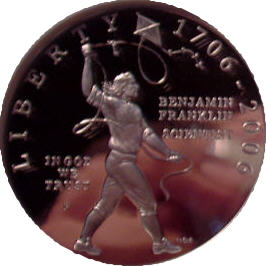 |
| |
Replies: 9 / Views: 1,113 |
|







 Posted 05/15/2006 12:30 pm





