| Author |
 Replies: 10 / Views: 2,122 Replies: 10 / Views: 2,122 |
|
|
Pillar of the Community
United States
731 Posts |
I hope I am not repeating a topic already out there...
I am looking for pre-printed sequential bar code stickers that I can affix to my 1.5x1.5 flips... I came across a good example of one when I bought a coin from Allens a while back...
Anyone have an idea where I can find them? I've looked all over the web using google, but no such luck...
Thanks,
CheetahCats
Moved to Supplies section
-GO
|
|
|
|
Pillar of the Community
 United States
731 Posts |
Below is an example of the bar code sticker I'm talking about... (and yes, it's a horrible looking reverse) 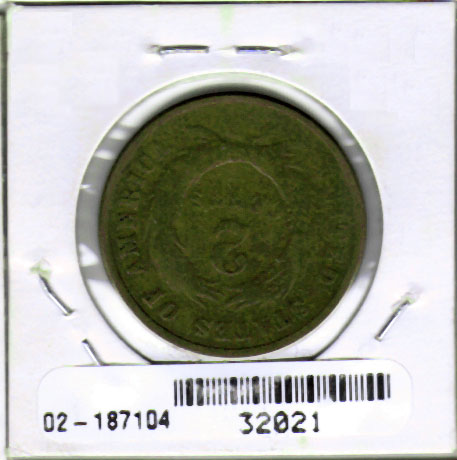 |
|
Pillar of the Community
United States
677 Posts |
hmmm...I think there is a bar code font out there. Although it may be a proprietary thing. (=$$$) I'll see if I can find it again.
|
|
Pillar of the Community
United States
677 Posts |
My bad...I skipped over the part about "pre printed"
I did find some free bar code fonts though, by doing a Google search for "barcode font word". Hope that helps?
|
|
Bedrock of the Community
United States
12437 Posts |
Do you own a barcode scanner? The stickers will be kinda useless without one.
|
|
Pillar of the Community
United States
731 Posts |
Biokemist6 -> A barcode scanner can be attained rather cheap, and it will interface nicely with my coin collecting software... Here is one example: http://www.tigerdirect.com/applicat...10&CatId=298Schmidty -> I also thought about getting stickers and using a barcode font, however, I've done searches for blank stickers that could be used, and couldn't find any at the size that would fit on a 1.5x1.5 flip. Avery makes a ton, but not at a small enough size... Hence the search for pre-printed... |
|
Moderator
 United States
195203 Posts |
Interesting idea.
For what it is worth, Android phones have a multitude of barcode reading applications (I use one on my Droid).
|
|
Valued Member
75 Posts |
|
|
Pillar of the Community
United States
731 Posts |
Tartop -> That was another angle that I approached. I purchased a Brother PTouch PT1230-PC. Unfortunately, after experimenting with the unit, the challenge that I found with this solution is that the label tape feeds tons far more tape than what is needed to make the bar code.
|
|
Valued Member
75 Posts |
CheetahCats
You are correct, I just use the smallest label and put a few bar codes on it, but then I have to trim it to fit, hope someone else can give you a suggestion, good luck....
|
|
Pillar of the Community
United States
731 Posts |
In case anyone is wondering, I found a solution for this that I'm going to test out...
I plan to get the labels on 8.5"x11" white adhesive sheets and use Word or Excel to create the lablels w/ bar codes.
The labels are .25" x 1". They are custom die-cut by a company named Kenco Label & Tag.
I was quoted a price of $139 USD for a 1000 8.5"x11" sheets w/ 234 labels per page.
The only other alternative I could find was to buy rolls of thermal labels, but they were cost prohibitive (upwards of $250+ for just the rolls, not including the thermal printer).
I should have results in about 30 days.
Thanks for everyones input.
CheetahCats
|
| |
Replies: 10 / Views: 2,122 |
|






 Posted 02/08/2010 8:37 pm





