Coin Community Family of Web Sites Join Thousands of Coin, Bullion, & Money Collectors
300,000 items to help build your collection! Shop for APMEX Bullion on eBay!Coin, Banknote and Medal Collectors's Online Mall Join Thousands of Coin, Bullion, & Money Collectors Vancouvers #1 Coin and Paper Money Dealer Specializing in Modern Numismatics Royal Canadian Mint products, Canadian, Polish, American, and world coins and banknotes.


Username:
Password:
Save Password
Forgot your Password?


This page may contain links that result in small commissions to keep this free site up and running.

Welcome Guest! Registering and/or logging in will remove the anchor (bottom) ads. It's Free!

Photo Help-Again-Updated

To participate in the forum you must log in or register.
Author Previous TopicReplies: 6 / Views: 1,585Next Topic  
Pillar of the Community
jprine's Avatar
United States
1599 Posts
 Posted 06/06/2010  5:53 pm Show Profile   Bookmark this topic Add jprine to your friends list Get a Link to this Message Number of Subscribers
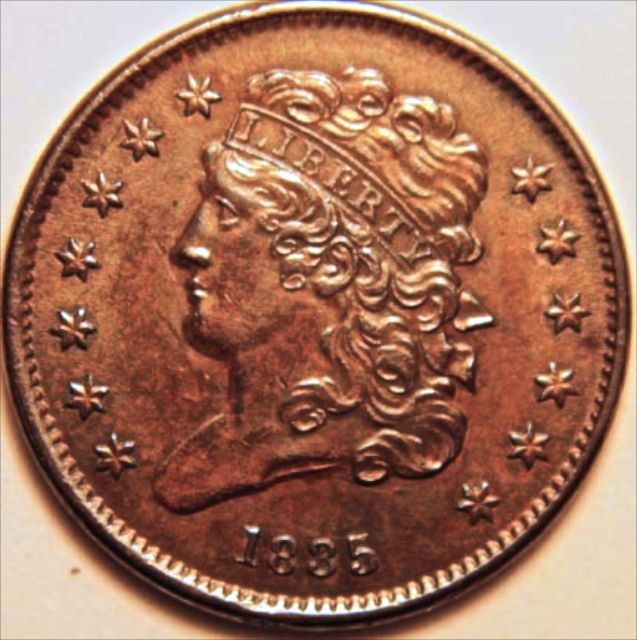
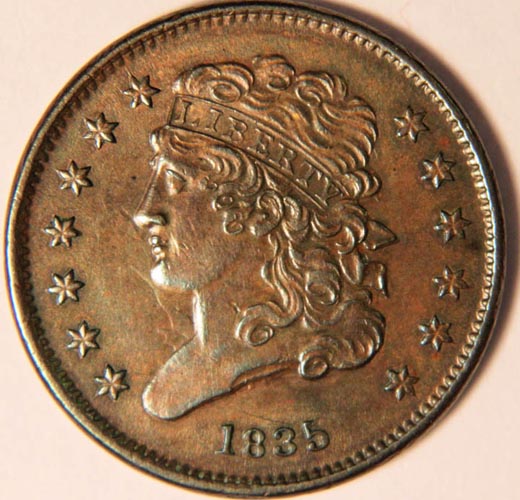
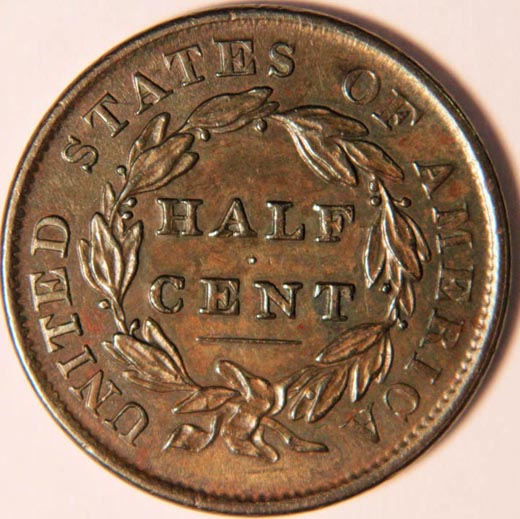
Here is my latest attempt and my first at copper. Still looks to yellow to me. Any opinions or help would be appreciated.

Here is the latest attempt-I think I adjusted the white balance. Bought a second light and as luck has it, it did not work, so I am still using one light. Does this look any better? By the way-Thanks SuperDave.
Photo-Help-Again-Updated


https://goccf.com/t/66274
Edited by jprine
06/11/2010 7:45 pm
Moderator
Learn More...
SsuperDdave's Avatar
United States
23522 Posts
 Posted 06/06/2010  6:28 pm  Show Profile   Bookmark this reply Add SsuperDdave to your friends list Get a Link to this Reply
Are you using the Custom White Balance function of the camera?
Pillar of the Community
jprine's Avatar
United States
1599 Posts
 Posted 06/06/2010  9:41 pm  Show Profile   Bookmark this reply Add jprine to your friends list Get a Link to this Reply
SuperDave-I used the Auto White Balance. Not real sure about setting it myself. I've read about using a sheet of white paper, etc., but once it is in front of the lens, what do you do then?
Moderator
Learn More...
SsuperDdave's Avatar
United States
23522 Posts
 Posted 06/06/2010  10:57 pm  Show Profile   Bookmark this reply Add SsuperDdave to your friends list Get a Link to this Reply
Here's how it works. You set lighting, camera and everything up just like you will to shoot the coin. If you shoot tethered to the computer, don't tether it yet. Put a piece (or a few pieces, so the background doesn't come through) of white paper where the coin will be. The paper needs to fill the whole viewfinder.

Take a shot of it, onto the memory card of the camera. I hold a toothpick in the center of the frame, to give the camera something to focus on, and then remove the toothpick while holding the autofocus, before taking the shot. It's easiest if you currently don't have any other shots on the card. Current White Balance setting doesn't matter, because you're essentially going to tell the camera, "This is what white/grey looks like under this lighting," and the camera will know how to adjust.

Hit the Menu button, and arrow to the second icon from the left. The drop-down choices will include "Custom WB." Arrow down to it and hit Set; the viewfinder will start showing the pics you currently have on the card. Find the white/grey card shot you took and hit Set - it should ask you something to the effect of "Do you want to use this for Custom White Balance?" Tell it Yes, and from then on, it will use that example when you choose Custom for White Balance. As long as you do your lighting the very same way, each time, that setting will give you correct color.

I use either one, two or three identical halogen lights when shooting, and the same Custom setting works regardless of how many of them I use. If *anything* changes, even the angle of the sun (if any is getting into your shooting area), the Custom setting will no longer apply. For that reason, I usually shoot after dark.


Valued Member
Stunet's Avatar
United States
211 Posts
 Posted 06/07/2010  11:35 pm  Show Profile   Bookmark this reply Add Stunet to your friends list Get a Link to this Reply
Each camera has a different sort of white balance method. Best to look at the manual for your camera to learn how to white balance.

Its important to understand that different light sources have different color temperatures. Our eyes adjust for color temperature but a camera doesn't. Incandescent bulbs can be deeply orange versus the sun which is blue. The best way to avoid the color issue is to use color balanced lights. Photo-grade fluorescent bulbs (Color temp 5700 degrees like the sun) can be had for $6. The auto balance on the camera will do the rest. A flash is 5700 degrees by the way.

If you insist on using incandescents then try using the incandescent auto mode on the camera. Above all don't mix different sorts of light-that causes hell. Impossible to get the color then.

Short of that go into a photo editor and color correct. I did the below in Aperture (My favorite editor and organizer). I assume the background is white. It went a little blue. (I am too lazy to figure out why the shot looked right in aperture but uploaded blue here.)

You only have one light source it is too close. Light will "Fall off" if its too close. Move the light back a bit and the coin should be lit more evenly instead of being dark at the bottom. It wouldn't hurt to have a second light to use as "fill". Experiment with the second light to even out the coin without making it look flat by filling in the shadows.

Hope this helps.


Photo-Help-Again-Updated
Moderator
Learn More...
SsuperDdave's Avatar
United States
23522 Posts
 Posted 06/08/2010  09:53 am  Show Profile   Bookmark this reply Add SsuperDdave to your friends list Get a Link to this Reply

Quote:
Best to look at the manual for your camera to learn how to white balance.


I looked at the manual for his camera.

He's using a Canon T1i, the next generation after my XSi. The menu functions are essentially identical to mine, which is why I tailored my instructions so specifically.

I also tailored my advice, knowing the shortcomings of these particular cameras. They're notoriously weak with tungsten correction in both Auto and Tungsten WB settings, but extremely capable when using Custom. Although your advice concerning lighting of one color temperature is generally sound, I've found these Canon dSLR's (I've owned more than one in the series) to be quite capable of color-correcting with light sources of more than one type at the same time.

Pillar of the Community
jprine's Avatar
United States
1599 Posts
 Posted 06/08/2010  8:08 pm  Show Profile   Bookmark this reply Add jprine to your friends list Get a Link to this Reply
Thanks Superdave. It will be this weekend before I get a chance to try again and adjust the white balance. I did buy a second light. The original pics were with only one light. Hopefully the second light and your help will improve my pics.
  Previous TopicReplies: 6 / Views: 1,585Next Topic  

To participate in the forum you must log in or register.


Disclaimer: While a tremendous amount of effort goes into ensuring the accuracy of the information contained in this site, Coin Community assumes no liability for errors. Copyright 2005 - 2026 Coin Community Family- all rights reserved worldwide. Use of any images or content on this website without prior written permission of Coin Community or the original lender is strictly prohibited.
Contact Us  |  Advertise Here  |  Privacy Policy / Terms of Use

Coin Community Forum © 2005 - 2026 Coin Community Forums
It took 0.23 seconds to rattle this change. Forums