| Author |
 Replies: 10 / Views: 4,397 Replies: 10 / Views: 4,397 |
|
|
New Member
United States
17 Posts |
I thought this would be a good place for people to post information that they have about vaious photo editing software they use. I would like to keep it to only free versions of software if possible. That way users could download the software and try it out without haveing to pay anything. So I'll start it off. I use 'The Gimp'. As I commented in a different thread it functions much like Adobe's Photoshop. You can find it by going to http://sourceforge.net/projects/gimp-win you will need to install GTK first and then The Gimp. So what others are out there? Edited by stormbind
08/23/2006 4:11 pm
|
|
|
|
Forum Dad
 United States
24227 Posts |
|
|
Valued Member
United States
363 Posts |
I've been using Irfanview for a few months. It doesn't seem to have a simple lighten/darken option like Photoshop does. Am I missing something? I copied an image of a medal I was interested in, but can't seem to be able to lighten the image with Irfanview. Have Photoshop CD, but haven't uploaded it yet to this machine. |
|
Pillar of the Community
United States
830 Posts |
Picasa by Google is a pretty good free download. It does a lot that you find in more expensive programs. Get it here http://picasa.google.com/ |
|
Pillar Of The Community
Turkey
1205 Posts |
Picasa is a really a good and free software as far as I can see.
Thanks for the link ;)
|
|
New Member
United States
3 Posts |
quote:
Originally posted by adobero1
I've been using Irfanview for a few months. It doesn't seem to have a simple lighten/darken option like Photoshop does. Am I missing something? I copied an image of a medal I was interested in, but can't seem to be able to lighten the image with Irfanview. Have Photoshop CD, but haven't uploaded it yet to this machine.
 I'm not sure about Irfanview specifically but you could look for a histogram filter. It will let you move the lightest light and darkest dark of your image around and improve what you can see in the image dramatically. This works especially great for old copper/bronze coins where the almost totally brown image is hard see details in. |
|
Pillar of the Community
Belgium
2078 Posts |
@MarkL I looked up the default setting of my scanner which I never touched and it looks pretty drastic Image:  Scanner tonemap jpeg.jpg Scanner tonemap jpeg.jpg16.17 KB 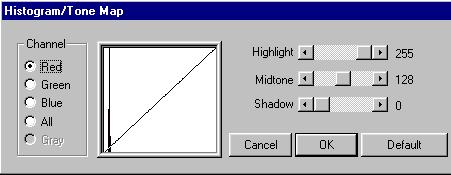 |
|
Pillar of the Community
Australia
1295 Posts |
You can adjust the brightness in Irfanview on the Image->Enhance Colors menu. |
|
Valued Member
United States
208 Posts |
quote:
Originally posted by adobero1
I've been using Irfanview for a few months. It doesn't seem to have a simple lighten/darken option like Photoshop does. Am I missing something? I copied an image of a medal I was interested in, but can't seem to be able to lighten the image with Irfanview. Have Photoshop CD, but haven't uploaded it yet to this machine.
(Adobe) Photoshop cost hundreds of dollars. Hands down Adobe Photoshop is the best image editing software on the planet. Irfanview is probably the easiest to resize in, and uses high-tech filters to preserve quality, and of course is free. It also has a neat sharpen feature. I've heard good things about GIMP from a buddy of mine. Depending on the digital camera brand, a software will be included that can do such things as brighten. Edited by RangerXLT8
10/31/2006 10:54 pm
|
|
Pillar of the Community
United States
830 Posts |
Ranger, Photoshop Elements 4.0 (or v.3.0 for that matter) cost less than $100 and will do everything a collector or dealer would need. The "Elements" programs have tons of features that most people would never use.
I just happen to have Photoshop CS-1 because I needed it for other uses, but I would not pay for it just to deal with coin photos.
|
|
Valued Member
United States
208 Posts |
quote:
Originally posted by AuldFartte
Ranger, Photoshop Elements 4.0 (or v.3.0 for that matter) cost less than $100 and will do everything a collector or dealer would need. The "Elements" programs have tons of features that most people would never use.
I just happen to have Photoshop CS-1 because I needed it for other uses, but I would not pay for it just to deal with coin photos.
Ahh ok, something for everyone! I use CS2 and it cost about 400USD. |
| |
Replies: 10 / Views: 4,397 |
|










 Posted 09/09/2006 11:46 pm


