| Author |
 Replies: 30 / Views: 5,465 Replies: 30 / Views: 5,465 |
|
|
|
Pillar of the Community
 United States
595 Posts |
quote:
Originally posted by bobby131313
janknez ~ your next job is to get out the camera manual and figure out how the white balance works so you can get rid of that ugly brown tint. Hopefully you're not just stuck with presets and you have a point and shoot manual setting available.
If you have point and shoot white balance capability, don't point it at white like they tell you. 18% grey is much better to set your WB. Plain newsprint from about 18"-24" away works beautifully.
Thanks, Bobby, for the great advice. I will work on it. I know I need better lighting too. It's a decent camera, Sony DSC-S75. About five years old now, only 3.3 mp -- but it was the biggest and best when I bought it. But the fact that I took such a good close-up is what got me so excited that I wanted to share. AND that I got that Franklin for $6. I'll keep after it. By the way, janknez is Jan Knez and is she, not he.  |
|
Pillar of the Community
United States
830 Posts |
Jan, that's a very nice pic of the Frankie !!!
I'm guessing the "brown" referred to earlier is just reflections.
|
|
Forum Dad
 United States
24232 Posts |
quote:
By the way, janknez is Jan Knez and is she, not he.
Doh! Sorry. You will be able to get really nice photos with that camera. It does indeed have a one touch white balance which means you should be able to do what I said above. Here are some details on it... http://www.steves-digicams.com/2001...ews/s75.html |
|
Pillar of the Community
Belgium
2078 Posts |
quote:
Originally posted by bobby131313
quote:
On ebay download the second adevertising itself as 300 dpi would have been a lot more detailed
I'm sorry ageka, but no it wouldn't. I'm sure you have never had the opportunity to download the same image from ebay (with the exception of the DPI) to do a real controlled test.
Thank you for putting me to think about this seemingly contradiction Murphy said when everything else fails read the introduction manual  I think I start to understand 1) My computer says the monitor is set to 96 dpi at 100 herz to avoid immage flickering and that I turned off the automatic pic enhancement which will give automatic high contrast to any internet pics being present in any internet page (Philips T104 monitor ) It also says I never calibrated the monitor etc to make a real coin show at the same size on the monitor as in real life 2) iphoto plus says it will insert information if I ask a bigger size and delete information when I ask a smaller size so not to do this Changing dpi setting will only show on printpreview because on screen there is automatic resizing to full screen It says to save everything as a Bitmap because Jpeg and all the others are lossy formats 3) ebay Belgium says they will limit to 50 000 bytes at 300x400 and do autosizing .So they advise not to size before because there is the risk of a double resizing making the coin a pinpoint in the field 4) Nobody I asked knows what their jpeg compression is set at ( mine is set at 20% compression with the option to go all the way to 80% and more ) So if you post a pic to ebay at 80% compression where the coin is a small button in the field of the very large uncropped background chances are it will never show detail on a full monitor screen and only contain 8000 bytes or so The good pics will have more then 24 000 bytes with a coin cropped so the background is minimal Why some pics announce themselves as 72-96-200 dpi has probably to do with the ebay handling of autosizing If the 72 dpi is only one inch by one inch on screen forget about photograding |
|
Pillar of the Community
Belgium
2078 Posts |
|
|
Pillar of the Community
Belgium
2078 Posts |
|
|
Pillar of the Community
Belgium
2078 Posts |
quote:
Originally posted by bobby131313
quote:
On ebay download the second adevertising itself as 300 dpi would have been a lot more detailed
I'm sorry ageka, but no it wouldn't. I'm sure you have never had the opportunity to download the same image from ebay (with the exception of the DPI) to do a real controlled test.
This pic is offered at 72 dpi I cannot see the coin and if I try to crop and blow up I only get jpeg nightmares I still am convinced if it were 300 dpi I would be able to see the coin Problem is the vendor knows nothing of Belgian coins If the reverse has the lettres qp it is a proof Otherwise it is a business strike Vendor claims the box is original which would surprise me Can I do a controlled test by asking for more dpi and how do I ask because this is obviously not a scan but a photo ? http://cgi.ebay.fr/PIECE-EN-OR-25-E...UF_W0QQitemZ260054684933QQihZ016QQcategoryZ127263QQrdZ1QQcmdZViewItem |
|
Forum Dad
United States
24232 Posts |
300 DPI.... 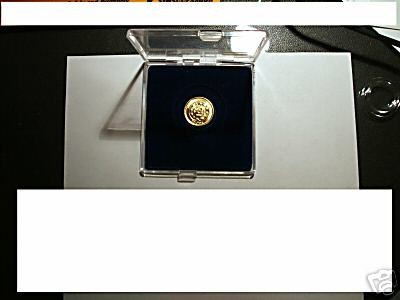 |
|
Pillar of the Community
Belgium
2078 Posts |
Thank you Bobby
I finally figured it out
My photosoftware really shows me a print preview if I manipulate dpi
So at 300 dpi it is a small high quality print
at 96 dpi it is a large low quality print but the VDU resolution does not see a quality difference . So I see a bigger coin at the same quality on screen
If the pic or scan is well focussed and the jpeg is high quality (like 25% compression max ) and the original pic fills the whole scan or photo I can reduce the dpi to 96 and blow up the pic and see more details because the screen printpreview does not degrade above 96 dpi
The final amount of information is in the file size this file was around 15 000 bytes with a coin I barely see tagged 72 dpi
For some reason files of 50 000 bytes get tagged between 150 and 200 dpi most of the time and probably have low jpeg compression whence the larger file which will show a larger printpreview at 96 dpi which on screen can be seen without quality loss
|
|
Forum Dad
United States
24232 Posts |
quote:
For some reason files of 50 000 bytes get tagged between 150 and 200 dpi most of the time and probably have low jpeg compression
Nothing "gets tagged" with a DPI according to file size. It's according to the imaging instrument (cameras will always be 72 unless you steal your FBI buddies camera, scanners are usually "settable") or the software tweaking, in which any DPI can be changed. As I said before DPI is 100% irrelevant on the Internet, it only matters for printing. I can take any image and make it any DPI and the size and quality will always be identical on your monitor. Now printing is a different story. 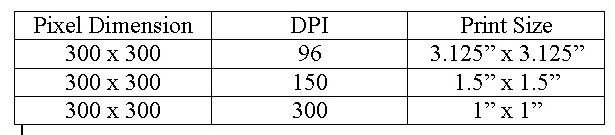 As the DPI goes up, the image gets smaller but the quality gets better. |
|
Pillar of the Community
Belgium
2078 Posts |
I expressed myself badly If you upload a file to ebay Belgium they say not to crop because their software crops it too and it might get cropped twice leaving nothing to see They also give a maximum file size of 50 000 bytes if you do not pay for extra large pics So by tagged I meant a 50 000 bytes file probably gets an "identity" tag of 200 dpi from them whilst being sized I understand if you pay extra you can upload 1.2 megabytes |
|
Forum Dad
United States
24232 Posts |
I would hope they didn't tell you not to "crop" your photos because they're going to. How in the world would they know where to crop your photos. That's pretty much absurd. I'm hoping they really said not to "compress" your photos because they do it when you upload. That would make waaaaaaaay more sense.  quote:
I understand if you pay extra you can upload 1.2 megabytes
Or pay GoDaddy $3.99/month for 200 gigabyte of space (that's 2,097,152 100KB images) and use 10MB pics in your listing if you want.(you could upload 2,048 of those)  |
|
Pillar of the Community
Belgium
2078 Posts |
quote:
Originally posted by bobby131313
[quote]
As I said before DPI is 100% irrelevant on the Internet, it only matters for printing. I can take any image and make it any DPI and the size and quality will always be identical on your monitor.
Now printing is a different story.
As the DPI goes up, the image gets smaller but the quality gets better.
I never saw that table before so I filed it away immidiately Thank you Bobby for taking the time to educate me This also explains why if you pm a vendor and ask for a better pic you get the same bad pic sometimes But when it is a scan and he pm's you back a bitmap at 300 dpi you really can blow it up because you got 750 000 bytes of information |
|
Pillar of the Community
Belgium
2078 Posts |
quote:
I would hope they didn't tell you not to "crop" your photos because they're going to. How in the world would they know where to crop your photos. That's pretty much absurd.
I am sure the instructions are translated from English now English got 6 times more words then Flemish does To the best of my translation knowledge they say not to size ( resize ) which could mean crop ( gets smaller in surface ) compression ( gets smaller in bytes ) pixel width like from 600 pixels wide down to 300 pixels wide |
|
Forum Dad
United States
24232 Posts |
quote:
I am sure the instructions are translated from English
now English got 6 times more words then Flemish does
To the best of my translation knowledge they say not to size
( resize ) which could mean crop ( gets smaller in surface )
compression ( gets smaller in bytes ) pixel width like from 600 pixels wide down to 300 pixels wide
OK, they probably mean resize. You should probably just crop it and leave it. Let them resize and compress when you upload. That way it will stay in the rawest state possible. quote:
But when it is a scan and he pm's you back a bitmap at 300 dpi you really can blow it up because you got 750 000 bytes of information
Yup. |
| |
Replies: 30 / Views: 5,465 |







 First Page


 Posted 11/02/2006 11:18 am





