| Author |
 Replies: 30 / Views: 5,463 Replies: 30 / Views: 5,463 |
|
Pillar of the Community
United States
595 Posts |
I'm just starting to experiment with digital pictures of coins. I had been scanning them, but the results of disappointing.
What is the best size picture to set it to? For general picture taking, I have it set to "e-mail" size, which I think is 640x480. On the bigger settings, I end up with pictures that are unprintable at something like 22" wide. Not to mention the space they take up.
Anyway, any advice will be appreciated.
|
|
|
|
Forum Dad
 United States
24232 Posts |
You're better off taking the pictures at the highest setting on the camera. Yes, they will be huge. Edit them afterwards down to a manageable size. The photos will be a much better quality this way.
|
|
Valued Member
United States
208 Posts |
quote:
Originally posted by janknez
I'm just starting to experiment with digital pictures of coins. I had been scanning them, but the results of disappointing.
What is the best size picture to set it to? For general picture taking, I have it set to "e-mail" size, which I think is 640x480. On the bigger settings, I end up with pictures that are unprintable at something like 22" wide. Not to mention the space they take up.
Anyway, any advice will be appreciated.
Take the pictures with the highest MP your camera will do. If not the highest, at least 4MP. Then after they are transferred to your PC, get this program. IRFanview http://www.irfanview.com/ is free and used many professionals to resize, crop and make small tweaks to pictures. Very easy to use. Edited by RangerXLT8
10/30/2006 3:59 pm
|
|
Valued Member
United States
287 Posts |
I agree with bobby131313 and RangerXLT8 and use the highest mega- pixels you can use. When you reduce the image size be sure and go small 2"x3" or even smaller. If you intend to post them on ebay or other auction sites, the average person will wait less than 10 seconds to load or they just move onto the next listing. |
|
Forum Dad
United States
24232 Posts |
quote:
When you reduce the image size be sure and go small 2"x3" or even smaller. If you intend to post them on ebay or other auction sites, the average person will wait less than 10 seconds to load or they just move onto the next listing.
True for most ebay auctions. Not true for coin auctions. In fact, it's exactly the opposite. Small images where no real detail can be seen will cause coin buyers to move on quickly. Most coin buyers actually get a little excited when they see a large detailed image starting to load and wait very patiently. Make ebay photos at least 400 pixels for half dollars and down, 500 pixels above that. Trust me, I've done surveys with our many thousands of ebay customers. Think about it, if you were going to spend $100 or more for a nice commemorative would you rather wait 3-5 seconds for this image or 15-20 seconds for this image |
|
Pillar of the Community
 United States
595 Posts |
quote:
Originally posted by bobby131313
[br
Make ebay photos at least 400 pixels for half dollars and down, 500 pixels above that.
OK, now tell me exactly what you mean by 400 pixels. In size? Diameter? My digital photography has been point and click. I tried a couple shots tonight, and I need some serious work with lighting. Just not good at all. |
|
Pillar of the Community
United States
830 Posts |
Jan, you probably need to get a photo editing program of some kind. I use Photoshop or Photoshop Elements 3.0 or 4.0. But there is a free download from Google called Picasa. It will help you to resize your photos, crop them, adjust them, etc.
In Photoshop programs, you can set the cropping size to pixels, cm., or inches of size. I usually crop all my coins to 2000 x 2000 pixels now, and put them on Photobucket (free photo hosting site) and link to them in posts here. I used to crop or resize pics to 500 x 500 pixels. That works well, too.
|
|
Pillar of the Community
United States
595 Posts |
Thanks, everybody, for your feedback. The big size did the trick. I have Picasa, I just haven't figured out how to use it yet. I did take this picture this morning and edited it in MS Paint. Not perfect, but it gives me hope for my photographic future. Image Insert: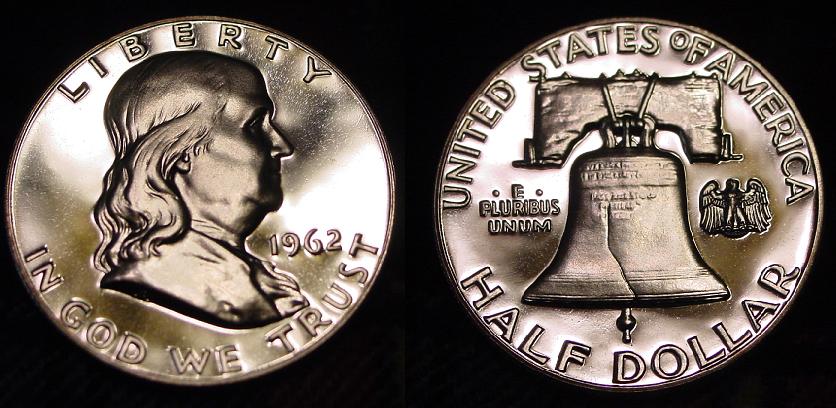 |
|
Valued Member
United States
208 Posts |
quote:
Originally posted by janknez
quote:
Originally posted by bobby131313
[br
Make ebay photos at least 400 pixels for half dollars and down, 500 pixels above that.
OK, now tell me exactly what you mean by 400 pixels. In size? Diameter? My digital photography has been point and click.
I tried a couple shots tonight, and I need some serious work with lighting. Just not good at all.
See in the pic below, there are different units you can resize in. Irfanview is very easy to use and is free.  Download: http://www.irfanview.com/Edited by RangerXLT8
10/31/2006 10:47 pm
|
|
Pillar of the Community
Belgium
2078 Posts |
In the example you posted it says 72 dpi That is really lousy 96 dpi is about the minimum I will use to try and grade a coin Most ebay vendors seem to know this because they give 96 dpi or better All my scans are at 300 dpi BMP and Jpegged for showing |
|
Forum Dad
United States
24232 Posts |
quote:
In the example you posted it says 72 dpi
That is really lousy
96 dpi is about the minimum I will use to try and grade a coin
Most ebay vendors seem to know this because they give 96 dpi or better
Ageka, he's taking photographs, not scanning. I haven't seen a camera yet that will do above 72dpi. Changing it afterward certainly won't make the image any better, especially for internet use, since I haven't seen a monitor that displays over 96 DPI. Maybe the FBI has, but not the public.  You can post 1200 DPI images all over the internet, they will only be displayed at 96 DPI Max. I can scan a coin at 400 DPI and leave it there. Take the same image, scanned at 400 DPI, and change it to 96DPI, and upload them both and they will look exactly the same on your monitor. Conversely janknez could convert his image above to 300 DPI and it would look exactly the same to you. The only thing DPI (above 72) truly affects is printing. |
|
Pillar of the Community
Belgium
2078 Posts |
I do not know how ebay pics are stored When I download a pic into my iphoto program and properties say 72dpi I know it is useless to blow it up to 200% because the only thing the jpeg will give me is the pixels falling apart on my 16 inch screen However from 200 dpi onwards I push the plus sign on my keyboard and the same pic will nearly fill the complete sreen of my monitor without any loss of definition So I can zoom in and with a 300 dpi pic I can blow it up manually another 50 % and look at part of the coin on a nearly full screen Attached is what a 300 dpi pic will tell you about an area only one tenth of the coin blown up 360 % Allthough the pixels are starting to fall apart it is very clear what a rubbing alcohol dip did to the proof surface on drying ( No harm done - an acetone dip restored the coin - but I want to know what all kind of dips do when buying ) Image:  50000 won 2 wash.jpg 50000 won 2 wash.jpg49.11 KB 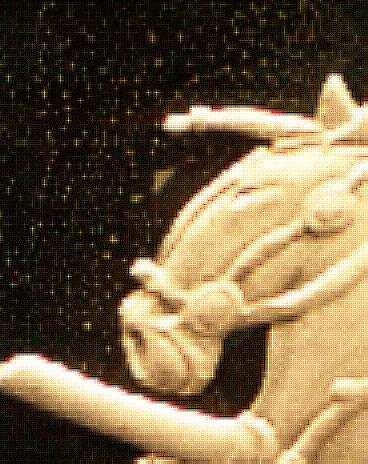 Edited by ageka
11/01/2006 1:04 pm
|
|
Forum Dad
United States
24232 Posts |
Which image below is better? 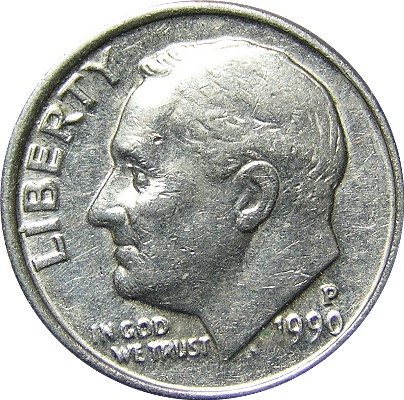 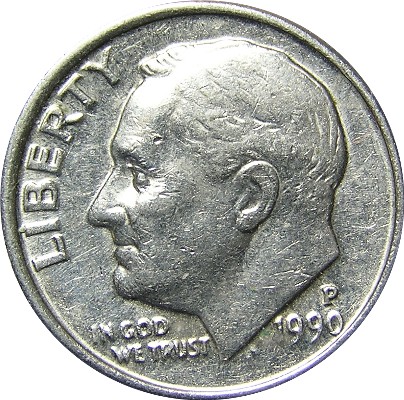 Answer: They're exactly the same. The top one is 72 DPI. The bottom one is 300 DPI. Download them both to your computer and tell me you can get either one bigger than the other on your screen with the same quality. You can't. I'm talking the same visual size, I dont care what the percentage in your program says. Get roosies head the same size on your screen for both images (72 & 300) and they will be identical. The bottom line is that you're monitor couldn't possibly care less what the DPI of the image is. It will display what it's set to display, period. |
|
Pillar of the Community
Belgium
2078 Posts |
After trying my full box of tricks I will have to answer tong in cheeck the second because both got 82600 odd bytes but the second got 16 more bytes They both open up at 474 KB in my photoprogram so my program sees no difference whatsoever I blew them both to 400 % and saw no difference On ebay download the second adevertising itself as 300 dpi would have been a lot more detailed So I should count the bytes instead of the dpi ? |
|
Forum Dad
United States
24232 Posts |
janknez ~ your next job is to get out the camera manual and figure out how the white balance works so you can get rid of that ugly brown tint. Hopefully you're not just stuck with presets and you have a point and shoot manual setting available.
If you have point and shoot white balance capability, don't point it at white like they tell you. 18% grey is much better to set your WB. Plain newsprint from about 18"-24" away works beautifully.
|
|
Forum Dad
United States
24232 Posts |
quote:
On ebay download the second adevertising itself as 300 dpi would have been a lot more detailed
I'm sorry ageka, but no it wouldn't. I'm sure you have never had the opportunity to download the same image from ebay (with the exception of the DPI) to do a real controlled test. |
| |
Replies: 30 / Views: 5,463 |








 Posted 10/30/2006 3:57 pm


