| Author |
 Replies: 12 / Views: 2,041 Replies: 12 / Views: 2,041 |
|
|
Pillar of the Community
United States
4008 Posts |
I thought it was just a temporary glitch that would work itself out, but it has been going on all day.
Everything on the left side of the page is long spelled out links rather than the compressed and condensed list column I'm used to seeing. Making the forum topics all the way to right side of the page.
It's starting to give me a headache. Is it me?
|
|
|
|
Forum Dad
 United States
24233 Posts |
There's been a few reports. Very odd. Clear your cache or do a forced refresh. (ctrl-f5)
|
|
Forum Dad
United States
24233 Posts |
3 reports, all Chrome browser.
|
|
Pillar of the Community
 United States
4008 Posts |
Whew! Ctrl-F5 works great!
Thank you!
|
|
Pillar of the Community
United States
3213 Posts |
Yeah my browser is not displaying properly either. I use Chrome also.  |
|
Bedrock of the Community
United States
14454 Posts |
yep mine did it today also, clearing the cache fixed it right up though
|
|
Valued Member
United States
397 Posts |
Same here with Chrome - will try Ctrl-F5
|
|
Pillar of the Community
United States
3213 Posts |
Yep cleared the cache and works fine now. Thanks.
|
|
Pillar of the Community
United States
3345 Posts |
I'm using Chrome and nothing is wrong.
|
|
Bedrock of the Community
United States
14454 Posts |
Quote:
I'm using Chrome and nothing is wrong. Good, but this is what it looks like 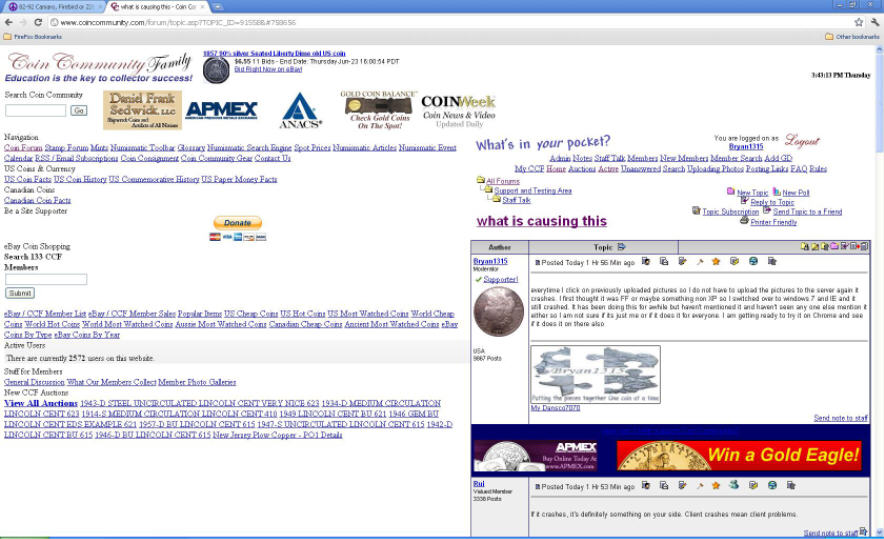 |
|
Pillar of the Community
United States
4008 Posts |
That was literally starting to give me a headache. Took 2 Ctrl-F5's (50mg) and felt much better.  |
|
Pillar of the Community
United States
609 Posts |
It was doing that to me a couple weeks ago, but now its stopped.
I use maxthon 3
|
|
Pillar of the Community
United States
4541 Posts |
mine was doing it also. Then I was trying to do the ctrl f5 and that want working. So I had to hit fn ctrl f5. laptops are different
|
| |
Replies: 12 / Views: 2,041 |
|










 Posted 06/23/2011 4:16 pm


