| Author |
 Replies: 30 / Views: 5,652 Replies: 30 / Views: 5,652 |
|
Pillar of the Community
United States
891 Posts |
|
|
|
|
Moderator
 United States
23522 Posts |
You're doing better than I ever did with the exact same camera.  Are your MR16's the only lighting in the room when you shoot? Even a computer monitor nearby is capable of messing up the white balance. I shoot in a room that's completely dark besides the actual lights shining on the coin, with my monitor turned away from the camera (I'm controlling the camera from the computer). |
|
Pillar of the Community
 United States
891 Posts |
The MR 16's are the only lights on in the room with an exception of my dual monitors about 2' from where I am shooting. I cover the window to keep out the outside light when I shoot during the day. Although most of my shooting is in the evening when it is dark. I suppose that could be some of the problem I am having. I never would have thought that. I will have to figure something out to isolate it from the monitors and give it a try. I shoot remotely from my computer also, so I have to keep it close to the computer as the cord is not that long. Thanks for the response and the suggestion.
|
|
Pillar of the Community
United States
4051 Posts |
Your pics are very nice, and the color isn't that far off. The weird thing I see is the color temp varies from top to bottom in the same picture. Top of each pic is quite cool, while the bottom is warm. I am judging this by the apparent color of the white tabs in the slab. Top tabs are bluish, bottom are reddish. When you take a picture of the reference coffee filter after MWB, does it also have this gradient of color temp?
|
|
Moderator
United States
23522 Posts |
That's why I'm thinking there's a variable outside light source, like a monitor, which doesn't shine the same as the moment the WB shot was taken. It's my experience that Canon Custom white balance solutions are very good, and I've owned and shot this same camera. But, when you're shooting at a level of sophistication that includes custom white balance, the variables which can screw up the shot are magnified.
|
|
Pillar of the Community
United States
891 Posts |
I haven't taken any pics of the filter after MWB. Been busy with getting ready for vacation. I will make some modifications when I get back and post some pics. Thanks for the help.
|
|
Pillar of the Community
United States
891 Posts |
Finally got back to it. I diffused the light and reset the white balance. Tried to calm down the hotspots some. Looks like the white balance is a little off. Then again I can't tell if it is my monitor or not. Being colorblind is not helping much either. Would like to know what anyone else thinks.   |
|
Moderator
United States
23522 Posts |
I very much like the lighting in this set; you're getting tremendous results from this camera. The background of the Jefferson looks yellowish, as if you shot it in a Dansco. If that's the case, don't change a thing.
Your mention of your monitor is telling - my two monitors are (deliberately) using slightly different color casts. Your images are "yellower" on one than the other.
Personally, I think you've got it pretty much nailed. when evaluating color balance, I generally base the opinion on areas known to be white, like the tabs in the NGC slab you're picturing. Their color in your pics is perfect white, making me think your color adjustment is spot-on.
|
|
Pillar of the Community
United States
4051 Posts |
Much better than before. Seems your lights have some color variation across their field. This might actually explain some other comments folks have had about LED lighting being hard to WB. I almost never use the LED's with direct lighting, instead diffusing them through vellum, which equalizes their WB a bit and increases apparent "size". This may be why I have no issues with WB using LED's.
I'd personally prefer to see your lights at a higher angle to the coin. You'd get better luster and color. The toning on the quarter is showing up as a dull oxidation with the low lighting angle. Bring the lights up a bit and the color will come out rather than the dull surface finish.
Contact me for photographic equipment or visit my home page at: http://macrocoins.com |
|
Pillar of the Community
United States
891 Posts |
Thanks guys for the help. I also like these better than the first group. Diffusing the lights seemed to have helped. The quarter has been put into a dansco album since I shot the first photos. Glad to see I am on the right track. I will leave the white balance alone.
As for the lighting angle I will play around with it and see what results I get. Other than that I really don't think I can or need to get much more out of this camera. Again thanks guys. Happy camper here.
|
|
Pillar of the Community
United States
4051 Posts |
Post your final results if you make any changes to lighting or other factors!
Contact me for photographic equipment or visit my home page at: http://macrocoins.com |
|
Pillar of the Community
United States
891 Posts |
Here are some updated pics. I raised the lights up as far as I could. I also went from f4.5 to f5.6. Moving the lights up seemed to have helped. I also threw in a cent to see how the copper showed up. I noticed that the copper was slightly out of focus, so I leveled my camera which was off slightly. Pics were before leveling. Now when I took the pics I only filled the viewer up about 75%. Would it be better to fill it up as much as possible?    |
|
Moderator
United States
23522 Posts |
Quote:
Now when I took the pics I only filled the viewer up about 75%. Would it be better to fill it up as much as possible?
I don't see any need in your case. These images are very large, clear, and more than sufficient to grade from. What picture setting are you using with the camera? Having mentioned going to f/5.6, I imply that you're using Aperture Priority, setting aperture and allowing the camera to determine exposure. This (and I express only my own opinion here, not necessarily a fact) has led to images slightly brighter than I'd create for myself. I note from EXIF data that the Lincoln was shot at an exposure of 1/30. I took that image into the Gimp, and manipulated the Level to illustrate what a switch to 1/60 or 1/80 might do for this coin: 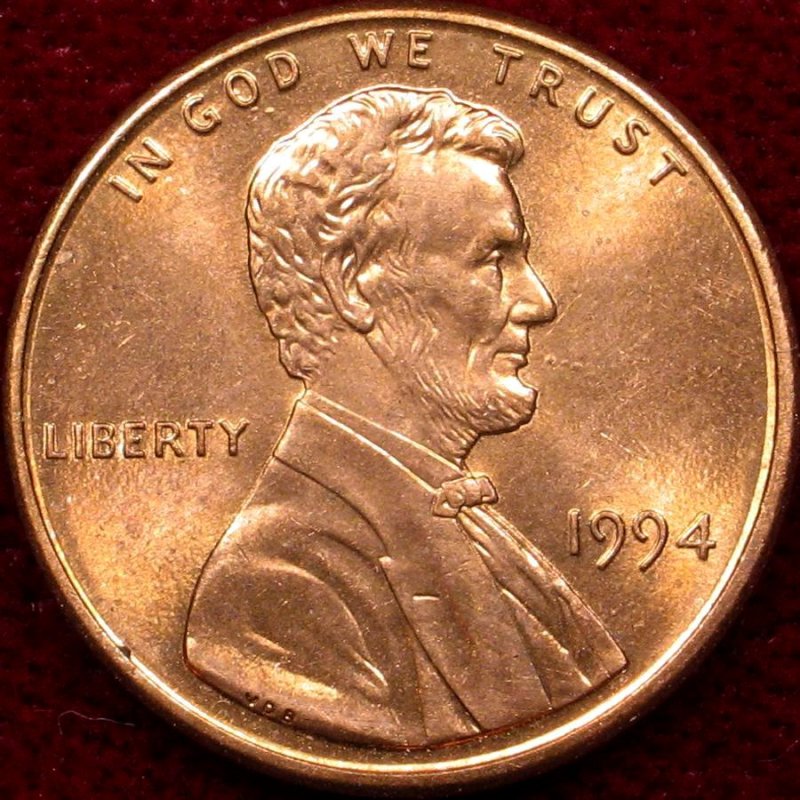 I manipulated only the brightness of the image - the color and sharpness level are precisely what they were in the one you posted. |
|
Pillar of the Community
United States
891 Posts |
All of the pics were shot in manual mode. All at ISO 100 & F5.6. I adjust from there until the exposure zero's out.
The quarter was set at 1/200 and the cent was set at 1/60. Don't know why it said 1/30.
|
|
Pillar of the Community
United States
891 Posts |
Edited by Southern Yankee
08/25/2011 1:36 pm
|
|
Pillar of the Community
United States
3076 Posts |
very nice results, they are so minimal, that only these guys can cretique it to perfection....
|
| |
Replies: 30 / Views: 5,652 |








 Posted 07/09/2011 5:56 pm


