| Author |
 Replies: 528 / Views: 88,714 Replies: 528 / Views: 88,714 |
|
|
|
Valued Member
United States
70 Posts |
Cool; I appreciate the solid advice. Here are a few of the images that I'm hoping to improve upon. I'm happy with the images, but I know they can be better. Kinda like the images that you're producing.    |
|
Valued Member
United States
70 Posts |
My bellow came in today and I went and got 3 Jansjos from IKEA. They were only $9.99 each and they had hundreds of the things; two pallets full. I decided to get black, just so the poles wouldn't show up in a reflection. So now all I'm waiting on is my lens and the adapter. 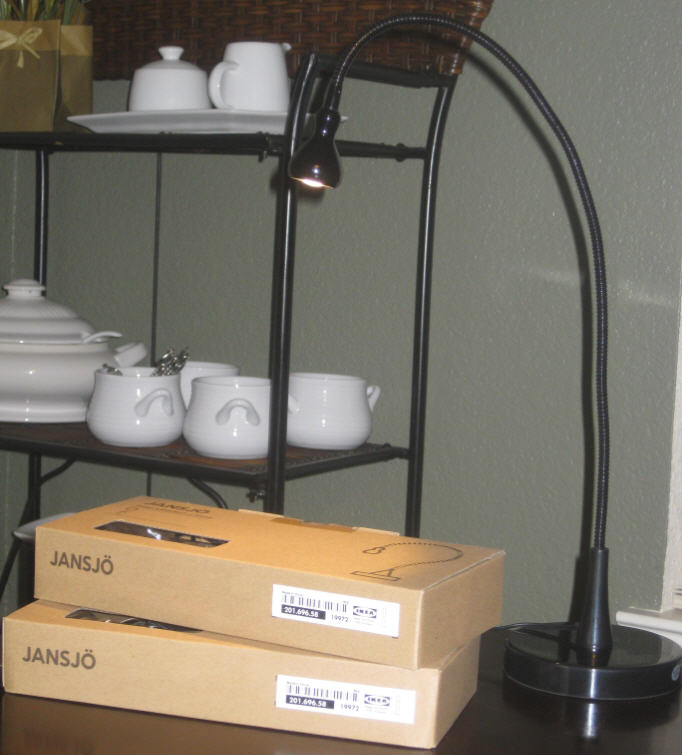 |
|
Valued Member
United States
70 Posts |
Alright tonight I finally took my first pic with my el cheapo setup, and right out of the gate its delivering solid images. I ended up getting an El Nikkor 80mm f5.6 enlarger lens because its a six element lens, opposed to the El Nikkor 75mm that only has four elements. And at under $50 it was a no brainer. Attached is the a 1953 D cent on top of my Rubik's Cube  The image is unedited and is exactly as shot from the camera.  I want to give a sincere thank you to all who have contributed to this photography forum, most notably rmpsrpms. You've got a true talent as a skilled photographer as well as an educator. You have very generously shared your knowledge to help us. I have a long road ahead of me, but the old saying is true in that getting there is half the fun. |
|
Valued Member
United States
70 Posts |
Hmm, for some reason photobucket didn't put the full size image in my album. The actual image can zoom into some serious macro level imagery with high levels of clarity.
|
|
Pillar of the Community
  United States
4051 Posts |
|
|
Pillar of the Community
United States
9811 Posts |
Wow, I'm liking your shots too, you will love the flexibility of those Jansjo lamps! I know I do. What is your set up looking like, to get the nice black backgrounds? I can tell you are cropping the coins in a circular mask, but the edges also look pretty black as well, are you shooting over felt or velvet? I like the photoshop template you are using, very similar to BlueCC photos with the slab label behind the coins, very professional looking. I'm still trying to get an El-Nikkor 50mm off ebay I keep getting outbid, and I was glad to on one last week, as I read the filter threads were damaged, and I want to mount it reversed on my bellows. "Buy the Book Before You Buy the Coin" - Aaron R. Feldman - "And read it" - Me 2013! ANA Life Member #3288 in good standing since 1981, ANS, Early American Coppers Member (EAC), Colonial Coin Collectors Club member (C4), Conder Token Collector Club member (CTCC), Civil War Token Society (CWTS) member, Liberty Seated Collectors Club (LSCC) & Numismatic Bibliomania Society member (NBS), USMex, Member in good standing, 2¢ variety collector. See my want page: http://goccf.com/t/140440Edited by westcoin
04/24/2012 03:33 am
|
|
Valued Member
United States
70 Posts |
It's actually an amateur method of doing things, as I know I could probably do it all in 1 application, I just don't know how...so I use 3 applications...Corel Paint Shop Pro X2 to straighten the coin in the image and to enlarge. Then I use SnagIt to capture that image (reduces size) and then crop it to a black square background. Then I use Gimp 2 to place all the images onto a large black rectangle canvas background and add text if not a slab. It sounds like a lot but I can do all the steps from start to finish in less than 5 minutes. For the background I typically have a small black dowel that's mounted to a square base that's covered in non-reflective black fabric. I place the raw coin on top of the dowel so the lens only focuses on the coin and blurs the entire background. I still need to build another setup like that for the el cheapo setup. I'll take a pic of my entire setup later and you'll see that I'm keeping in the spirit of the thread by being an el cheapo  |
|
Pillar of the Community
United States
4051 Posts |
Good buy on the 80mm EL Nikkor for <$50. They usually go for $100 or more...Ray
Contact me for photographic equipment or visit my home page at: http://macrocoins.com |
|
Valued Member
United States
70 Posts |
Ok as promised, here is my El Cheapo setup... A targus tripod (Target $22), 2 Jansjos lights (Ikea $20), wood block and dowel (Lowes $3), ConnectMyNikon software (Internet $9), Nikkor 80mm f5.6 Enlarger Lens ( ebay $44), Spiratone Rapid Rail Macrobel Bellows ( ebay $49), M43-M39 Lens Mount Ring Adapter ( ebay $2) all for a grand total of $149.    And here is the reverse of that 1953 D cent.  |
|
Valued Member
United States
70 Posts |
BTW, not to get off topic, but does anyone know how to post/view the full size image to photobucket? For some reason it always seems to scale mine down when I post it here. You know, so if someone wants to see the full image, they click it and they can truly see the image at a macro level.
|
|
Pillar of the Community
United States
4051 Posts |
Very nice setup for $149 and producing good results.
Now, let's talk about a couple things...
1) What camera are you using, and what's the original image size?
2) How are you downsizing for web publishing?
3) What post-processing are you doing?
Ray
PS...also, what aperture setting are you using?
Edited by rmpsrpms
04/24/2012 11:10 pm
|
|
Pillar of the Community
United States
4051 Posts |
Quote:
BTW, not to get off topic, but does anyone know how to post/view the full size image to photobucket? For some reason it always seems to scale mine down when I post it here. You know, so if someone wants to see the full image, they click it and they can truly see the image at a macro level. I don't think you can. I am a "premium" member or whatever they call folks who pay them $25 per year to get their best service and storage levels, and while I can upload a file and can see it at "original" size up to very large image sizes, folks can't view my files at full size even if they go to my folders, and I can't post at full size. So I gave up and stopped uploading anything beyond 1600x1600. Ray Contact me for photographic equipment or visit my home page at: http://macrocoins.com |
|
Valued Member
United States
70 Posts |
Hi Ray,
1) Nikon D5000, image size 4288 x 2848
2) The two images of the 1953 D I just uploaded to photobucket
3) The only post processing I did on the 1953 D was straighten. Other than that they are exactly how I shot the image. These are jpg format BTW
4) For aperture it's one click between 5.6 and 8...and this lens goes to 32
Ah bummer that photobucket won't allow the full size image...as you're well aware you know that a usb microscope isn't needed because the zoomed level of detail on these images is just insane.
|
|
Pillar of the Community
United States
4051 Posts |
OK, then a couple suggestions and a question...
1) Use ViewNX or ViewNX2 or whatever you like to resize the images to 1072x712 instead of letting Photobucket do the resize for you. They are not optimizing the resize ratio
2) After you resize, do a sharpening of "1" to compensate the resizing algorithm
3) What is straighten?
Contact me for photographic equipment or visit my home page at: http://macrocoins.com |
|
Valued Member
United States
70 Posts |
Cool; will do for 1 and 2. I'll do some research to see what ViewNX is all about.
3) Straightening is rotating the coin image so the mottos are perfectly horizontal.
|
| |
Replies: 528 / Views: 88,714 |





 First Page
 Previous Page


 Posted 04/12/2012 11:30 pm


