| Author |
 Replies: 223 / Views: 43,299 Replies: 223 / Views: 43,299 |
|
|
|
Pillar of the Community
United States
1620 Posts |
when looking at it in hand the 43 looks like the reverse in the pic when I took some close ups it was like real spotty odd looking so I guess it was reprocessed its ok ill keep it for my dont buy coins that look like this lol thanks again coop.. I only wiped a few tears away lol.
|
|
Pillar of the Community
 United States
1331 Posts |
Here's my recently purchased BU 1943 steel. On a white background with built in LEDs on low. With the USB camera setup you have to experiment with both a black and a white background as well as light intensity. Not enough light and or black backgrounds on this coin makes it appear glossy.. Too much light will bring out all the surface imperfections. Low intensity LEDs on white background works well when using my scope to photograph BU coins. 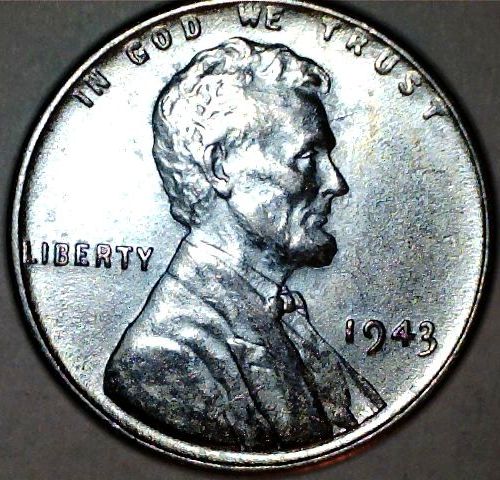 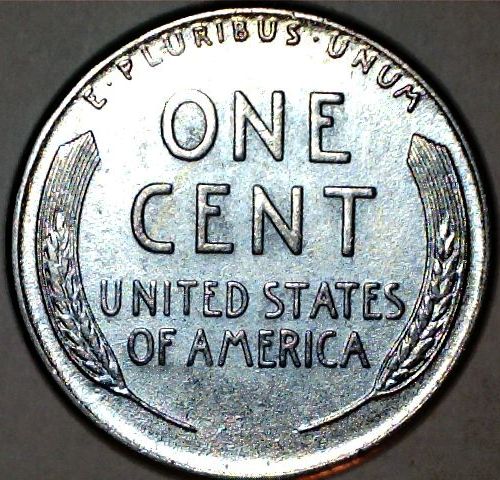 |
|
Valued Member
United States
242 Posts |
Looks like I gotta get one lol. Shoulda ordered it soon as someone said it worked under 64bit. Now I've wasted a day! And tomorrow is Sunday! Thats two! Noooo....  . |
|
Pillar of the Community
United States
1620 Posts |
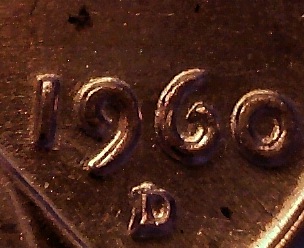
I've been messing with it a ton I'll post a pic of my 1960 D Small date 1mm 102
|
|
Valued Member
United States
242 Posts |
I broke down and paid for two day shipping. New egg claims they dont provide third party shipping so I dont know if that means I just wasted 15$s or thats just their legalize for dont shoot us if the shipper screws up. Hopefully I'll get it by Tuesday.
|
|
Pillar of the Community
United States
3540 Posts |
Mine is in hand. Over the next week, shall see what I can do with this. Thanks for the heads up!
|
|
Pillar of the Community
United States
1331 Posts |
That's awesome, post pics we can help each other
Get better at it.
|
|
Pillar of the Community
United States
1620 Posts |
|
|
Pillar of the Community
United States
1331 Posts |
Looks great to me daniels... Is this just using the scope by itself with the built in light? or are you using any additional software or lighting? Looks really good!!
By the way I picked up a cheap $19 goose neck LED table lamp at Staples. I am using that as an alternate light source for taking pictures of coins through the Mylar windows. I have eliminated the glare you get from using the scopes lights. I was wondering if LED light is closer to cool white or natural daylight? Because the light from the LED on the scope, and the LED lamp, give better results than any other lamps I have used.
|
|
Pillar of the Community
United States
844 Posts |
Hey all. Hope you don't mind my intrusion. I have a Carson Zorb and I noticed in an earlier post something about the laptop recognising as a web cam. When I tried to install the program for mine, it went to web cam. Can I somehow get that straightened out so my microscope cam will work? I'm not too bright with computers, so English please! lol Just to clarify; Everything was turned on and plugged in, but instead of the microscope being on, the web cam was doing the viewing.
|
|
Pillar of the Community
United States
1331 Posts |
Jaymon74...Well I have no idea what kind of laptop or operating system you are running but, assuming its Windows...Then....With the microscope running, look in the program tray at the bottom right of the screen. Highlight the web cam software icon with the mouse pointer. Then Right click the program icon so the drop down menu opens. Then Select exit, this will close the webcam software. If nothing happens try restarting the microscope and re-installing the software for it. You can also try temporarily disabling the webcam in Device Manager...These are probably some of the simpler fixes to try. If this doesn't get it working you may have to take a crash course in computers for the next troubleshooting steps :) Good luck.
|
|
Valued Member
United States
242 Posts |
Whatever software your using to view the 'video' that is using the webcam instead of the microscope should have an option somewhere that lets you select the source. Look for something in the menus like "Options" or "Preferences" or "Settings". Should see a option somewhere, might have a little arrow next to a box, that has the name of the web cam. Should be able to click the arrow and change it to the microscope. Another option is to just unplug the webcam. The software should by default, depending on how it was written, look for the next 'video device' and choose the microscope. *Edit* For unplugging it, when you plug it back in you'll probably want to unplug the microscope unless you 'get lucky' and dont need to. Keep in mind this isn't a perfect solution so dont unplug the webcam if you need it for something majorly important and may not have the time or help to get it working again. (I used to be in a long distance relationship and having the web camera go down and take 2 hours to get back up wasnt fun.  . Not saying thats gunna happen but I prepare for the worst and hope for the best. Still better solution is to find the option that lets you choose the source. Unless the software is REALLY cruddy (unlikely) its there somewhere. Edited by Schwanke
09/25/2012 12:20 am
|
|
Pillar of the Community
United States
1331 Posts |
Its a laptop.. The webcam is built in, you can't unplug it.
|
|
Valued Member
United States
242 Posts |
Depends on the laptop. None of my laptops have ever had built in webcams. I've always bought a usb one and plugged it in and clamped it to the case. Particularly because you cant adjust the angle of the camera and I sit at wierd angles sometimes and sometimes like to move the camera around the room to show people things in my environment.
|
|
Pillar of the Community
United States
1620 Posts |
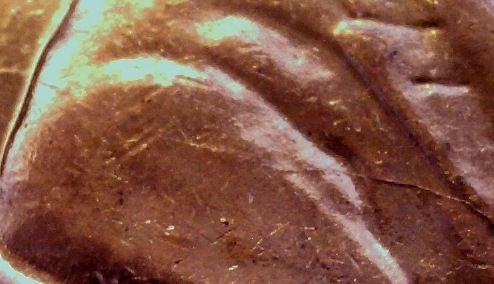
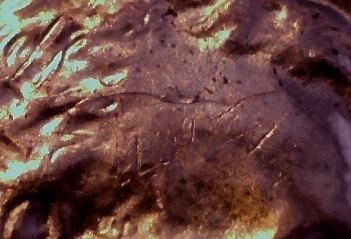
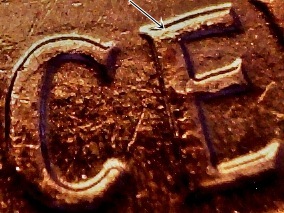
Harry I'm using just a regular table lamp sitting on my computer desk it has a shade but what I found helps is angling the scope a bit. sometimes away from the light and sometimes towards the light. Also I kinda cover the lamp with a envelope lol and when I take the picks I adjust the brightness on the software and then I save it to my laptop and do some fine tuning with a free program I seen on a post that someone uses. I only had the webcam pop up one time and I hit the red button on the camera before I ran the software and it popped up Maybe its a default setting Idk.
|
| |
Replies: 223 / Views: 43,299 |







 First Page
 Previous Page


 Posted 09/23/2012 12:25 pm