| Author |
 Replies: 223 / Views: 43,300 Replies: 223 / Views: 43,300 |
|
|
|
Pillar of the Community
United States
844 Posts |
Thank you all for the input on the computer issue. Yes, the web-cam is built in. I'll have to try all this when I get home from work. I won't have much time to work on it though. I have bowling league tonight, just remembered. If I get it to work, I'll take some pictures and post.  Btw the pics I've seen posted on this thread look amazing! Edited by Jaymon74
09/25/2012 05:58 am
|
|
Valued Member
United States
242 Posts |
Well I got mine. Got it plugged in. Windows 7 64bit recognizes it. Even works as a web camera. But the software wont see it and I cant find any freeware software that takes advantage of the high resolution. They all wanna stop at 640x480 or something similar. :( I'll keep attacking the problem but I am running out of ideas. I tried finding new drivers. Nothing listed for windows 7 64bit except one site that I think may have just been one of those search term scammers that makes you think they have it but they dont. They wanted me to download some piece of software that scanned my whole computer for driver upgrades. No thanks. Supposedly Irfanview lets you capture video at any resolution the camera supports but it only wants a TWAIN support and if I cant find basic drivers finding TWAIN drivers (outdated capture technology) is highly unlikely. Anyone have any ideas? Software to try if the default doesn't work? Places to get 64bit drivers? Thanks for any help. Looks good as a webcam but obviosly need the high resolution. |
|
Valued Member
United States
242 Posts |
I got it to produce an image. Turned out the setup never ran properly from the driver disk so it didnt install the drivers that let it work with the provided software. After I ran DrvSetup it installed 'microscope drivers' (as opposed to window's webcam drivers I guess) and now the software recognizes it. Admitedly I dont think much better then the software I found for free but I'll see how it goes. Here is a shot of a 2011 penny reverse around the designers initials. The first is the raw on low LED light with only minimal ambient light. (Sunlight behind curtains across the room coming in, mostly shadowy where I am sitting. Thats all I can do.) For the second I took the first into gimp and used the color levels option and picked a white spot that was white in the photo, particularly the lower right corner where it had been sitting on the cd sleeve that came with the camera. For doing detail work where I want to check out something better then my eyesight I would say this is great. Or for situations where you want detail more then a whole coin or accurate color. I personally have no clue how to do much of any post processing in software unless someone can spell it out for me in gimp or something similar and since this 'camera' doesn't have a 'white set' like my real one does, I am mostly stuck with whatever it gives me. Comments welcome. Here's the images: 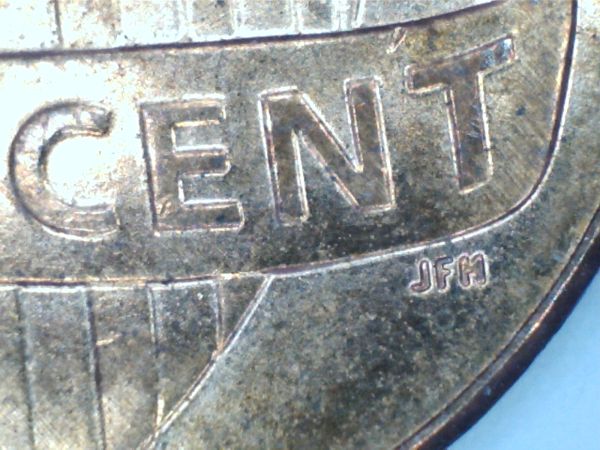 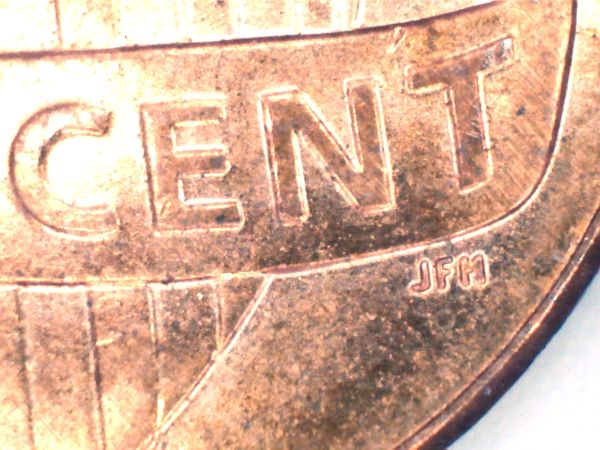 *EDIT* An here is a shot of the dime that I've been wondering 'whats wrong' with the mint mark. Clearly it should be a P but the the internal cut out of the top of the P is missing and I was wondering if maybe its double stamped or something. Comments? 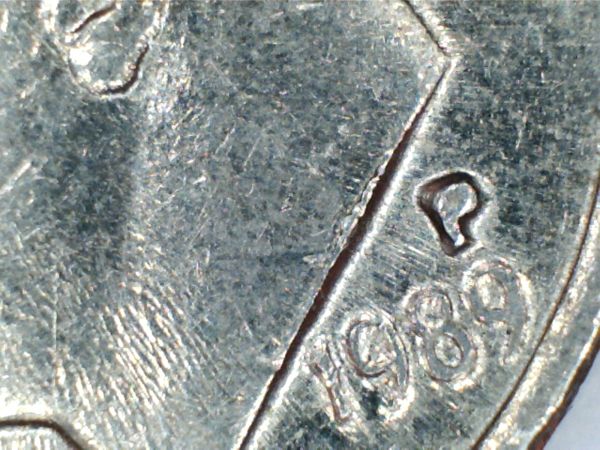 Edited by Schwanke
09/26/2012 12:28 pm
|
|
Pillar of the Community
 United States
1331 Posts |
I think we can attribute a lot of technical problems with this to either bad installation or user error.. But Wow looks like you've done a Whole Lot in a Really Short amount of time. Just an observation but, I assume you have another camera setup you've been using before this, and just curious as to how much time and experimentation you invested in that before you got a good shot? And how many materials and improvisations did you have to do to get a "set up" built? Here's my point, I think with an equal investment in time and experimentation you can achieve a variety of good quality professional results. And do it without an elaborate hodgepodge set up of lights and improvised equipment. Basically just using the scope and a light source. I took a few "quick" photos of a similar 2012 Lincoln Cent on white background as a demonstration. These are RAW photos, no post processing. Scope software on default settings and auto whit balancing. The only thing I did was I re-sized them for the web with a program that came with Windows 7. I could have tweaked them further and made them look better with the same program, but I chose not to for this demonstration. The first photo is with the scopes LED lights on Low. As you can see the lights, even on low, are way too bright for shiny coins. And since the scope is so close, the reflection floods back into the lense and washes everything out. The second shot is with the LED off and my table lamp as the light source. The third photo is same as the second except I used a white envelope to reflect the light directly onto the coin. Very quick simple setup. Equipment used; Scope, Lamp, Piece of paper..... 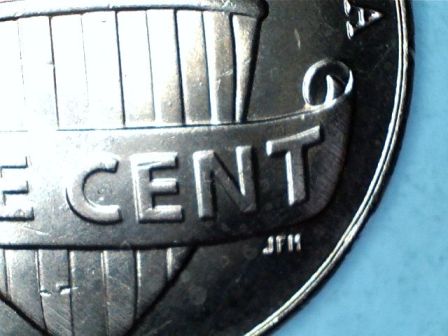 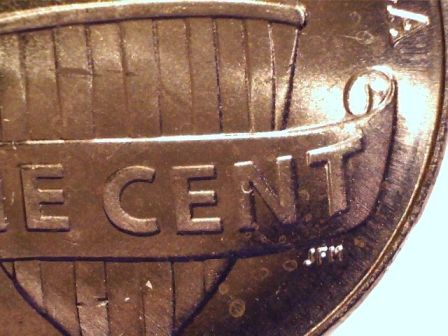 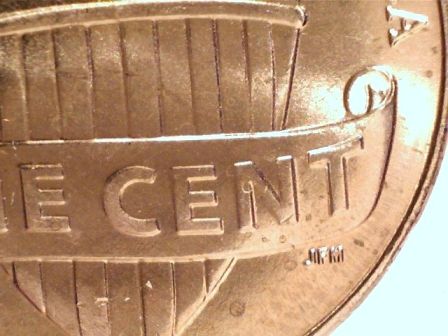 |
|
Valued Member
United States
242 Posts |
I'm confused. Who are you talking to Harry? I didnt do that much at all, definitely not a Whole Lot. Though it was a Short Amount of Time not counting the fact that the installation instructions in the badly written Chinese English manual were wrong. This is what I get when all I do is take a shot without the LEDs using my table lamp. 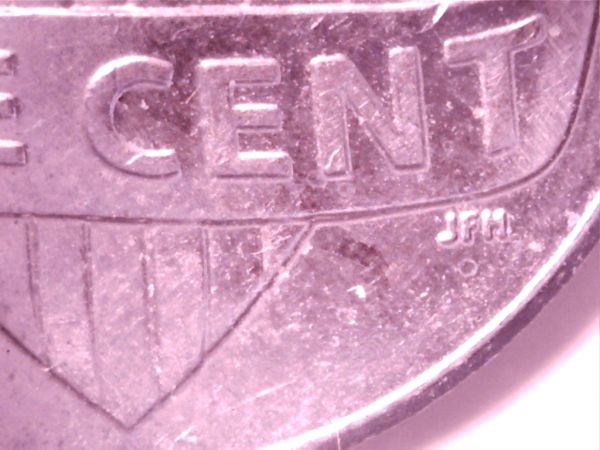 Still think the color is wrong and the catpure is grainier then yours. So 'default' settings are different for different configurations I guess. Though it does look like my system zoomed more by default but I dont know how much of that is just the difference in cropping/converting for posting on the forums. Anyway sometimes I think you sacrfice something by doing it 'the easy way' when a more robust solution produces a more intense result with finer artiquities. Ive also noticed when the microscope is plugged in, with or without the capture software running, my mouse stutters when moving across the screen. When I unplug it it goes away. Is your system 64bit windows 7? That may make a difference. All the references I saw for this microscope on the internet showed it was pretty much developed for 32bit Vista at the most. So 7 may be doing things differently enough to cause the subtle changes and differences. *EDIT* Now this is what I get when I use mostly just the LEDs with auto white balance. I think this looks great though the color may be off a little bit. (Considering the blue on the outside should be white lol) 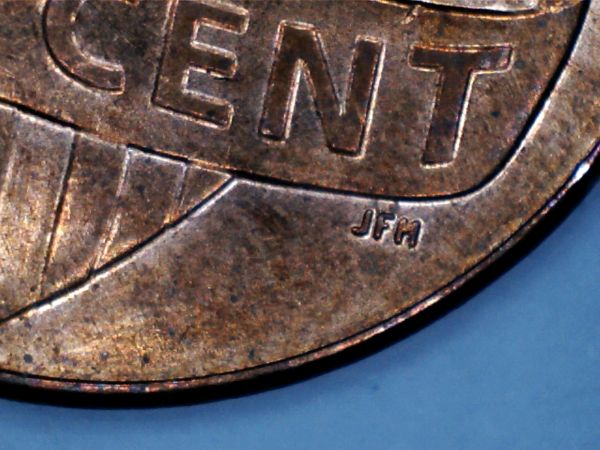 Unless I get inspired to fool around some more or someone makes a comment that gets me inspired I think I am going to wait for the jansjo lights on friday and see if using one of them will better work this out. I cant position the table lamp where I want it where the jansjo's will probably be pretty much placeable anywhere. Probably start replacing my other table lamps with them in this area. Edited by Schwanke
09/26/2012 7:56 pm
|
|
Pillar of the Community
United States
1331 Posts |
Quote:
I'm confused. Who are you talking to Harry? You  Quote:
I didnt do that much at all, definitely not a Whole Lot. I was refering to your play by play of the install, troubleshooting, setup, search for drivers, search for software, resolution problems, post processing, comparisons, reviews... .. Sounded like a lot of work. Quote:
Is your system 64bit windows 7? That may make a difference. All the references I saw for this microscope on the internet showed it was pretty much developed for 32bit Vista at the most. I'll try to make this brief, I don't want to turn this into a computer repair thread 64 bit operating systems with 64 bit processors will run both 32 bit AND 64 bit applications with no problem. The reason that 32-bit will always run on 64-bit is that the 64-bit components have been designed to work that way. So the newer 64-bit systems are backward-compatible with the 32-bit systems (which is the main reason most of us haven't moved to 64-bit software). An example of backward compatibility is Windows 64-bit. It has software called WOW64 that provides compatibility by emulating a 32-bit system. Both Windows 7 64 / Vista 64 Support 32-bit Applications. But not forward compatible, meaning you won't be able to run 64 bit on 32 bit....... Did you read my comment on how 90% of issues are installation or user error? Quote:
This is what I get when all I do is take a shot without the LEDs using my table lamp. Maybe I forgot to mention that the table lamp I am using is an LED lamp.. The scope is geared by default for LED lighting. Quote:
Still think the color is wrong and the capture is grainier then yours. So 'default' settings are different for different configurations I guess. Though it does look like my system zoomed more by default but I don't know how much of that is just the difference in cropping/converting for posting on the forums. One reason your color is off may be you are using the wrong lighting for this USB, it's default settings are geared for the LED lights. I couldn't get color right with anything but daylight and LED..... Zoom can not just be adjusted through the software but also simply by moving the scope further or closer to coin...... There was no cropping all I did was re-size photo to under 400x400 pixels, did absolutely nothing to alter the look of the photo, just made it smaller. |
|
Pillar of the Community
United States
1620 Posts |
Well that's a ton of typing y'all did lol its late but what I did read when taking the pics with bu or proof coins all I use is a lamp that would be used for house lighting and angle the scope away from the glare then adjust the brightness contrast and sharpness before you take the pic every coin is different and your gonna have to adjust as needed and I'll save my pic to my coin folder and make a few more adjustments in a free program called photo scape its awesome and for free it has a lot of options
|
|
Valued Member
United States
242 Posts |
Quote:
I was refering to your play by play of the install, troubleshooting, setup, search for drivers, search for software, resolution problems, post processing, comparisons, reviews..... Sounded like a lot of work.
Ahh no. It wasnt. that was just following a logical progression from A to B to C to solve a problem to its solution. For me a lot of work is recoding a 100,000 entry database for an MMORPG while its running live and trying not to crash the economy of the gamers already playing. Ask me about my 5 million dollar hammer LOL. After all that, "A Lot Of Work" took on a whole new meaning lol. Quote:
64 bit operating systems with 64 bit processors will run both 32 bit AND 64 bit applications with no problem.
Actually thats not entirely true. I have several programs that do not run on a 64bit system and only run on 32bit. One particularly I had to contact the creator and have him add code for the 64bit version of windows 7 because he didnt realize there was a market for it. If it were truly backwards compatable then we could run the original versions of Doom and Quake because they all ran on XP and Windows 7 is supposed to be backwards compatable with Vista and XP. Even with the compatability modes checked they wont run anymore with out an emulator. To keep with the idea of not turning this into a computer repair thread lol my reason for stating all of that Not a Lot of Work was for people who may or may not be having similar problems. If I ran into the problem someone else might have too. Some of the point of the previous parts of this thread in my opinion was geared towards installation and setup issues so I thought I was just contributing to the thread lol. doesn't especially matter. We can drop now if we like hehe. Quote:
Maybe I forgot to mention that the table lamp I am using is an LED lamp.. The scope is geared by default for LED lighting.
Yah. Would have been usefull information hehe. We dont have any lights in the entire house that LED so I hadnt even thought of LED lightbulbs for table lamps until I saw the Jansjo's and even then I didnt know they were that common. We're mostly still using the old fashion filament ones hehe. Quote:
One reason your color is off may be you are using the wrong lighting for this USB, it's default settings are geared for the LED lights. I couldn't get color right with anything but daylight and LED Yeah thats why I am waiting for the jansjo's. They are a good chance to try some serious high qaulity LED lighting. It hit me the reason the white background turned blue is the LEDs on the microscope have a blue tint to them. That was the problem I had trying to buy 'white' LED lamps in target and using them for my box mujumba, they were all blue and not really white. @daniels Sounds good. I'm hoping to pull off no need for post processing with the jansjo's but if its needed I'll look into your software. :) |
|
Pillar of the Community
United States
1331 Posts |
Quote:
Well that's a ton of typing y'all did lol   And I'm exhausted for it, But seriously, without any further beating the dead horse,  Especially with all the pros and cons, I think if someone actually just takes the time to carefully read everything that's already been written in this thread. That should be enough to help most people in the setup and use of this microscope. At the end of the day it's only a $26 device, it won't jump out of the box, install itself and start snapping magazine quality photos... Yet with a little patience and practice it can give results comparable to some more elaborate and costlier camera setups. Quote:
all I use is a lamp that would be used for house lighting and angle the scope away from the glare then adjust the brightness contrast and sharpness before you take the pic every coin is different and your gonna have to adjust as needed and I'll save my pic to my coin folder and make a few more adjustments in a free program called photo scape its awesome and for free it has a lot of options I think I asked this before, but does anyone know if cool white or daylight colored compact flourescent lightbulbs are in the same spectrum as LED light? After experimenting with the post processing I found that if I simply used the LED light and left the camera on its default settings, I was able to more accurately capture color in raw photos. And eliminated alot of time spent making adjustments to settings and in post processing.. So in the absence of an LED lamp one could probably just use a cool white or daylight CFL bulb. Right now using only LED light, the ONLY post processing I do is optional. That is Auto Correct, (that only makes the the image crisper), or re-sizing or cropping.. Thats it.. And I use Microsoft Office Picture Manager.. Quote:
It hit me the reason the white background turned blue is the LEDs on the microscope have a blue tint to them.  Hmm I think it may also be due to the Auto White Balancing over compensating for the huge flood of light being reflected back into the lense. That is why I switch the built in light off and use the LED lamp that is placed off to the side... With BU and Proof coins, Placing the scope directly over the coin, with the built in light on, makes the coin act like a mirror...If you look at my first photo you see the background also looks blue and the coin looks like shiny steel.. |
|
Valued Member
United States
242 Posts |
Quote:
Hmm I think it may also be due to the Auto White Balancing over compensating for the huge flood of light being reflected back into the lense. I turned off the auto white balancing because it gave that steel cent look to it. But the ones where the coin looks brownish to reddish, those are all without the AWB and the background still looks blue even though its always white. I used both a shiny white and a matt white surface and both came out about the same. Btw, my Jansjo's arrived today, they look like LED flashlights on snake poles lol. Reminds me of the creatures from the original Charlie and the Chocolate Factory books, think it was the sequel that had them lol. Look like they definetely could be helpful though. Given that its Ikea and not a knock off Chinese company making them, I'm hoping the light thrown by them is actually white and not blue tint. We'll see I'll work on those later. |
|
Pillar of the Community
United States
844 Posts |
This is great information on how to set up the microscope camera. I was able to get mine to capture images finally. Now I think I have to do what was said earlier and drop the pixels to 400x400 so I can post pics on here. I didn't do that and the pictures would be about an inch small to post. lol. like I said before; I'm not computer smart at all. great images I'm seeing posted though. I hope to get mine to look that good too. This is what I came up with. 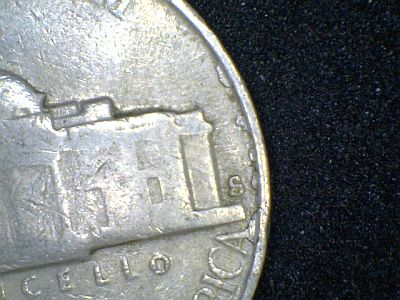 Edited by Jaymon74
09/27/2012 7:01 pm
|
|
Pillar of the Community
United States
8534 Posts |
Schwanke I'm betting the pink pics you took are from incandescent light bulbs. I changed out my overhead room light with them and my pics immediately went pink. I freaked tiill I realized it must be the incandescent and put my cfl's back in. That was it.
Oregon coin geek.....*** GO BEAVS ! ! ! ***
|
|
Pillar of the Community
United States
1331 Posts |
 Not bad Jaymon74. The size of that photo looks about right. I read in the forum rules the recommended size is about 500 pixels on the largest side. What I do is I keep my scope set to default which is 640x480 resolution. Though I could go larger that is fine for viewing and storing them on my computer.. |
|
Pillar of the Community
Australia
674 Posts |
I have been using 'Photoscape' software for the last week to crop some photos taken with a USB microscope (200x) and found it to be if not perfect at least great fun.! The ability to 'practice' is a great learning tool and then to repair by hitting the 'undo all' and start over until you are happy with the results works for me. Adds a new dimension to our hobby.!
|
|
Pillar of the Community
United States
1620 Posts |
Amazing how we can all come together and make this camera work better cause I know I can't afford a expensive camera that does all the work I enjoy doing it this way cause the final product in my eyes looks just as good as a expensive camera photo lol I would recommend this camera to anyone. what I think would be cool too if ccf had like a live viewing like skype but for the usb camera
|
| |
Replies: 223 / Views: 43,300 |








 First Page
 Previous Page


 Posted 09/26/2012 10:22 am


