| Author |
 Replies: 78 / Views: 12,265 Replies: 78 / Views: 12,265 |
|
|
|
Bedrock of the Community
United States
79681 Posts |
The pictures look great ngs428! I think you did a great job editing the pictures as well!  Errers and Varietys.
|
|
Pillar of the Community
 United States
4051 Posts |
What software is that? I'm still on an older version of DPP. Is that a newer version?
Contact me for photographic equipment or visit my home page at: http://macrocoins.com |
|
Valued Member
 United States
359 Posts |
Thanks Errers and Varietys!
Ray, that is Photoshop CS6 extended. It seems to do the trick. I like the circle crop tool in paint.net, so I have been using it more often than CS6. But for color manipulation I reverted back to Photoshop.
With my T2i I use DPP 3.15.0.0. I installed V4 at some point but did not see much of a difference if I remember right. I really don't use it for anything other than it auto launching after I take a pic. I could unlink it in settings I suppose...
Do I seem to be on the right path? I am thinking of buying a manual focusing rail to mount the ring light on. something easier to adjust than my blocks I have now..
Edited by ngs428
07/30/2018 9:46 pm
|
|
Pillar of the Community
United States
4051 Posts |
I have mounted my light on a rail as you describe and it works superbly.
The direct histogram control in DPP is actually very powerful. I find I have no need for any other tool to adjust levels. Of course Photoshop is far more powerful, but for levels control I don't like canned controls as much as direct histogram control. I'm sure you can do the same in Photoshop but I have never learned how...
Contact me for photographic equipment or visit my home page at: http://macrocoins.com |
|
Valued Member
United States
359 Posts |
I picked up a rail from ebay. I will have to construct a stand to hold it up so I can dial in the height. I will see what DPP has for histogram control... Is it basically just adjusting the levels as I did so black or near black will all appear black? The spots in the fields are still there, but black is deep black. |
|
Pillar of the Community
United States
4051 Posts |
You have a complete range of adjustment of the histogram using DPP, including shaping it how you want for a wide range of tone control. FYI, here is a pic of my latest "smile" calibration using the rail with 50mm angel eye ringlight, with the rail adjusted so that the ringlight falls just outside the radius of the coin. Note the ringlight does not have an even illumination, with a dark spot where there is a space between lights. I may try to rotate the light to minimize this effect. Also note that I have extended the "smile" to 3 and 9, and may want to move it back a bit, but the illumination seems pretty good. My original smiles only went from 10-11:30 and 12:30-2 or so. See here for the original smile description and calibration info: http://goccf.com/t/108348And here is the latest smile pic: 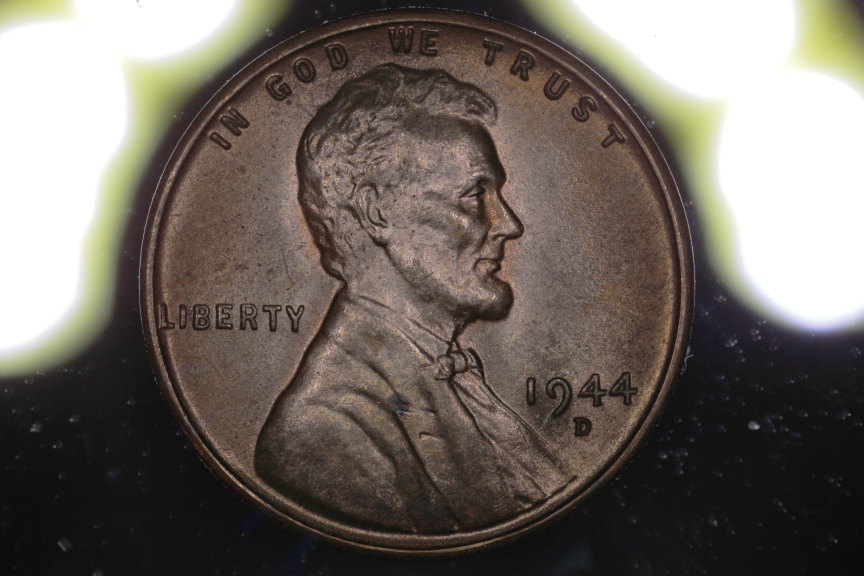 Contact me for photographic equipment or visit my home page at: http://macrocoins.com |
|
Valued Member
United States
359 Posts |
I crafted up my single arm ring light stand from some oak board scraps and the 100mm manual focusing rail. Easy to adjust now, just need to dial in my process a bit. 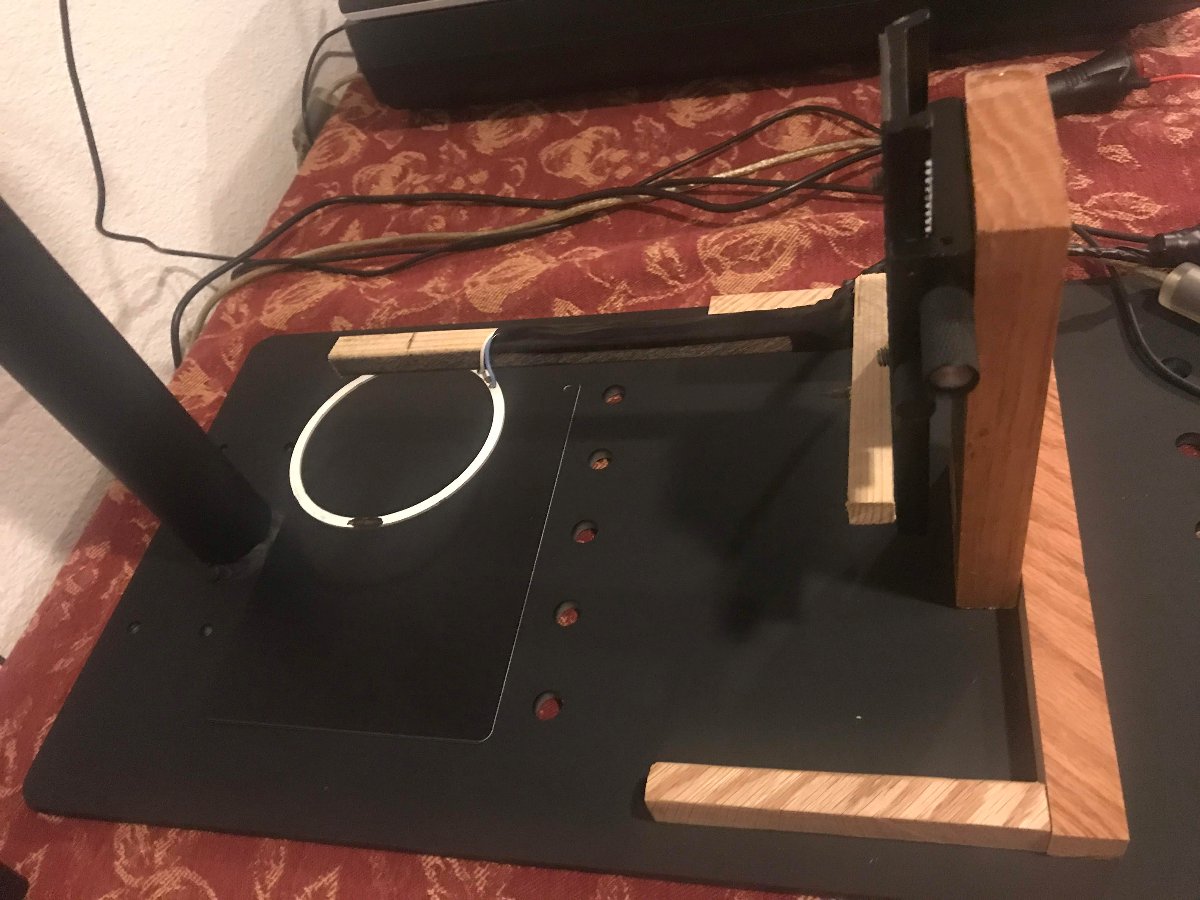 |
|
Pillar of the Community
United States
4051 Posts |
Looks good! I think you'll be happy with continuous adjustment capability.
Do you plan to calibrate with a mirror like I did in previous post?
Contact me for photographic equipment or visit my home page at: http://macrocoins.com |
|
Valued Member
United States
359 Posts |
Ahh I see what you did there now. Coin was placed on a mirror and the light adjusted as shown. Also the bottom half of the ring is blacked out.
|
|
Pillar of the Community
United States
9395 Posts |
With modern slabbed proofs, you have a built-in shiny (mirror-like) surface that you can use to move the lights around, until there's no glare washing out the coin.
Edited by pepactonius
08/07/2018 11:25 pm
|
|
Valued Member
United States
359 Posts |
I don't seem to be having too much of an issue with glare, so that is good. I have been worrying more about reflections from the camera lens and body.
Edited by ngs428
08/08/2018 12:07 am
|
|
Pillar of the Community
United States
4051 Posts |
Same thing.
Contact me for photographic equipment or visit my home page at: http://macrocoins.com |
|
Valued Member
United States
359 Posts |
I was referring to reflections from the camera. Yes, glare and reflection would be the same thing.
Edited by ngs428
08/08/2018 12:08 am
|
|
Pillar of the Community
United States
4051 Posts |
Some folks put a piece of cardboard with a hole cut out and painted flat black or with flocking velvet over the camera to keep any reflections from happening. Only the lens can reflect at that point. Do you have a filter on the lens? If so you should remove it to eliminate reflections from it.
Contact me for photographic equipment or visit my home page at: http://macrocoins.com |
|
Valued Member
United States
359 Posts |
Yes, that is what I did. If you look back to page 2 of this thread you will see the cardboard. I also masked out the white writing around the lens face. I got that tip from another forum a couple weeks back.
|
| |
Replies: 78 / Views: 12,265 |





 First Page
 Previous Page


 Posted 07/30/2018 8:36 pm





