Coin Community Family of Web Sites Join Thousands of Coin, Bullion, & Money Collectors
Specializing in Modern Numismatics Royal Estate Auctions - $1 Coin Auctions300,000 items to help build your collection! Join Thousands of Coin, Bullion, & Money Collectors Coin, Banknote and Medal Collectors's Online Mall Royal Canadian Mint products, Canadian, Polish, American, and world coins and banknotes. Vancouvers #1 Coin and Paper Money Dealer


Username:
Password:
Save Password
Forgot your Password?


This page may contain links that result in small commissions to keep this free site up and running.

Welcome Guest! Registering and/or logging in will remove the anchor (bottom) ads. It's Free!

Copy Stand Vs. Tripod

To participate in the forum you must log in or register.
Author Previous TopicReplies: 91 / Views: 14,608Next Topic
Page: of 7
Moderator
Learn More...
SsuperDdave's Avatar
United States
23522 Posts
 Posted 08/18/2011  11:07 am  Show Profile   Bookmark this reply Add SsuperDdave to your friends list Get a Link to this Reply
OK, I'm going to throw a couple fastballs at you.

First, White Balance. This is the ability of the camera to correct for the different "color temperature" of lights you can use. Color temperature is measured in degrees Kelvin, just like stars are. Sunlight at noon is about 5500-6000K. The average "standard" light bulb is about 3000K.

Different colors of light bouncing off an object make it return different colors of itself to our eyes. We learn to compensate for this subconsciously, and see the "correct" color of an object whether we're looking at it under sunlight or a table lamp.

Your camera isn't that smart. All it can do is capture precisely what it sees. Your coin images are tinted too far towards the yellow end of things for that reason - you've probably used standard Tungsten lighting, as that's the color I would expect an uncorrected image under tungsten lighting to take.

Your Pentax is a study in contrasts when it comes to White Balance correction. On Auto - which I'm sure you're shooting - it's really not that good. On the bright side, it is very good at correction when asked properly, and here's how you ask: on the bottom right of the back is the 4-way controller - 4 buttons in a circle, with "OK" in the center. Pressing the left-hand "WB" button brings you into the White Balance Menu. The top and bottom buttons go up and down to highlight a choice, and "OK" chooses and locks in that choice. Switch to the "Tungsten" setting under the same lighting you used for these coin pics, and see what you get.

Mind you, this is just a beginning. You're going to end up using Manual white balance settings, where you tell the camera specifically how you want it to correct for lighting color. But one step at a time.

Now, Point the Second. Just to the left of the 4-way controller is a stack of 4 little round buttons. The top one is a blue rectangle with an arrow in it. That's for reviewing images/movies you've taken. The next one down, labeled "LV," is what we want. That's Live View. In this mode, the camera will project exactly what it's seeing at the moment onto its' LCD screen. If you're not already using it, you should find it much easier to see your focus when you do.

If you haven't yet, I strongly urge you to snag an AC adapter for the camera, so keep you from going through batteries so quickly. Live View is especially abusive of batteries.


A couple of responses to things you mentioned in your last post: "75 ARD" is a lens, the Rodenstock 75mm APO Rodagon-D. It's the lens which Ray has been posting many of his staggeringly-good images from. I will be buying one for myself, soon - its' quality is head and shoulders above anything else available at a less-than-silly price.

"EFCS" is a proprietary function of Canon cameras to help reduce vibration during the snapping of an image; I won't bore you with technical details about how it specifically works. Yet.
Pillar of the Community
Learn More...
United States
4038 Posts
 Posted 08/18/2011  12:06 pm  Show Profile   Bookmark this reply Add rmpsrpms to your friends list Get a Link to this Reply
Kurt...sorry to confuse. My posts have been a combination of responses to your situation (backgrounds, nice stable stand you've built) and an ongoing discussion SuperDave and I have regarding high resolution lenses and techniques. I'll try to keep them separate in future...Ray
Contact me for photographic equipment or visit my home page at:
http://macrocoins.com
Pillar of the Community
Chute72's Avatar
United States
1314 Posts
 Posted 08/20/2011  12:35 am  Show Profile   Bookmark this reply Add Chute72 to your friends list Get a Link to this Reply
Gentlemen,
Thanks for your expert advise.
I just can't keep up.
I feel like I'm waterskiing behind a 747.

It isn't so much the material we discuss as it is the other demands in my life. (Let me just say that there is no danger of an illegal immigrant taking my job) So please be patient.

Just so you know where I am in my studies...
I'm familiar with the Kelvin scale of thermal activity from Chemistry and Boyle's law, and from Mechanical Engineering and Thermodynamics.
I don't know how the naked eye subconsciously tricks me to see one color if it is an object and not if it is a picture of the same object, but I'll set aside that discussion for another thread.
What is important, is that I learned the camera is not a human eye. And thankfully, it can see things I cannot. But when I print the camera's captured image, it shows that it saw something other than what I did. Like the gold tones of the coin.

And you were so right in knowing it was due to the conventional tungsten lamps.
I got CFLs to reduce the effect of my hair catching on fire while working over a hot work area, but discovered my garage sale lamp holders were of poor quality, and did not want to risk a broken CFL bulb over my work desk.

Your suggestions on changing camera settings are greatly appreciated. And I'll try them later tonight, but not until long after midnight. And I cannot hope to post them before tomorrow.
Truthfully, I feel guilty letting you assist me in matters that I should be researching for myself.
If the information I need is in the Owners Manual, then that is where I should be getting it.
Still, your expertise greatly speeds up my progress in one narrow field of photography. Coin shoots.

I have knowledge of the AC adaptor, and must get one. It seems to be designed for desktop shoots, and maybe not so useful when chasing the migration of wild butterflies in a National Forrest.

Out of order, I'd like to address the anti-shake features. I'm supposing it might be wise for me to learn how to use the timed shutter release, before learning about the anti-shake features.

Then I would like to know more about the Rodenstock lens. It is talked about as though it is a foregone conclusion that I'll be needing one. That being the case, what is it, how is it used, and does it have any substitutes?

I gather it is a lens of fine quality used for Macro photography.
Does it attach directly to the camera? If so, then aren't there several models manufactured for other cameras (Cannon, Nikon and Kodak etc?)
Is it used exclusively with a bellows? Which I'll need if I get the lens.
If I guess correctly, Rodenstock is the manufacturer. Rodagon-D is a model -- that means nothing to me. APO is also an acronym that escapes me. And I think the 75 mm is the focal length, or the distance from the lens to the film or receptor.

Now, of course I just have to have one if you guys say it's good. And will as soon as I win the lottery, or my turtle ranch starts producing trophy breeders. But until then I'll be looking for bargains.

But of all the Rodenstock lenses I've seen on ebay, would any others do as well or better for my purposes?
I'll assume it must be a Rodagon (but don't know why.)
It might need to be a --D, and APO (and again don't know why.)
But are there other sizes (80mm etc,) that are as good or better?
On this issue I may need to take a long time looking before purchase, and would like to know if I am viewing a bargain of equal usefulness.

And Ray, I am in awe of what you can do with a camera. The value of your input is hard to calculate. Especially the advise about the Sorbothane. It converts the stresses from torsional to tensional. A good thing. (Anyone can use a bottle opener and tear the lid off a bottle of beer from one side, but how much greater must one pull to remove it straight off, as if pulling a cork from a bottle. It requires much more force.)

Just remember that I am like a puppy.
I want to learn everything, and can easily be distracted by anything.

At my stage, all learning is good learning.

Thanks for everything, and I must get back to work.

Kurt

Pillar of the Community
Learn More...
United States
4038 Posts
 Posted 08/20/2011  03:00 am  Show Profile   Bookmark this reply Add rmpsrpms to your friends list Get a Link to this Reply
Kurt,

You published some nice closeups earlier in this thread. Next pics I'd like to see are overall views of that Dollar, full frame.

Will you be primarily imaging Dollars, or is your interest in coins of other sizes as well? I mainly image Cents, and only do other sizes for demonstration purposes. If you will mostly be doing one size coin, you can set up the copy stand and lens in one position and leave it alone. Moving between sizes is more difficult with rigid setups.

FYI the lens SuperDave and I are talking about (my shorthand for it is 75ARD) is the 75mm f/4 Apo Rodagon D M 1:1. It is a 1:1 optimized Macro lens made by Rodenstock primarily for 1:1 copying of 35mm slides. The "Apo" is short for Apochromatic, meaning it is color-corrected for chromatic aberrations at 3 wavelengths rather than the 2 wavelengths of an Achromatic lens. For a bit more info see the topic "Worlds Best 1:1 Macro Lens" at:

https://goccf.com/t/89954

The lens is a "bellows" type and has no focusing mechanism, so must rely on a bellows or separate focusing helicoid to adjust lens-camera distance to set the magnification.

On that topic, I assume you know the Manual Mode procedure for taking macro photos of coins, but just to be sure:

1) Open lens aperture to maximum
2) Adjust lens focusing helicoid or bellows length to approx magnification desired
3) Adjust camera height above coin for best focus
4) Iterate 2 and 3 above while framing coin in viewfinder or on PC screen
5) Set aperture for desired resolution and depth of field (usually 5.6 or 8 for coins...)
6) Adjust Lighting for desired composition and effect
7) Adjust ISO and shutter speed
8) Shoot picture and check result
9) Iterate 7 and 8 above until correct exposure is achieved
10) Use manual WB procedure for your camera
11) Take final photo

I've emphasized manual operation here since that's the best way to learn what you are actually doing. You can of course do everything in auto mode, but in the end you won't have a complete "feel" for the process. And using the procedure above is the only way to achieve highly consistent results for Magnification, Resolution, DOF, WB, etc.

Each step in the procedure is critical to achieving a superb picture. Item 6 "Adjust Lighting for desired composition and effect" may take you a fair amount of time to master on its own!

Only after you have mastered the above manual procedure should you consider making changes to your setup, and then only if you are not satisfied with the results. Lenses like the 75ARD will require you to use the manual procedure since they won't support any of the auto functions of your camera.

But don't get too ahead of yourself. Let's see some full frame pics of your favorite coin first and go from there.

Ray
Contact me for photographic equipment or visit my home page at:
http://macrocoins.com
Pillar of the Community
Chute72's Avatar
United States
1314 Posts
 Posted 08/20/2011  4:40 pm  Show Profile   Bookmark this reply Add Chute72 to your friends list Get a Link to this Reply
Just checking in to let me know you havn't lost me.
However I'm having a little trouble "Gitten 'er done."
First I had to learn how to delete the images from my camera's storage. Not as easy as you might think with out dated software. I can up date it when I get a larger memory chip.
The shooting session went quickly, but I still need to use the shotgun approach. Even with "Live View" my eyes have a hard time picking up on the exact razor sharp focus.
And of course the images were about 1.8 MB in size. Using the onsight optimizer is good but slow. My two pictures took over an hour with my dial up connection. And when saved back on my hard drive, they won't upload to the discussion page. Even after renaming.
So , I've got my work cut out for a while. And have to depart from the work bench for a few hours to to visit with my parents.
When I get back, I'll pick where I left off, and make a little more progress.
In the mean time, does anyone know of a free downloadable program for image optimizing?
My computer is fast, but my connection is horribly slow.

Pillar of the Community
Chute72's Avatar
United States
1314 Posts
 Posted 08/20/2011  4:55 pm  Show Profile   Bookmark this reply Add Chute72 to your friends list Get a Link to this Reply
The problem I am getting with the uploads is in the file extension .jpg.
Even though I rename the files Front and Back, something adds the .jpg extension to the name.
Any thoughts?
Pillar of the Community
Chute72's Avatar
United States
1314 Posts
 Posted 08/20/2011  5:00 pm  Show Profile   Bookmark this reply Add Chute72 to your friends list Get a Link to this Reply
Or maybe the problem is that after being optimized, the file is still too big. 140Kb
Send it through the optimizer again?
Moderator
Learn More...
SsuperDdave's Avatar
United States
23522 Posts
 Posted 08/20/2011  6:24 pm  Show Profile   Bookmark this reply Add SsuperDdave to your friends list Get a Link to this Reply
The .jpg extension is to be expected; that's the file type you're using.

I would expect the files that camera produces to be far larger than 1.8MB. My 12MP Canon produced images of almost 5MB each at full size. Look into it, and see if you're using your camera's largest and highest quality settings.

Of course, that's going to multiply your filesize problems.

For picture processing I use the Gimp, which is renowned for its' obscurity and steep learning curve. That's probably a bit much at this point in your learning, far more capabilities than you'll actually require. I have heard good opinions on this board of Irfanview (Google it up) as an easy interface for editing images. It's free.

Consider an online hosting service such as Photobucket for your images. That does an end run around the CCF filesize limitations. Further, once you hit the 50-post mark, you can have a Gallery hosted by CCF, which has far less limitation on filesizes.
Valued Member
daveyn's Avatar
United States
160 Posts
 Posted 08/21/2011  09:48 am  Show Profile   Bookmark this reply Add daveyn to your friends list Get a Link to this Reply
Hello SuperDave,
see there still are a lot of knowledeable people here on the site, been three years now and I'm just now getting around to that 100mm lens purchase. I'm not too sure about a used one off the Internet, I'm a little concerned about used phot equipment. I have a Rebel Xsi, haven't used it much, not even sure how to use it yet, but plan to use the software to take some nice pics of my Varieties. I just can't seem to capture them as well with scans and my QX5, the camera will allow me the angle and lighting I need to really display my variety coins.
I guess I'll be bugging you guys here now that I have retired, lot more time on my hands lately.


Later,

Pillar of the Community
Chute72's Avatar
United States
1314 Posts
 Posted 08/21/2011  8:24 pm  Show Profile   Bookmark this reply Add Chute72 to your friends list Get a Link to this Reply
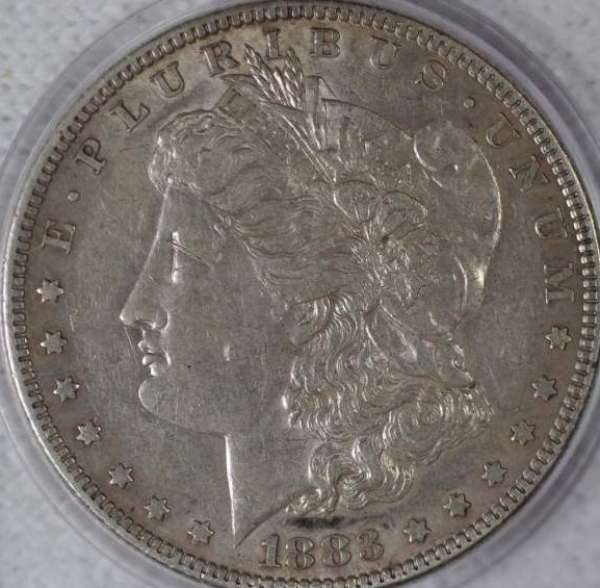
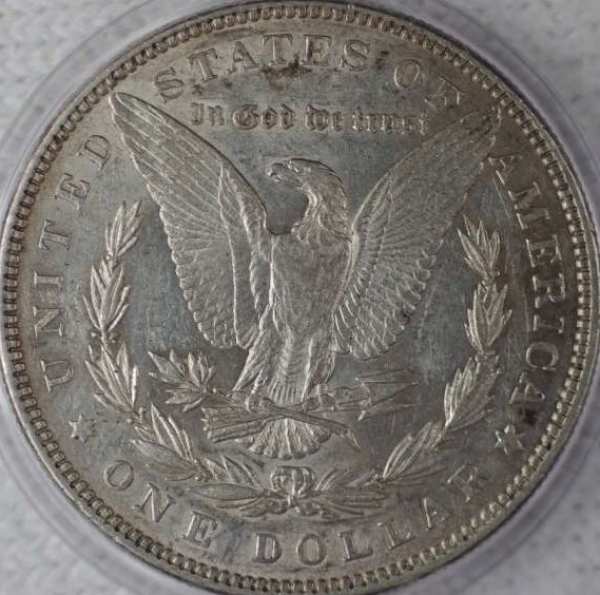
Now we're cooking with gas,

Copy-Stand-Vs.-Tripod

Copy-Stand-Vs.-Tripod

Go to minimum pixels and minimum file size, amd optimizer works.
Yeah, that bit about tungsten lamps works.
Dittos with the t-shirt. I substuted a cotton sock.

Still using the shotgun approach (and considering new glasses,) but it works.

Learned image deleting when my card got full. I know, go to town and get a 32G. But I'm working with a 1G for today.

Super Dave...
I can't thank you enough for all your help.
And to answer a few questions,

This will not be a dedicated camera.
I got a box of lenses from Macro to Telescopic, and chose the Pentax body to use them all.
And when I can post a telephoto of that goofy red fox chasing rabbits around the front yard, you'll forgive me for wanting to operate from a single camera.

My immediate objective is coin shoots. Silver dollars. For an occasional sale on ebay, and also as a record of my collection for insurance purposes. But also as a way to transfer images when trying to determine a specific VAM.

Doesn't answer all your questions, but it is a start.
And after been infused with enough viruses from Intraview, that took me 4 hours to remove, I deserve a rest.

I'll get back on the treadmill shortly after making a pot of gizzard stew. Just tired and hungry.

And in great appreciation of everyone's assistance and expertise.

Kurt

Pillar of the Community
Learn More...
United States
4038 Posts
 Posted 08/22/2011  12:31 am  Show Profile   Bookmark this reply Add rmpsrpms to your friends list Get a Link to this Reply
Now that is a good start! Your image has a lot of good features:
- It's in focus
- It's properly framed
- The white balance looks pretty good
- Exposure is good

How much room do you have between coin and lens in these shots? It appears you are using a single light at a fairly low angle. If you can raise the light higher and closer to the camera (without having camera block it) you will bring out more luster and color. If you can add another light you can illuminate the coin more evenly, though you're already doing well in that regard.

Good show!
Contact me for photographic equipment or visit my home page at:
http://macrocoins.com
Rest in Peace
biggfredd's Avatar
United States
9104 Posts
 Posted 08/22/2011  03:56 am  Show Profile   Bookmark this reply Add biggfredd to your friends list Get a Link to this Reply
Chute72
Rest in Peace
biggfredd's Avatar
United States
9104 Posts
 Posted 08/22/2011  04:38 am  Show Profile   Bookmark this reply Add biggfredd to your friends list Get a Link to this Reply

Quote:

And of course the images were about 1.8 MB in size. Using the onsight optimizer is good but slow. My two pictures took over an hour with my dial up connection. And when saved back on my hard drive, they won't upload to the discussion page.

Don't use on-line programs with laid-up.

DL the free foto program http://www.irfanview.com It's wicked fast, like a few seconds to crop, sharpen, and adjust colors. Save as jpeg and you should be ready to list.
Rest in Peace
biggfredd's Avatar
United States
9104 Posts
 Posted 08/22/2011  04:48 am  Show Profile   Bookmark this reply Add biggfredd to your friends list Get a Link to this Reply

Quote:
Doesn't answer all your questions, but it is a start.
And after been infused with enough viruses from Intraview, that took me 4 hours to remove, I deserve a rest.


is intraview? Go directly to http://www.irfanview.com I've used it for a dozen years and never got a virus. My email and phone are there by clicking on my name. Pheel Phree.
Pillar of the Community
Chute72's Avatar
United States
1314 Posts
 Posted 08/22/2011  7:56 pm  Show Profile   Bookmark this reply Add Chute72 to your friends list Get a Link to this Reply
Part of the problem with my last coin shoot is that the coin is a funny color. In hand, it looks like a lead slug. But I am trying to determine which VAM it is, and hoped the photo shoot would allow me to pick up some important point. It did. Will post a shot of it.

I'll try a brighter coin, and measure the distance to the lens (though I guess it was 4-6 inches.) Used two lights and got them as verticle as I could. Maybe 45 degrees.
And retry infraview. Likely it was something else causing the problem.
I do have some CFLs I can screw in and change the settings in the camera.

And I need to update my Pentax software.

We'll see how far I get.

Thanks All
  Previous TopicReplies: 91 / Views: 14,608Next Topic
Page: of 7

To participate in the forum you must log in or register.


Disclaimer: While a tremendous amount of effort goes into ensuring the accuracy of the information contained in this site, Coin Community assumes no liability for errors. Copyright 2005 - 2026 Coin Community Family- all rights reserved worldwide. Use of any images or content on this website without prior written permission of Coin Community or the original lender is strictly prohibited.
Contact Us  |  Advertise Here  |  Privacy Policy / Terms of Use

Coin Community Forum © 2005 - 2026 Coin Community Forums
It took 0.41 seconds to rattle this change. Forums