| Author |
 Replies: 91 / Views: 14,800 Replies: 91 / Views: 14,800 |
|
|
|
Rest in Peace
United States
9104 Posts |
Quote:The cotton bolls aren't as sharp as those captured by SUPER DAVE, but are a good start. 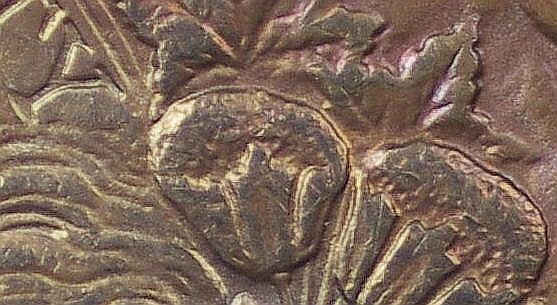 |
|
Pillar of the Community
 United States
1314 Posts |
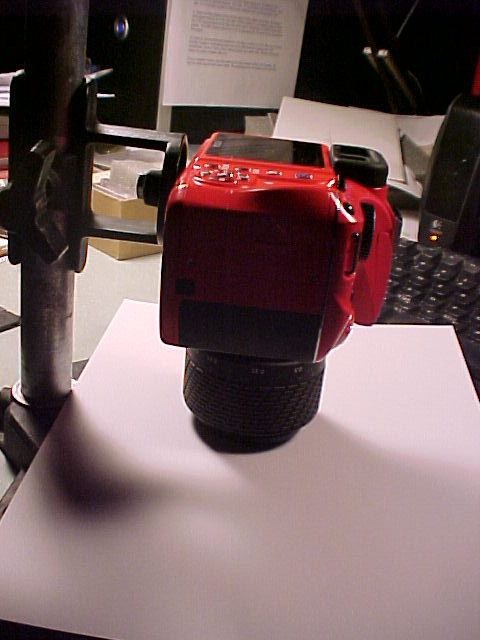 Ray, I want the camera lens square to the coin. Am I a bad person if I lower the camera to the shooting table, rest the lens bezel on the table, tighten the adjustments, then simply raise the camera? And could I enhance my setup by introducing a Leica/Leitz tripod ball head? Thinking of Morgan VAM shoots where I need to angle the camera in for a doubled die shot. And if I haven't bit off enough, What do I need to know about making a lens mounted shooting stand? Specifically, where do I grasp the lens? And will this affect my ability to make focal adjustments? Louie 2 Bits... It's a pink coin! Really, would you have known about the camera color if you hadn't seen the posted photos? But I know what you say is true. Ten minutes after I bought a red camera (on line,) I read the article about colored cameras for coin shoots. Looks like I'll be shooting through a milk bottle, or covering the camera in matte black duct tape. BigFredd, Did you sharpen my image? And if you can work such magic, could you improve the portrait I use for internet dating sites? Thanks all, Kurt PS, I know you've had to go through this many times before, but this is my first time, and I appreciate your patience and professionalism. |
|
Rest in Peace
United States
9104 Posts |
Some sharpen some don't. I've bought up wheat lines that didn't appear in the original. I used Irfanview > image > sharpen (20) twice. If nothing else, it's fun to play with (and free). Only image program I've seen that can play a mp3 while you edit. |
|
Pillar of the Community
United States
1314 Posts |
I downloaded Irfanview, and have started to learn about it. It seems user friendly and offers newbies quick gratification. Thanks, Kurt |
|
Pillar of the Community
 United States
4051 Posts |
Kurt...lowering the lens flush seems like it should work, but probably only if you make sure the lens doesn't actually touch the surface the coin is on. Lower it down so it just infinitesimally close to the surface, and has the same small gap all around. If you just set the lens on the surface, and all the weight of the camera rests on the lens rather than putting stress on the mount, the camera may tilt a bit when you lift it up and the mount has to support the weight. Remember, we're only talking a few hundred microns or so of tilt causing problems...Ray
|
|
Pillar of the Community
United States
1314 Posts |
Good points.
Certainly, I don't do this over a coin.
And knowing that the mount will flex as I pick up the weight of the camera and lens, I've tried supporting the camera and moving the paper between the camera and base.
When the light drag of paper movement is equally distributed around the perimeter of the lens bezel, I hope to approximate an oblique position. (And wonder if the Leica/Leitz ball socket wouldn't be useful.) And I could employ a feeler guage as well.
In the greater scheme of things, this is primitive. So is hunting with a slingshot. But if it works, life is better than if we don't use the primitave tools.
The important question, that you have answered, is that it is not harmful to the camera lens to set it on the table. Just know that it may not lift straight up.
Thanks,
Kurt
|
|
Pillar of the Community
United States
1314 Posts |
I'm back. And regret the discocnnect. Storms, Power outages and a few other distractions. But I'm doing my homework. Picked a white coin for photographing. Seems to show some of the red as a reflection from my red camera. (I was warned, after I bought the camera.) 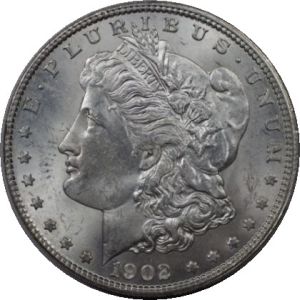 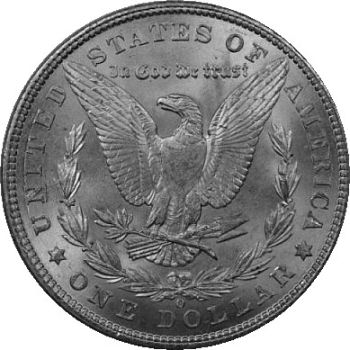 And can't help but try to use the cotton bolls as a standard of comparison. Not as good as the experts, but better than I did before. I hope someone will tell me when I approach the limits of my equipment, and need to consider that Rodenstock /bellows configuration. I don't want to do it just yet. And would prefer others tell me that what I have is capable of producing more. 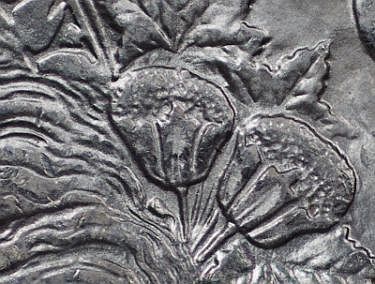 Also, I was shooting with the computer monitor on. So, I can improve photographs some by turning off my computer screen. Thanks all for your assistance. Kurt |
|
Pillar of the Community
United States
4051 Posts |
Nice clear detail. With that detail you won't need to upgrade. But if you are getting that level of detail on small features, it is not showing up in your overall images you are posting. They are too small and for some reason not clear enough to show off your equipment and skills. Your final image should be around 800px or so. I recommend as well downsizing only by integers to maintain max resolution.
Your lighting looks good. Luster bars are properly placed, and shadow detail is showing up well.
I hate white backgrounds. Others may disagree. I don't like to close-crop my coin images to remove the background, so I usually shoot on a background I can leave in place. Disadvantage is the texture will show up if the DOF is set wide enough. If you want the background to disappear, cut a dowel (1" or so for dollars, 1/2" for cents) about 1" long and set the coin on it. Put whatever material you want under the dowel to set the color, and the 1" height will make it look like the coin is suspended in air, which it is. You can also just make a stack of dollars or whatever to set the coin on to experiment with height. This will simplify your "workflow". It also makes it more feasible to do side-lighting, edge lighting, etc to bring out surface details.
Contact me for photographic equipment or visit my home page at: http://macrocoins.com |
|
Pillar of the Community
United States
1314 Posts |
I can get good detailed photos, I just can't post them. It seems as though there are two systems of measurement. Pixels vs Bytes. If I crop a photo to fit pixels, it has too many bytes. To fit the byte size, I need to crop to 450x450 pixels. Obviously I am not educated in this area. Help is appreciated. 800x600 pixles is 1.8 KB Won't upload. I can take better pictures, but can only share them if they are cropped to about 1/4" square of the actual coin. 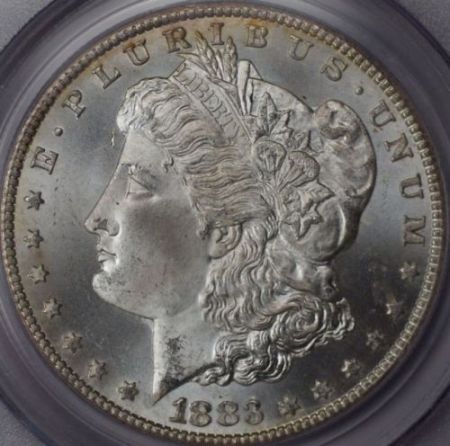 Big picture, but lacks detail. |
|
Pillar of the Community
United States
1314 Posts |
Oh, and... I love the suggestions about using a pedestal. Will try soon, but last shoot was with a TPG slabbed coin. The background is a light grey cardstock. I thought it would not conflict with the camera's settings for a silver coin. The circle cropped photo did two things. It removed unnecessary data, and gave me the opportunity to learn about cropping. Later, I'll want to add a cropped obverse and Reverse with VAM details to a single picture. If anyone can tell me how to transmit a 1200x1200 Pixel file of less than 100KB, I will be forever grateful. Thanks, Kurt |
|
Rest in Peace
United States
9104 Posts |
Irfanview > resize resample > 900*900 If 1200*1200 is under 100K, you'll be fine at 900.
|
|
Pillar of the Community
United States
1314 Posts |
Thanks all, I'm still having problems understanding the relationships between file size and pixels. And as I have never seen a "properties" window that gave both pieces of information, I can only conclude that the relationship is so linear as to be redundant to give both numbers. And having problems getting a detailed photograph uploaded. As I said before, I can only deliver detail if I crop the photo down to a minor fraction of the original picture. My biggest problem at this time is not taking the picture, but uploading it. 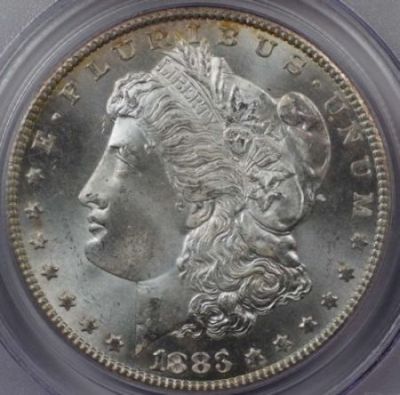 I set my Pentax K-x settings to least detailed (and it seemed very counter intuitive to do so.) The M settings (and who knows what an M is, as the owner's manual didn't see fit to define the variable) range from 12 to 2. I chose 2, the smallest. 1728 x 1152 (Just guessing, but maybe pixels, however they were not thoughtful enough to define the quantity.) Then I changed the Quality setting. To the very lowest quality (again counterintuitive as our goal is to achieve the best quality image, but what do I know?) Then I take the picture. The properties are given as 269KB. No mention of pixels. I send it through Irfanview for croping to get a square picture with no extras. Where it miraculously expands to 282KB. (Mystifies me.) Send it through Irfanview again to set new size. This time 800x800 pixels. And it comes out a 184KB file. Irfanview again. 500x500 and get 112KB. Ditto 450x450. @103 KB that will not upload to CCF. 425x425 did. What an I missing? A little confused, but as everyone on this blog has been so generous with their time and expertise, I hold out hope that I may come to learn enough to keep me plodding forward. Thanks All Kurt |
|
Pillar of the Community
United States
511 Posts |
Not 100% sure but posting my guestimate:
The 100kb limit is for the coincommunity site itself. Not for linked images.
Some of the other users use image hosting services like photobucket or imageshack. When posting, the image is not uploaded directly to CCF, but linked as a url. If the image is too large, it is downsized with a rectangle around it where you can click to enlarge. I don't know about the other users, but I use imageshack and rmpsrpms uses photobucket.
Try uploading a full size file to one of those sites (both free), and link to the image from here.
Other members, please correct me if I am wrong,
-wheatiefan
|
|
Rest in Peace
United States
9104 Posts |
wf- you're kewl.
72- You are taking very detailed images, so you have to use 425*425 to get under 90k. When manipulating, always go as directly as possible. IOW, 1728*1152 > crop > resize resample 425*425, not 1728*1152 > crop > save > 800*800 > 500*500 > 450*450 > 425*425.
Every time you manipulate an image, you lose a little clarity and add a little info (K).
|
|
Pillar of the Community
United States
1314 Posts |
Great to be back at the work bench. My job realy cuts into my research on coin photography. When the boss said I never do anything anyway, I said,"Then why don't I just stay home, and you can mail me my paychecks?" I Don't think he will. But I have gotten a lot better at coin photography (with everyones help.) And the product of a horse nearly beaten to death is... 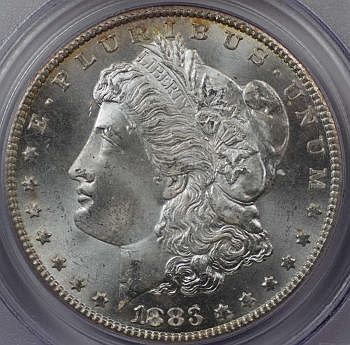 Starting with a 285KB file of 1075x1075 pixels, run through Infanview once, resized to 350x350 pixels (yealding a 96KB file,) and sharpened. Next question is... How do I make the bicture appear larger in my posts? Before I go on to a couple of interesting exercises, would anyone care to look at the coin picture and guess it's grade? I'll be back shortly with a picture of it in it's holder. Thanks all for your help and patience. Kurt |
| |
Replies: 91 / Views: 14,800 |








 First Page
 Previous Page


 Posted 08/30/2011 11:07 pm


