| Author |
 Replies: 24 / Views: 9,537 Replies: 24 / Views: 9,537 |
Page 2 of 2
|
|
|
|
Pillar of the Community
United States
1299 Posts |
Garoyn, thanks for the information. I'm looking for a good record keeping program that I can import my own photos of my coins. Also, have many report choices, get updated prices, and some easy to access support. Looks like Exact Change would work for me.
|
|
Pillar of the Community
 United States
858 Posts |
Thank you all who answered my initial request. After researching various software programs I think I might give exact change a try. I think it will do everything I want and more.
Happy collecting, Frank
|
|
Valued Member
United States
72 Posts |
This may be late but...
I have Coin Assistant for my coins and EZ Stamp for my stamps. I like the stamp program so much that I have been thinking about switching to EZ Coin. However CA was really helpful in creating an affordable custom template for when I went from Liberty Street software to CA. They have continued to be a truely valuable resource for me.
Some of the cheaper I'd be wary of. They tend to go out of business and so in a few years you may not be able to use them on a newer computer.
|
|
Pillar of the Community
United States
650 Posts |
Yeah I know this is an old thread. I just recently got Numismatist's Notebook II, it's a free download. It seems okay so far.
|
|
Pillar of the Community
United States
1247 Posts |
EZ Coin's software is pretty awesome.
I have been using it for 5 years..
I can add my own photos, super easy...as well as add my own data.
Plus the updates are out every year..
The reporting is very flexible, you can design your own. It has a report manager built in.
I can't recommend this enough.
|
|
Moderator
 United States
194970 Posts |
The recent posts have made for a worthy bump.  |
|
CCF Advertiser
United States
1533 Posts |
I downloaded the demo of EZ Coin and I cannot believe how bad it is. Sorry, but I can't see how anyone can consider this intuitive. Fortunately, its free to try, so don't take my word for it. Download it and see for yourself.
|
|
Bedrock of the Community
United States
10065 Posts |
Hey Mac users, don't forget... if your Mac was made after 2005 (and some select 2005 models) you own an Intel-based machine. This means it can run WIndows natively. For the not sop geeky out there this simply means your Mac is 100% a WIndows machine if you want it to be. A free program from Apple, called Bootcamp, allows you to boot (when you ask for the optin by holding down a key suring startup) to boot in Windows or your Mad's OS X. If you buy either "Fusion" or "Parallels" you can run WIndows AND the Mac OS X at the same time. The programs makes the Windows programs totally interactive with all Mac features as if they are Mac programs. I use parallels. I only want Windows for my graphics program. Here is a pic of running a WIndows-only program on my Mac with full ability (and actually faster speed). 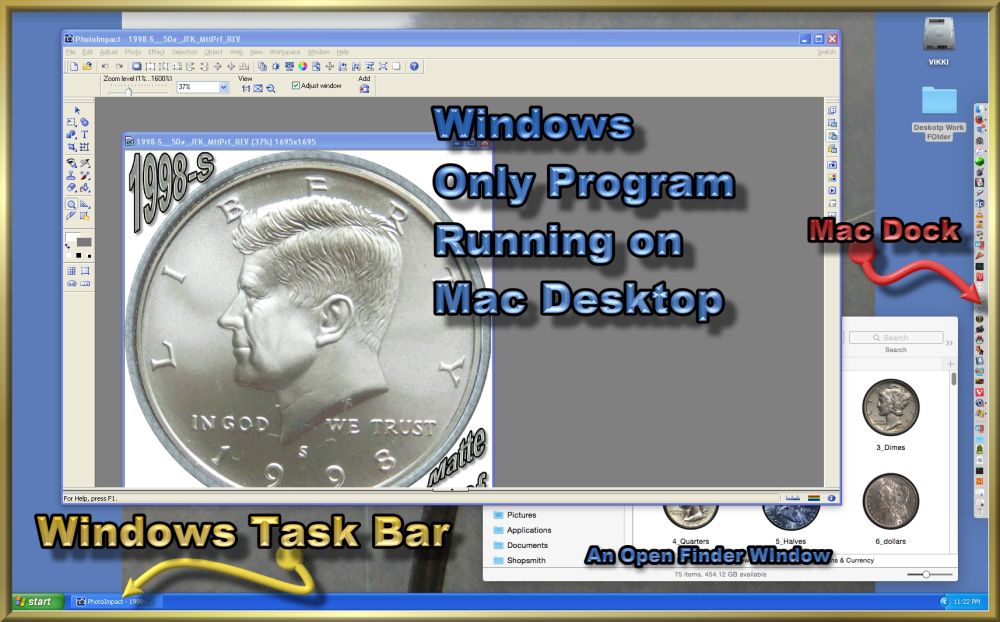 Granted, its only WIndows XP, but Windows 10 will also run. I just don't need, or want, a more modern Windows version. Oh... the task bar can be hidden. You can also set the program to run WIndows in a...well...window on your Mac desktop if you prefer. How much squash could a Sasquatch squash if a Sasquatch would squash squash? Download and read: Grading the graders Costly TPG ineptitude and No FG Kennedy halveshttps://ln5.sync.com/dl/7ca91bdd0/w...i3b-rbj9fir2 |
|
Moderator
United States
194970 Posts |
I have never used it myself (other than remote control support), but we have a few customers running the Mac/Windows/Parallels setup without complaint.
|
|
Bedrock of the Community
United States
10065 Posts |
Actually, if I was going to run Windows only, I would likely opt for a Mac to do it anyway. There are still a few times I want to download Windows stuff (like add-ons for my graphics programs etc). But I can download them from OS X. This way WIndows never is connected to the internet. Its the best malware/virus "protection" for Windows I have ever used.
How much squash could a Sasquatch squash if a Sasquatch would squash squash? Download and read: Grading the graders Costly TPG ineptitude and No FG Kennedy halveshttps://ln5.sync.com/dl/7ca91bdd0/w...i3b-rbj9fir2 |
|
Moderator
United States
194970 Posts |
You do realize Macs are not immune to malware, right?  |
|
Bedrock of the Community
United States
10065 Posts |
Thanks for this. Yes, very aware. I have been called a computer geek since the 80s. I have built, repaired, serviced (software/malware/viruses etc.) many types since then also.
At present the extent of Mac viruses can be dealt with rather quickly with a free program called Malwarebytes. Apple is pretty incredible also about keeping up on malware , fixing problems they exploit, and sending out updates.
Don't get me wrong. I am not an Apple worshiper. At present I do see them as being light years ahead in many areas - especially user-friendliness and efficiency. However, besides the gap becoming more narrow, I have been back and forth from Windows to Apple quite a few times in the past. I just want the machine to not be troublesome and do what I tell it to, when I tell it to, and with the least amount of (nonsense) steps.
I am still waiting (seriously) for Apple and Windows to catch up to the Amiga platform's abilities from the 80s and 90s in many aspects - especially TRUE, ACTUAL multitasking as it was invented by Commodore by use of dedicated chips for all major functions. Exccept for file sizes nowadays as compared to then, I could do what I do on modern platforms even more efficiently (a LOT less memory needed with same power over the machine). Imagine a real-time, virtual factory tour with a single spin speed CD ROm drive! Dedicated chips make a big difference.
I digress - sorry...
How much squash could a Sasquatch squash if a Sasquatch would squash squash? Download and read: Grading the graders Costly TPG ineptitude and No FG Kennedy halveshttps://ln5.sync.com/dl/7ca91bdd0/w...i3b-rbj9fir2 |
|
Pillar of the Community
United States
711 Posts |
If we are having the OS throw down, I am going to throw in a vote for Linux.
Either the Ubuntu or Mint is fine for every day use.
Completely free to use. You can even dual boot so you can choose windows / mac or linux at start up. Heck you can even try linux out off a CD rom or thumb drive without altering your computer.
If you aren't a power user and have an old computer that just isn't up to snuff, instead of throwing money at the problem, throw some linux at it. It is amazing what it will do for an older PC / laptop. No risk and it is free, what do you have to lose other than part of an hour playing around on the PC.
|
|
Bedrock of the Community
United States
10065 Posts |
How much squash could a Sasquatch squash if a Sasquatch would squash squash? Download and read: Grading the graders Costly TPG ineptitude and No FG Kennedy halveshttps://ln5.sync.com/dl/7ca91bdd0/w...i3b-rbj9fir2 |
|
Moderator
United States
194970 Posts |
I have two Ubuntu machines, one at home and one at work.  I do miss the glory days of the Amiga. I still have my Amiga 500 (and a Commodore 128) hooked up at home. I will get on either one of them when I feel nostalgic. I have emulators on my PCs, but nothing like the real thing. Oh, and Malwarebytes, good for Macs and Windows. Now, what were we talking about? Oh yes, EZ Coin software.  |
|
Page 2 of 2
|
Replies: 24 / Views: 9,537 |
Page 2 of 2
|








 First Page


 Posted 10/26/2015 10:57 am


