| Author |
 Replies: 8 / Views: 1,640 Replies: 8 / Views: 1,640 |
|
|
New Member
United States
18 Posts |
I got this coin when I was a kid. Never tried to ID it so here it goes. 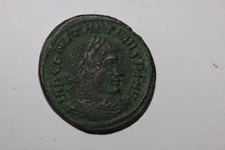 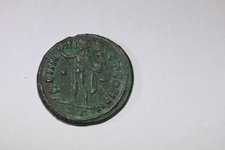 thanks in advance. ken |
|
|
|
Pillar of the Community
United States
2044 Posts |
That coin has nice details. It's a Constantine I. Would be nice to get a larger image of it to see more of the details. We might be able to give you an RIC ID for it.
Edited by Gil-galad
12/19/2011 12:07 am
|
|
Pillar of the Community
United States
4253 Posts |
I think it is Constantine I Rome RIC VII 49v: AE Follis. IMP CONSTANTINVS P F AVG, laureate, draped, cuirassed bust right / SOLI INV-I-CT COM D M , Sol, radiate, standing left, raising right hand, holding Victory on globe in left. Star in left field; straight line (should be a crescent) in right field. Mintmark RT. Yours is very good example, center struck and with what appears to be a nice green patina. Oh, and BTW,  |
|
New Member
 United States
18 Posts |
Thanks for the info. Here, I think, are better photos. I am having troube to lowering the resolution to fit the forum. 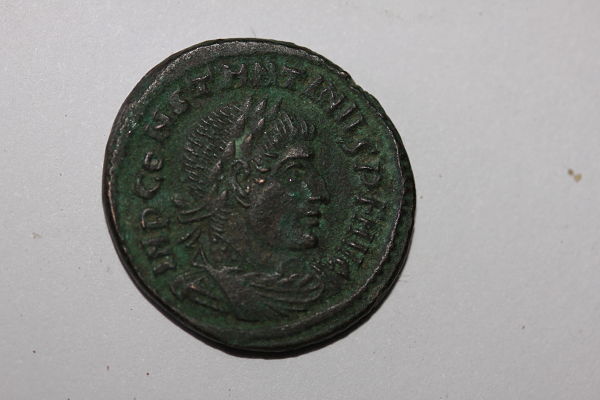 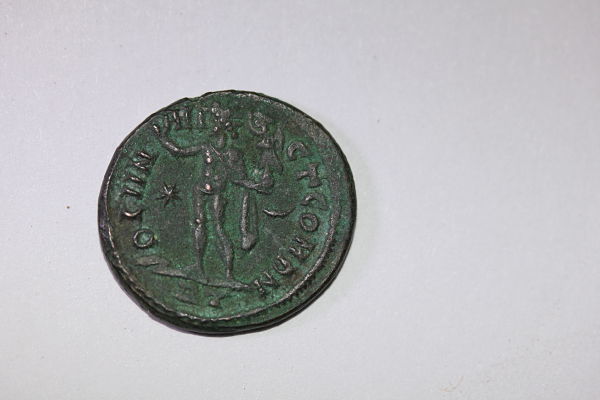 |
|
Pillar of the Community
United States
4778 Posts |
Not a bad coin at all. Very nice.
|
|
Pillar of the Community
United States
1549 Posts |
If you have not tried it, I suggest you us the 'Free Image Optimizer' option which appears on the reply to topic screen. It does not appear on the Quick Reply box so you need to use the 'long form' replies. After entering your oversize image (everything I shoot is oversize by CoinCommunity standards), it presents a small image acceptable to this group which you then download. Next you have to take a separate step of 'Upload Image' to place your image in your post. It will put the code for the image at the end of your post but you can cut/paste it to where you want it and can have more than one image. I am a firm believer in joining obverse and reverse in one file but CoinCommunity standards are based on width so you get a larger image if you do squares of one side at a time. It depends on what you are trying to show but the reduced file is usually big enough for getting the point across. After I have uploaded the small file, I immediately delete it from my drive since it is too small for other uses I make and I prefer a standard size for my images which I use elsewhere. Also, if you are skilled resizing in programs like Photoshop, you will probably find that you can do better and will not want this image. (It tends to apply more artificial oversharpening than I would.) On the other hand, the two step nature of the utility will allow you to use it on images you don't want to post here and may be good if you do not have other software that allows resizing or cropping. There is nothing gained by having a lot of blank space around your coins so this utility might be very useful to you.
My participation in CoinCommunity was greatly lessened by the photo limitation (which is more restrictive that other coin venues I use) until I learned to use this utility. Overall, I consider the software package used by CoinCommunity the worst I have seen but there are enough good points about the people involved to offset the software hassles. I hope you will take the effort to learn the tricks required to post here with minimum difficulty.
|
|
Pillar of the Community
United States
4253 Posts |
Doug has explained the steps thoroughly enough. I just wanted to add that I find it very easy to use now that I use it all the time. I also keep thumbnail images of the obverse and reverse of each of my coins in my catalog and I use the Image Optimizer for these photos as well. It cuts down on the space required for the images and makes my catalog run much smoother.
I also use Picasa, free photo editing software to manipulate the image and to crop the image so not to have the excess blank space around the image. It's an easy program to use.
BTW, I like your coin. It's quite nice with sharp detail.
|
|
Pillar of the Community
United States
2044 Posts |
I don't use the photo optimizer software included with this board. When I had Windows XP I was using Paint Shop Pro 9. Since Windows 7 doesn't like it much, I use an older version, PSP 5. Works well enough for me most of the time. I never resize the photos after I scan them. The only modifications I make are doing slight rotating adjustments and to merge both sides of the coin into one image.
I've noticed that when an image exceeds the width allowed, the board auto-resizes it but if you click on the image, you can see the original sized image.
I like the coin and the art style of the coin. Nice patina as well.
|
|
Moderator
 United States
23731 Posts |
to the community Very nice coin for your first Ancient. |
| |
Replies: 8 / Views: 1,640 |
|










 Posted 12/19/2011 12:18 am


