First - here is a pic of my computer desktop screen:
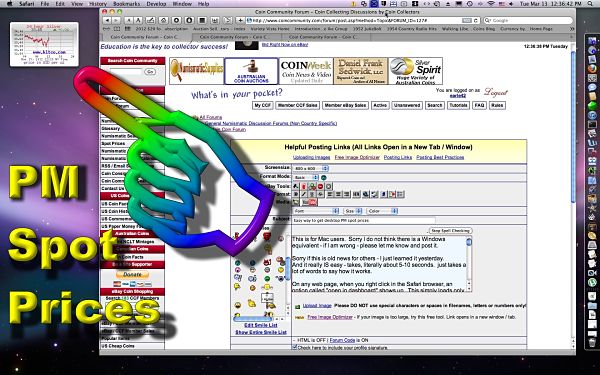
And its draggable!
This is for Mac users. Sorry I do not think there is a Windows equivalent - if I am wrong - please let me know and post it.
Sorry if this is old news for others - I just learned it yesterday.
And it really IS easy - takes, literally about 5-10 seconds. just takes a lot of words to say how it works.
On any web page, when you right click in the Safari browser, an option called "open in dashboard" shows up. This simply loads only part of a web page to your computer (like just the spot metal charts you can link to here on CCF!)
Here is how:
1. Click the "Spot Prices"on the menu to the left here at CCF
2. Right click anywhere (or control click with single button mouse) and choose "Open in Dashboard" from the menu that appears.
3. Drag the white rectangle that appears to the Spot Price chart (If necessary, re-size the white box to cover the entire chart by dragging the corners of the box).
4. Click the "ADD" button on the horizontal strip.
You now have a widget on your dashboard that will show the spot prices.
 To get this on your desktop (!):1.
 Go to dashboard.
2. Left click
and hold on your new widget.
3. Hit whatever key you have assigned to close the dashboard (can be assigned in preferences) and release the left mouse button.
You now have a real-time, draggable PM Spot Price widget on your desktop!

If you want to put it back on the dashboard - repeat the last 3 steps - simple!
I also did this with the menu on CCF so now I have
one click access to this forum without even needing to open my browser! Man, what power!

OS X never ceases to amaze me at all of the little extras that I keep finding - its almost like Christmas every time I start looking around.
BTW - please, this is not a "Microsoft vs Apple" post - people can get pretty emotional over which system they use. Personally, I do not care which system I use as long as it meets my needs the way I want it to. Right now I favor the Apple system, but there have been times in the past I went from Apple back to Windows. And, if Windows makes a new system which will meet my needs better, I will be back in that system.
edited for syntax







 Posted 03/13/2012 9:19 pm





