Coin Community Family of Web Sites Join Thousands of Coin, Bullion, & Money Collectors
Royal Estate Auctions - $1 Coin AuctionsSpecializing in Modern Numismatics 300,000 items to help build your collection! Vancouvers #1 Coin and Paper Money Dealer Join Thousands of Coin, Bullion, & Money Collectors Royal Canadian Mint products, Canadian, Polish, American, and world coins and banknotes. Coin, Banknote and Medal Collectors's Online Mall


Username:
Password:
Save Password
Forgot your Password?


This page may contain links that result in small commissions to keep this free site up and running.

Welcome Guest! Registering and/or logging in will remove the anchor (bottom) ads. It's Free!

1901-O Morgan New Light Set Up

To participate in the forum you must log in or register.
Author Previous TopicReplies: 10 / Views: 1,416Next Topic  
Pillar of the Community
shadowtrooper78's Avatar
United States
1370 Posts
 Posted 05/06/2012  2:17 pm Show Profile   Bookmark this topic Add shadowtrooper78 to your friends list Get a Link to this Message Number of Subscribers
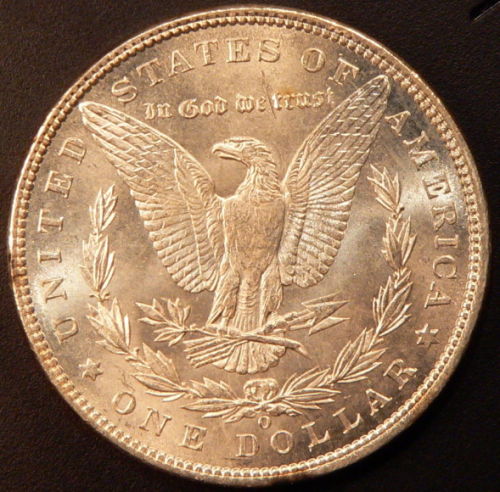
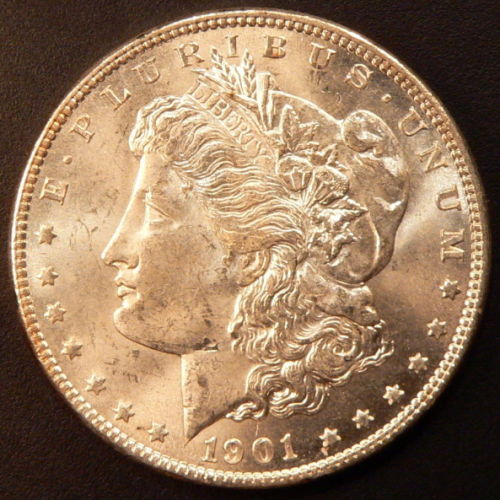
Hey guys would like to get your opinion of this coin as well as the photo's. Just set up some new lighting for photographing coins, I believe these to be a fairly accurate portrayal.

1901-O-Morgan-New-Light-Set-Up

1901-O-Morgan-New-Light-Set-Up

1901-O-Morgan-New-Light-Set-Up
Valued Member
Mechman's Avatar
United States
275 Posts
 Posted 05/06/2012  2:53 pm  Show Profile   Bookmark this reply Add Mechman to your friends list Get a Link to this Reply
Nice pic. shows the luster. One thing I don't know if it is my laptop but there is a red purple tint. Might be the lighting.
Pillar of the Community
VisigothKing's Avatar
United States
4778 Posts
 Posted 05/06/2012  2:58 pm  Show Profile   Bookmark this reply Add VisigothKing to your friends list Get a Link to this Reply
MS-63
Pillar of the Community
shadowtrooper78's Avatar
United States
1370 Posts
 Posted 05/06/2012  3:05 pm  Show Profile   Bookmark this reply Add shadowtrooper78 to your friends list Get a Link to this Reply
I'm using 3 white light sources .....3 halogens, I which is placed roughly 2 feet above the coin and the other two roughly 6 inches on opposite sides of the coin. I just took a couple pictures of a PL 80-S and can see the discoloration area you mentioned....not sure how to balance that out.....will have to work on that
Pillar of the Community
D0ubl3Eagle's Avatar
United States
5854 Posts
 Posted 05/07/2012  5:41 pm  Show Profile   Bookmark this reply Add D0ubl3Eagle to your friends list Get a Link to this Reply
Overall, the photos and the coin look good. The white balance appears to be off but I would wait for some of the more experienced photographers to comment. I will guess this coin grades MS-63+ maybe MS-64.
Pillar of the Community
tatt2ed13's Avatar
United States
557 Posts
 Posted 05/07/2012  6:57 pm  Show Profile   Bookmark this reply Add tatt2ed13 to your friends list Get a Link to this Reply
Nice pic's ..

I agree with DOubleEagle about the WhiteBalance being off ..

Something I do when photographing , If you cam has the feature .. Look for the "white balance evaluation tool" .. all I do is hold a white paper above my coin and click the evaluate the white balance .. you may need to use a pen and make alil mark for you cam to focus on .. But once you do that it will set your cam to the proper setting for the lights you are using ..

I also , adjust the ISO down to 80 .. just helps with capping a photo with less noise (mho and works great for me) ..

But I would really try to adjust your WB and snap a few more to see how much clearer it is .. should get rid of the "Brownish" color you have ..

Best of luck .Hope my ramblings made some sense lol .

Phil \m/
Pillar of the Community
tatt2ed13's Avatar
United States
557 Posts
 Posted 05/07/2012  7:06 pm  Show Profile   Bookmark this reply Add tatt2ed13 to your friends list Get a Link to this Reply
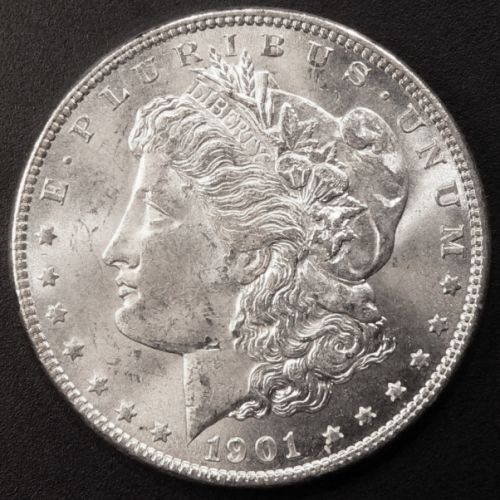
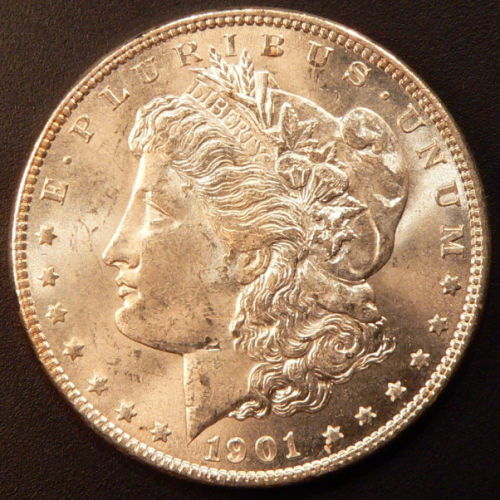
Heres alil comparison


. First pic , is without the White Balance adjusted on the camera-


1901-O-Morgan-New-Light-Set-Up

This photo is with the White balance evaluated , and with the ISO dropped to 80


1901-O-Morgan-New-Light-Set-Up

Hope some of this helps .. easy to do and should make your photos a bit better which is all you need since they look great already ..

best of luck ..
phil \m/

EDIT= The camera I use is alittle hand held Canon Powershot A470 .. I use the SUPER MACRO feature also .

and for some posted coins I have ,if I need to show some little details I just hold a 10x loop which for me works great . others I hear just get frustrated with them lol ..

also I hold it in hand no tripod .. Just personally never picked one up so never had it to use haha ..
Edited by tatt2ed13
05/07/2012 7:10 pm
Pillar of the Community
southsav's Avatar
2224 Posts
 Posted 05/07/2012  7:51 pm  Show Profile   Bookmark this reply Add southsav to your friends list Get a Link to this Reply
What/how did you shoot your 78 S in the other post? I thought that photo was great.
Pillar of the Community
shadowtrooper78's Avatar
United States
1370 Posts
 Posted 05/07/2012  7:52 pm  Show Profile   Bookmark this reply Add shadowtrooper78 to your friends list Get a Link to this Reply
i moved the lighting around some on that one ....also tweaked the white balance....I'm getting there haha
Pillar of the Community
SeatedNut's Avatar
United States
2797 Posts
 Posted 05/08/2012  1:42 pm  Show Profile   Bookmark this reply Add SeatedNut to your friends list Get a Link to this Reply
Hey Shadow ... here's your coin "color-corrected".

1901-O-Morgan-New-Light-Set-Up

If you are using Windows you should have a program called "Microsoft Office Picture Manager." Open your file with it and select "edit" from the upper menu, then "color" from the right menu. There is a sliding bar there for "Saturation". Just start sliding it to the left until you achieve what you're looking for. Then "save".
Pillar of the Community
southsav's Avatar
2224 Posts
 Posted 05/08/2012  3:48 pm  Show Profile   Bookmark this reply Add southsav to your friends list Get a Link to this Reply
That color correction is spot on!!
  Previous TopicReplies: 10 / Views: 1,416Next Topic  

To participate in the forum you must log in or register.


Disclaimer: While a tremendous amount of effort goes into ensuring the accuracy of the information contained in this site, Coin Community assumes no liability for errors. Copyright 2005 - 2026 Coin Community Family- all rights reserved worldwide. Use of any images or content on this website without prior written permission of Coin Community or the original lender is strictly prohibited.
Contact Us  |  Advertise Here  |  Privacy Policy / Terms of Use

Coin Community Forum © 2005 - 2026 Coin Community Forums
It took 0.27 seconds to rattle this change. Forums