| Author |
 Replies: 9 / Views: 1,940 Replies: 9 / Views: 1,940 |
|
|
CCF Sponsor
Canada
149 Posts |
Hello,
To get pictures with no shadows around the coin, and for the background to look white what type of light should I use under the coin? or is there a better way of doing this? Cropping the image?
Thanks, Tomasz
|
|
|
|
Moderator
 United States
23522 Posts |
Any light from below the coin will impair the image since it will be shining directly into the lens. That will make decent images far more difficult. Your best bet for no shadows and a white background is a circular crop of the coin image in postprocessing.
|
|
CCF Sponsor
 Canada
149 Posts |
|
|
Pillar of the Community
United States
511 Posts |
Doug Smith (a member of this site) illustrates a method on his website hosted at Forvm ancient coins. It involves elevating the coin over a white background. I have not tried this method for white, but have used the methods he describes to get a black background and have been satisfied. -wheatiefan |
|
Moderator
United States
23522 Posts |
I'm going to try this again.
Backlighting a coin image will screw up the process by an order of magnitude. Yes, Doug's method works well for eliminating shadows (and he's no slouch when it comes to photographic chops) - it's commonly recommended around here, as well, as an appropriate method for eliminating background features - but it's as simple as this: the lighter the background, the more trouble you'll have with contrast in the final image.
You can minimize this by investing serious bucks in a dedicated dSLR/Macro rig. Or you can minimize it by learning what works with what coin, since the rules for circulated brass or copper have no resemblance to the rules for lustrous silver, and either way a white photographic background isn't going to be as kind to you as a black one. Ever.
|
|
Pillar of the Community
United States
4050 Posts |
There is only one situation where backlighting makes sense, and that is with a setup similar to the Nikon Multiphot. The setup is sort of a "darkfield" arrangement but used for illuminating opaque objects. The Multiphot has a lower illuminator and transparent stage plate for "brightfield" illumination, ala the traditional microscope we all worked with in high school. This is what is needed for some transparent subjects. But as SD describes, the direct light coming from the source onto the sensor really messes up the contrast. So, darkfield illumination was invented to pass the direct light at an angle through the object you're viewing, thus lighting up the object from all around on its sides but not sending any of that light directly to the lens. Many of the award-winning shots published on the web were taken with darkfield technique. But this won't work for coins, since we need the light to come from above. So Nikon took the darkfield technique one step further and added a parabolic reflector as a hood for the lens. The reflector screwed onto the lens (the Nikon Macro-Nikkor series, which were developed for the Multiphot) and in addition a small reversible black/white disk was provided for the specimen to sit on. The disk is the correct size to block all direct light from coming from the source yet allow the rest of the light to shine up and be parabolically refocused to the object sitting on the disk. I don't have any idea how well it might work for coins, though it seems like it might be similar to a ringlight technique. I actually bought a reflector at one point to try it out with a microscope base, but that is one of many projects waiting for me to have time to complete them.
Edited to fix typo "transparent objects" --> "opaque objects"
Edited by rmpsrpms
11/22/2012 1:25 pm
|
|
CCF Sponsor
Canada
149 Posts |
I really appreciate the help so far.
1. If I use a black background, and then want to crop the photo what is the easiest way of cropping it?
2. Is the black background good for Copper, Silver, & Gold? Or should I switch it up?
|
|
Pillar of the Community
United States
4050 Posts |
I prefer a non-shiny, dark gray background and that seems to work well for copper and silver both. I don't shoot much gold but gray should be OK for it as well. I had some "black" plastic disks cut for me by TAP plastics and they are just about right for color. When the coin is properly exposed, they come out around 10% illuminated...Ray
Edited to add that I find a pitch-black background (eg round-cropped coin on [0,0,0] background) to be distracting and unnatural.
Edited by rmpsrpms
11/23/2012 11:43 am
|
|
CCF Sponsor
Canada
149 Posts |
Thank you for your help. I'll try some dark background out, and cropping the photo.
|
|
Pillar of the Community
2087 Posts |
Quote:
Backlighting a coin image will screw up the process by an order of magnitude. Yes, Doug's method works well for eliminating shadows (and he's no slouch when it comes to photographic chops) - it's commonly recommended around here, as well, as an appropriate method for eliminating background features - but it's as simple as this: the lighter the background, the more trouble you'll have with contrast in the final image. I just purchased a back light and I am really impressed with the photos. The back light didn't screw up the process at all, I just had to ensure I used the ring-light so that the face being photographed was well illuminated. (Note Photo is very low res so that I could post it) 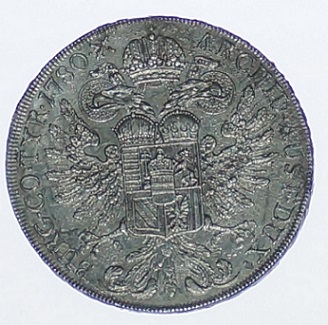 |
| |
Replies: 9 / Views: 1,940 |
|









 Posted 11/21/2012 8:31 pm


