



Coin Community Family of Web Sites Join Thousands of Coin, Bullion, & Money Collectors
Royal Estate Auctions - $1 Coin Auctions300,000 items to help build your collection! Royal Canadian Mint products, Canadian, Polish, American, and world coins and banknotes. Join Thousands of Coin, Bullion, & Money Collectors Specializing in Modern Numismatics Coin, Banknote and Medal Collectors's Online Mall Vancouvers #1 Coin and Paper Money Dealer


Username:
Password:
Save Password
Forgot your Password?


This page may contain links that result in small commissions to keep this free site up and running.

Welcome Guest! Registering and/or logging in will remove the anchor (bottom) ads. It's Free!

Lighting Help For DSLR

To participate in the forum you must log in or register.
Author Previous TopicReplies: 4 / Views: 1,776Next Topic  
Valued Member
cheezyfryes's Avatar
United States
359 Posts
 Posted 03/20/2013  11:12 am Show Profile   Bookmark this topic Add cheezyfryes to your friends list Get a Link to this Message Number of Subscribers
I have a Nikon DSLR (D50, yes a slightly older model) and upgraded to the Nikkor F1.8G DX prime lens last year.

When I snap a picture of a coin from about one foot away and then crop the picture, I'm able to get a nice crisp image. My problem is that I'm clueless on the best way to set up good lighting!

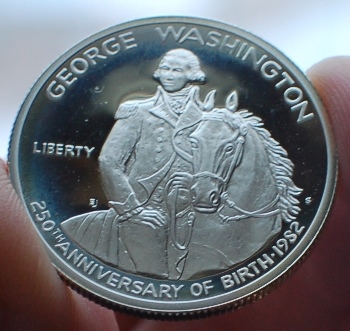
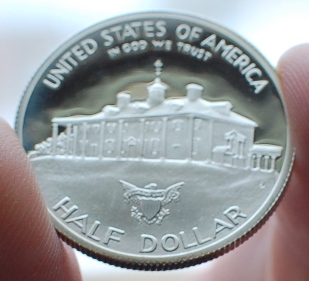
The built-in flash obviously washes everything out. No flash under our kitchen overhead lights isn't enough. Shining a flashlight from the side doesn't look so great either. I've had some success with holding the coin near a window to get indirect sunlight on the surface, but it's pretty cumbersome and has varying results. Here are a couple of examples of that setup:

Lighting-Help-For-DSLR

Lighting-Help-For-DSLR

I need help creating a setup with indirect artificial lighting that results in uniform pictures. I'm not looking to purchase $100s worth of equipment, but hopefully there's something I can cobble together on the cheap. Thanks in advance!

Pillar of the Community
CaptainFwiffo's Avatar
United States
4132 Posts
 Posted 03/20/2013  11:42 am  Show Profile   Bookmark this reply Add CaptainFwiffo to your friends list Get a Link to this Reply
Do a search of the forum for "smile directors". That will find several threads that discuss some good lighting techniques that involve cheap Ikea lamps and some basic craft supplies.

For proofs, you may also want to try a ring light (there are cheap LED ring lights ~$30 that work). Also do a search for "axial lighting".
Pillar of the Community
srs77's Avatar
United States
3180 Posts
 Posted 03/20/2013  1:26 pm  Show Profile   Bookmark this reply Add srs77 to your friends list Get a Link to this Reply
This is the setup I use. The link below will take you to a Smith-Victor's page on this setup. Granted it's not inexpensive but you will be able to diffuse your light or use direct lighting and be able to achieve different effects.

I'm assuming you have a tripod, if you don't one is highly recommended as you'll need it to do decent macro photography.

My approach is a little different than some in that I don't shoot my coins while the coins are lying flat on a table. I actually use the light tent and have created a small jig with a black board and a white acrylic bottom. I use the blaci board as a 'wall' and stand the coin up in front of it. Using the white acrylic board underneath the coin allows for some light to reflect back up on the coin.

On proof coins, to get that black field with the frosty part really popping off the coin try to position your lights directly in front of the coin over the top of your tripod. Then experiment with different camera settings until you come up with the look you want. The beauty of DSLR's is no wasted film!

For other coins I experiment with one and two light setups so that I can best represent the coin as the coin really is.

Here's an example of one of my proof coin shots:

Lighting-Help-For-DSLR

Good Luck!

http://www.markertek.com/Lighting-B...402042.xhtml
Edited by srs77
03/20/2013 1:30 pm
Pillar of the Community
United Kingdom
837 Posts
 Posted 04/12/2013  2:26 pm  Show Profile   Bookmark this reply Add DaytR to your friends list Get a Link to this Reply
When photographing using the pop up flash as lighting try getting into the cameras menu and looking for exposure compansation and set to -1ev then take a picture and the light from the pop up flash wont result in washed out picture .....you can try -2 if you like as well , but be aware that changing the exposure compensation will affect color saturation of you pictures so try a few settings till you get the one that suits your pictures best ....best of luck !

PS By the way the D50 is a fantstic camera ! :) When shooting using pop up flash or flashgun its flash sync speed is better than any of the latest Nikon cameras including the D4 , so a D50 like yours is worth hanging onto if you like flash photography and using faster shutter speeds !
Pillar of the Community
punman's Avatar
Canada
849 Posts
 Posted 04/14/2013  01:51 am  Show Profile   Bookmark this reply Add punman to your friends list Get a Link to this Reply
Can't help with the question but a comment about the D50. I have taken great pictures with it too. Just handed it off to my wife at Christmas and bought a Nikon 5100 and added the same 35 mm lens you have. It is a great low light lens. I have not yet taken coin pictures so I welcome your question and hope to learn.
  Previous TopicReplies: 4 / Views: 1,776Next Topic  

To participate in the forum you must log in or register.


Disclaimer: While a tremendous amount of effort goes into ensuring the accuracy of the information contained in this site, Coin Community assumes no liability for errors. Copyright 2005 - 2026 Coin Community Family- all rights reserved worldwide. Use of any images or content on this website without prior written permission of Coin Community or the original lender is strictly prohibited.
Contact Us  |  Advertise Here  |  Privacy Policy / Terms of Use

Coin Community Forum © 2005 - 2026 Coin Community Forums
It took 0.25 seconds to rattle this change. Forums